
Every fact about the change comes from Google Ads Help, read on November 2, 2026, and from archived copies of that help. We did not check the change on a client account, so there are no account numbers in this post. The only numeric example is Google's own: a $10 target and a $5 actual CPA.
What the Google Ads August 17, 2026 update changed
The Google Ads update of August 17, 2026 changed bidding in budget-limited campaigns with a target (target CPA, target ROAS, and target CPC in Demand Gen): before, they could beat their target; now they optimize more consistently toward it, even after a budget change.
According to Google's article on the change, such a campaign could previously deliver better than its target, and its performance fluctuated whenever the budget changed. Google's example: a $10 target CPA and a recent actual CPA of $5.
After the change the campaign delivers closer to a $10 CPA, so to keep your result, Google suggests setting the target to $5.
There are two dates, and Google gives both. According to the FAQ on the change, the rollout started on August 17, 2026 and was completed globally on August 27, 2026.
Starting in June 2026, Google is renaming "Maximize conversions with a Target CPA" to "Target CPA" and "Maximize conversion value with a Target ROAS" to "Target ROAS", and warns that names may differ during the transition, as the help on Target CPA says. Campaigns still showing the old name are covered by the change too.
Which campaigns the August 17 change affects, and which it doesn't
The Google Ads August 17 change only affects campaigns that have both a target-based bid strategy and the "Limited by budget" status, in Search, Shopping, Performance Max, Demand Gen and Travel.
| Campaign or setting | Affected by the Aug 17 change? | Source |
|---|---|---|
| Search, Shopping, Performance Max, Travel with a target CPA or ROAS, limited by budget | yes | Google FAQ |
| Demand Gen with a target CPA, ROAS or CPC, limited by budget | yes | Google FAQ |
| Same target-based strategy, but not limited by budget | no, behavior unchanged | Google FAQ |
| Display and Hotel campaigns | already worked this way before Aug 17 | change article |
| App campaigns, Video reach, Video view campaigns (VVC) | no, they keep the previous behavior | change article |
| Manual CPC, Target Impression Share | no | Google FAQ |
| Campaign total budgets | no, behavior unchanged | Google FAQ |
According to Google's FAQ, the auction doesn't change, because this is a bidding change only. It doesn't directly increase spend either: daily and monthly budget limits are always respected. It does cover all conversion types, online and offline, click-through and view-through.
For Performance Max and Demand Gen, Google's FAQ also mentions possible changes in how spend is allocated across channels.
The platform table in the change article lists Search Ads 360, Display & Video 360, Google Ads Editor and the Google Ads API next to Google Ads. In Display & Video 360, the FAQ says the change applies to Demand Gen campaigns only.
How to check budget-limited campaigns in Google Ads, step by step
You find the campaigns affected by the August 17 change in Google Ads in 4 steps: the "Limited by budget" status filter, the bid strategy type column, the bid strategy report with average target and actual result, and a final list of campaigns to decide on.
- 1Filter the campaigns limited by budget. According to help on fixing the status, go to Campaigns in the Campaigns menu, select the Filter icon, select Status, check "Limited by budget" and select Apply. The status also shows in the "Status" column of the campaigns table.
- 2Keep the campaigns with a target. Add the "Bid strategy type" column to the campaigns table, as help on bid strategy reports suggests. You want Target CPA, Target ROAS and, in Demand Gen, Target CPC.
- 3Compare the average target with the result in the bid strategy report. Open it via the Tools icon > Budgets and bidding > Bid strategies, then select the link in the "Bid strategy type" column. For Target CPA, the bid strategy report shows "Average Target CPA", "Actual CPA" and "Conversions".
- 4List the campaigns doing better than their target. According to Google's FAQ, these are the campaigns that may feel the change if you do nothing. A campaign in a portfolio strategy opens the report for the whole strategy, and that is also where you change the target.
In step 3, the date range changes the comparison in 2 ways. Google suggests trying a longer date range when the difference between the average target and the result isn't statistically significant. Conversions can be reported up to 90 days after the click, depending on the conversion window, so the last few days look worse than they will.
You can see the delay in the bid strategy report itself: according to help on conversion delay, hovering over "Conversions" shows the average delay and how many conversions Google predicts haven't been reported yet.
Next to "Limited by budget" you may also see "Limited by bid strategy". According to help on the limited status, it means the campaign is held back by a low target CPA, a high target ROAS or a bid limit, often together with the budget.
What to do with your target CPA or ROAS after the August 17 change: 6 situations
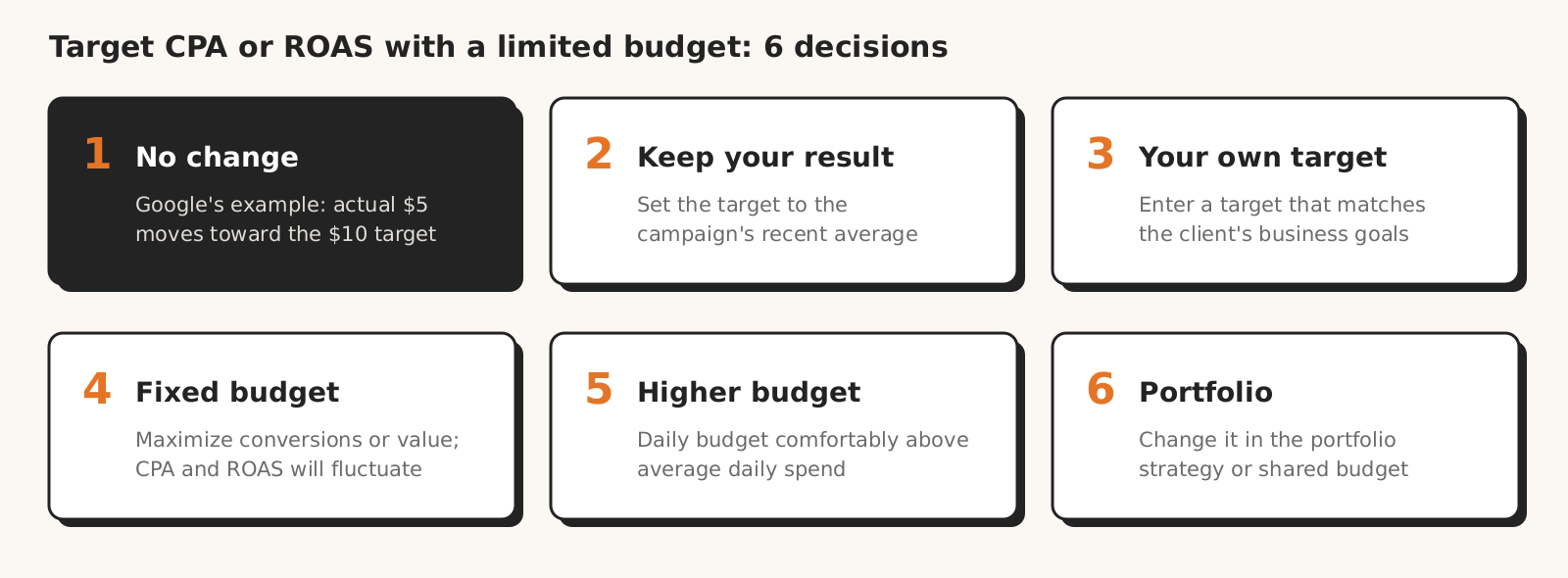
For a budget-limited campaign with a target CPA or ROAS, Google Ads offers 5 options: keep the target, set it to your recent average performance, enter your own target, switch to Maximize conversions or Maximize conversion value, or raise the budget. The sixth situation is a portfolio strategy or shared budget.
Google applies none of them for you, because it doesn't change targets or budgets on its own.
| Situation | What Google says to do | What to watch |
|---|---|---|
| The target matches the client's business goals | keep the target | a campaign that beat its target will move toward it |
| You want to keep your current result | set the target to your recent average performance | according to Google, a target equal to history shouldn't cause noticeable swings |
| The target should follow margin or another business goal | enter your own target | a more efficient target will likely change daily spend; model it in the bid simulator |
| The budget is fixed and you accept ROI swings | switch to Maximize conversions or Maximize conversion value | actual CPA or ROAS will move with the budget |
| You can give the campaign more budget | raise the budget | Google suggests a daily budget comfortably above average daily spend |
| The campaign is in a portfolio strategy or has a shared budget | change the target at portfolio strategy or shared budget level | with a constrained shared budget, the impact is spread evenly across all campaigns in the group |
The options come from the change article and Google's FAQ. If you're happy with your targets but can't raise the budget, Google suggests leaving as much budget buffer as possible, adjusting targets, or consolidating campaigns in a portfolio strategy or shared budget.
After any target change, Google recommends waiting 1-2 conversion cycles before you judge the result in the bid strategy report. Smart Bidding reacts to target changes in real time, and Google allows both large and small adjustments.
Google advises against one thing: adding data exclusions or new bid limits only because of this change, as they can cause performance fluctuations.
Bid Target Adjustment Tool and target recommendations in Google Ads: what the help says today
Google Ads Help described the Bid Target Adjustment Tool (available from July 6, 2026), used to adjust targets of campaigns affected by the August 17 change, step by step until at least September 25; the October 13 version and the current one no longer have those instructions.
The archived change article from September 25 gave two routes. First: the "Review your campaign targets" banner at the top of the account, or the Notifications icon, then Review campaigns. Second: Campaigns, the Settings icon next to a campaign, Bidding and Review campaigns. The "Apply" button set the target based on the performance shown in the tool.
Help on the budget-limited status still points to "the new Bid Target Adjustment Tool (available starting on July 6, 2026)". We haven't checked whether the tool is in the interface today, so treat the archived routes as a pointer, not a certainty.
Besides the tool, target recommendations suggest a new target. According to Google's FAQ, only campaigns that recent data shows will likely be affected get a recommendation. The notification about the change looked at a longer period: according to the archived help, at campaigns limited by budget in the last 12 months.
Campaigns with fewer than 7 conversions don't get a recommended target, so you check those by hand, even if they don't show up in recommendations. Before you apply a target recommendation, compare it with the client's goal; how bid and budget recommendations relate to client goals is covered in our post on optimization score.
7 mistakes after the Google Ads August 17 change
Mistakes after the Google Ads August 17 change include judging CPA a few days after a target change, blaming the whole CPA increase on this change, and changing the target in the campaign instead of in the portfolio strategy.
One practitioner on Reddit says the change hits small accounts hardest: "Small budget accounts are exactly where this hits worst, limited by budget is basically a permanent state for half your campaigns so stale targets surface immediately" (thread on r/PPC, September 2026). That's an opinion, not Google data.
| Mistake | Effect | How to check |
|---|---|---|
| Judging a few days after a target change | the result misses conversions still to come | 1-2 conversion cycles, delay in the bid strategy report |
| Blaming the whole CPA increase on the Aug 17 change | seasonality and other account changes are missed | the same period a year earlier, change history |
| Changing the target in a campaign that sits in a portfolio strategy | the change is made in the wrong place | the bid strategy report opens for the whole portfolio strategy |
| Looking for a recommended target for a campaign with fewer than 7 conversions | Google doesn't calculate one | compare target and result by hand |
| Data exclusions or new bid limits as a reaction to the change | Google warns about performance fluctuations | the list of data exclusions and the strategy's bid limits |
| Judging CPA without checking tracking | the target is changed on bad conversion data | checklist for zero conversions |
| Missing "Maximize conversions with a Target CPA" campaigns | the old name hides a strategy the change applies to | the "Bid strategy type" column |
The second row also comes from the same thread: the window after August 17 overlaps with the summer-to-fall shift, and another practitioner notes that with thin conversion volume a target CPA gets fragile: "tcpa becomes brittle when a few conversions materially change the trailing average".
Comparing with the same period a year earlier is our suggestion, not Google's.
What this guide to the Google Ads August 17 change doesn't cover
This guide to the Google Ads August 17 bidding change doesn't tell you how the change affected specific accounts, because we didn't check it on a client account and don't have data from many accounts. We couldn't find five things in Google's help:
- whether the Bid Target Adjustment Tool is in the interface today (the help stopped describing it);
- how the change works for campaigns doing worse than their target (Google only talks about campaigns that beat it);
- whether it applies to Target CPM (the FAQ names it in a question but not in the answer);
- whether the status filter in a manager account shows campaigns from many accounts at once;
- how long a "conversion cycle" is for a given account (it depends on conversion delay).
We also don't say how long each step takes, because we didn't measure it.
How Marketing Workspace helps you check target and budget
Marketing Workspace, our AI assistant for Google Ads, Meta Ads and GA4 accounts, has a Smart Bidding check that shows the CPA or ROAS target next to the actual result in one table and flags a large share of impressions lost to budget.
- The Smart Bidding check also flags the learning phase and strategy limitations, too few conversions for a target strategy, and week-over-week swings (Google Ads module documentation).
- The Google Ads assistant knows the new target CPA and ROAS behavior under a limited budget and can propose a target change in a campaign.
- The checks change nothing in the account, and every target change goes live only after a person approves it and is recorded in the change log.
What Marketing Workspace doesn't do: it doesn't change a target on its own, doesn't change the target of a portfolio strategy, and doesn't open Google's tool.
The Smart Bidding check doesn't filter campaigns by the "Status" column. It shows the bid strategy status (including limited by budget) and flags a large share of Search impressions lost to budget, so you still build the full list of budget-limited campaigns in Google Ads, with the filter in the campaigns table.
Questions about the Google Ads August 17, 2026 change are about scope, spend, the "Limited by budget" status and target decisions. We base the answers on Google Ads Help read on November 2, 2026 and on archived copies of that help.
See how Marketing Workspace works

Founder of Roition, independent Google Ads API developer
Founder of Roition, with almost 3 years of Google Ads experience. Designs and builds process automation for Polish companies: system integrations, handling enquiries and quotes, AI assistants working on company data.
Frequently asked questions
What changed in Google Ads on August 17, 2026?
Campaigns with a target CPA or ROAS (in Demand Gen also target CPC) and a "Limited by budget" status optimize toward their target instead of beating it, even after a budget change. The rollout ran from August 17 to August 27, 2026.
Will the August 17 change increase my spend or change the auction?
Not directly. Google says daily and monthly budget limits are always respected, and the auction doesn't change, because this is a bidding change only. Your own decision can change daily spend: Google notes that a more efficient target will likely affect daily spend.
Does the change affect campaigns that aren't limited by budget?
No. According to Google's FAQ, target CPA and target ROAS campaigns without a budget constraint behave as before.
Does the August 17 change affect Performance Max?
Yes, if the Performance Max campaign has a target CPA or ROAS and the "Limited by budget" status. For Performance Max and Demand Gen, Google's FAQ also mentions possible changes in spend allocation across channels.
Does the change affect campaigns doing worse than their target?
Google Ads Help doesn't say so directly. The FAQ only says that without action the change may affect campaigns that overperformed their target. So we don't claim that campaigns doing worse than their target are unaffected.
Does the change affect Maximize conversions with a Target CPA?
Yes. Starting in June 2026, Google is renaming it "Target CPA" (and Maximize conversion value with a Target ROAS "Target ROAS"), and during the transition the old name may still show in the interface. Maximize conversions without a target has no target value, and Google lists it as an option for a fixed budget.
What does the "Limited by budget" status mean?
According to Google Ads Help, your average daily budget is lower than the amount recommended to capture all available impressions and clicks with your current settings. It shows in the "Status" column of the campaigns table. A different status, "Limited by bid strategy", means the campaign is held back by its target or a bid limit.
How do I find budget-limited campaigns in Google Ads?
Go to Campaigns, select the Filter icon, select Status, check "Limited by budget" and select Apply. Then add the "Bid strategy type" column and keep the campaigns with a target.
Should I lower my target CPA to my current result?
Only if you want to keep your current result. Google lists it as one of the options: a target equal to your recent average performance. If the target matches the client's business goals, you can keep it, and the campaign will move toward it.
What if I can't raise the budget?
Google suggests leaving as much budget buffer as possible, adjusting targets, or consolidating campaigns in a portfolio strategy or shared budget. If the budget is fixed and you accept ROI swings, Google also lists switching to Maximize conversions or Maximize conversion value; actual CPA or ROAS then moves with the budget.
Where do I change the target of a campaign in a portfolio strategy or with a shared budget?
At portfolio strategy or shared budget level, not in the campaign. You find portfolio strategies under the Tools icon > Budgets and bidding > Bid strategies, and the bid strategy report for a campaign in a portfolio strategy opens for the whole strategy. With a constrained shared budget, Google says the impact is spread evenly across all campaigns in the group.
Where is the Bid Target Adjustment Tool?
The archived Google Ads Help from September 25, 2026 pointed to the "Review your campaign targets" banner or Campaigns > Settings icon > Bidding > Review campaigns. The current version of that help no longer has the instructions, and we haven't checked whether the tool is in the interface.
Why don't I see a target recommendation even though I got a notification?
The Google Ads notification about the August 17 change looked at a longer period than recommendations do. Only campaigns that recent data shows will likely be affected get recommendations, and campaigns with fewer than 7 conversions don't get a recommended target.
When should I judge the result after a target change?
After 1-2 conversion cycles, in the Google Ads bid strategy report. That's Google's advice, including for accounts with a long conversion delay.
Should I add data exclusions for the change period?
No. Google doesn't recommend data exclusions or new bid limits added only because of the August 17 change, as they can cause performance fluctuations.