
For each pitfall we also give our own assessment of whether you can check it yourself, without access to the client's Google Tag Manager (GTM), or need to ask the client or their developer.
If conversions dropped to zero, start with our post on zero conversions, which also includes Google's example of how much a banner lowers conversions. Differences between Google Ads and GA4 are in our post on mismatched conversions, and missing sessions in our post on GA4 users.
How a cookie banner and consent mode change Google Ads conversions
A cookie banner asks the user for consent, and consent mode passes that choice to Google. The choice determines how much conversion data Google Ads receives and which model fills the gaps.
According to Google Ads Help on consent mode, consent mode doesn't provide a banner, so a site needs both. Google describes 2 implementations, and the developer documentation adds that blocking tags makes behavioral modeling in GA4 unavailable:
| Basic consent mode | Advanced consent mode | |
|---|---|---|
| When Google tags load | only after the user interacts with the banner | right away, when the page opens |
| What reaches Google on denial | nothing, not even the consent state | consent state and cookieless pings |
| Conversion modeling in Google Ads | general model | advertiser-specific model |
| Behavioral modeling in GA4 | unavailable | possible, above GA4 thresholds |
A visitor who ignores the banner in basic mode sends no data to Google, because tags wait for interaction with the banner. In advanced mode, cookieless pings carry, among other things, the consent state and whether the page URL contained ad click information. Google builds its model from these pings.
Modeled conversions have no separate column. According to Help on conversion modeling, they appear in the "Conversions" column, their values in "Conversion value", and they feed Google's bidding tools. The same Help page notes that the model aims to minimize over-prediction, so some conversions that really happened may not show up.
The 70% figure attached to consent mode comes from a Google post from April 2021: early results showed modeling recovering, on average, more than 70% of ad-click-to-conversion journeys lost to consent choices. That average predates v2, and Google notes that results for each advertiser may vary widely.
The four Consent Mode v2 parameters and what Google loses on denial
Consent Mode v2 passes 4 consent parameters, and each one cuts Google off from a different part of the data. Google added the last two in the table when it updated consent mode in November 2023. Descriptions come from Google Ads Help on consent parameters and the developer overview of consent mode:
| Parameter | What it controls | Effect of denial |
|---|---|---|
| ad_storage | storage of advertising cookies | no advertising cookies written or read, ad click data used only for aggregate traffic measurement |
| analytics_storage | storage of analytics cookies (GA4) | GA4 sets no cookies and receives cookieless measurement |
| ad_user_data | sending user data to Google for advertising | enhanced conversions and user_id off, conversion pings sent cookieless, GA4 conversion export for bidding limited |
| ad_personalization | personalized advertising | remarketing and personalized ads receive no data |
Google Ads Help on consent parameters adds that ad_user_data is required for measurement, such as enhanced conversions and tag-based conversion tracking. The Help page treats a parameter that isn't set the same as denied, and personalized ads need both ad_user_data and ad_personalization set to granted.
Is Consent Mode v2 mandatory in the EEA since March 2024
In the European Economic Area (EEA), Google requires consent signals for measurement with Google tags and, since March 2024, for some advertising features too. According to Google Ads Help on EEA consent, to keep using measurement, ad personalization and remarketing for EEA users, you must obtain consent and share consent signals with Google.
Google Ads Help on EEA consent lists the features that need consent for ad personalization starting March 2024: Customer Match, store sales uploads with Customer Match integration, and Ads Data Hub. For EEA Customer Match lists, Help on Customer Match consent requires both consent fields to be set to GRANTED.
Two Google Help pages disagree on who has to implement Consent Mode v2.
Tag Manager Help on v2 says that if you already use consent mode and don't engage in personalized advertising, such as remarketing, you don't need to take any action. Google Ads Help on consent parameters requires ad_user_data for conversion measurement, and on denial or a missing parameter conversion pings are sent cookieless. For conversion measurement, check all 4 parameters.
Google's EU user consent policy applies when your agreement with Google or a Google product you use incorporates it. It covers the EEA, the UK and Switzerland, including your client's sites, and requires, among other things, keeping records of consent.
This post is not legal advice. Google Ads Help on EEA consent says that you are responsible for a consent banner that meets regulatory standards, and for consent to data uploads it tells you to consult your legal team. The client settles the banner wording with their lawyer; you check that their choice reaches Google tags.
7 Consent Mode v2 pitfalls that change Google Ads conversions
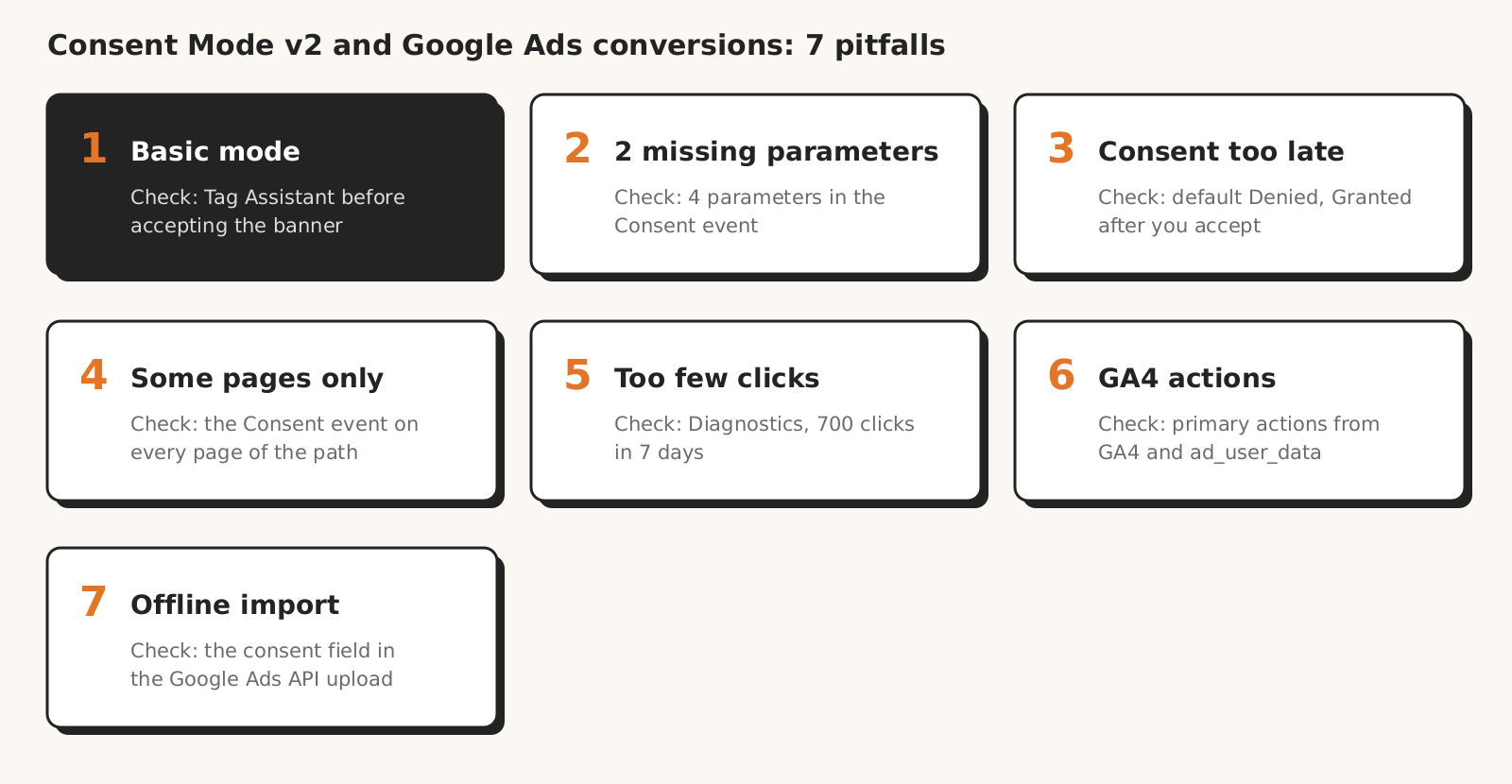
After a banner goes live, Google Ads conversions are changed by, among other things, seven pitfalls described in Google's help and developer documentation: basic mode, missing v2 parameters, late default consent, consent mode missing on some pages, too few clicks for modeling, GA4 conversions as primary actions, and offline imports without a consent field.
The last column is our own assessment of whether you can check the pitfall yourself, without access to the client's GTM.
| Pitfall | How you notice it | How to check | Without GTM access (our assessment) |
|---|---|---|---|
| 1. Basic mode | Tag Assistant can't connect to the site before the banner is clicked | Tag Assistant before and after accepting, mode confirmed by the client | partly |
| 2. No ad_user_data and ad_personalization | the Consent event shows only 2 parameters | "API Call" section in Tag Assistant | yes |
| 3. Default consent too late or no update | after accepting, the "On-page Update" column doesn't show "Granted" | earliest and most recent Consent event | yes |
| 4. Consent mode not on every page or in every region | smaller modeling uplift than you expect | Tag Assistant on ad landing pages and the cart; regions with the client | partly |
| 5. Too few clicks for modeling | Diagnostics status: implemented, thresholds not met | Diagnostics tab of the conversion action | yes |
| 6. GA4 conversions as primary actions | primary actions imported from GA4 | list of primary actions in Google Ads | yes |
| 7. Offline import without a consent field | CRM import via the API without consent | ask whoever sends the import | no |
1. Basic mode: tags wait for a click on the banner
In basic mode, Google Ads gets nothing from people who deny consent or ignore the banner. Per Google Ads Help on consent mode, tags don't load until the banner is used, and on denial not even the consent state reaches Google. Modeling in Google Ads still runs, but on a general model, not one specific to your account.
How to check: according to Help on verifying consent mode, a "Could not connect" message in Tag Assistant means the Google tag or GTM container may be blocked from loading. If Tag Assistant connects only after you accept the banner, tags were waiting for consent.
That's how basic mode works, and also how blocking tags without consent mode works. The client or banner provider can confirm which one it is.
2. The banner doesn't pass ad_user_data and ad_personalization
A banner set up before the November 2023 update may not pass the two parameters Google added then. According to Google Ads Help on consent parameters, a parameter that isn't set behaves like a denial. Without ad_user_data, enhanced conversions are off and tag conversion pings are sent cookieless.
Tag Manager Help on v2 says that a Google-certified consent management platform (CMP) provider will automatically update to the newest version of consent mode. A custom banner, written by the client's developer, has to be updated by hand.
How to check: following Help on verifying consent mode, select the Consent event in Tag Assistant and check in the "API Call" section that all 4 parameters are set: ad_storage, ad_personalization, ad_user_data and analytics_storage.
3. Default consent set too late or no update after the click
Consent mode works as intended when the default state is set before tags use it, and an update follows the click on the banner. Google's consent mode debugging guide warns that setting the default too late may not have the intended effect, and says not to set default consent states asynchronously.
For a banner that loads asynchronously, Google's consent mode setup guide describes the wait_for_update parameter, which makes tags wait for the consent update (500 milliseconds in the example).
How to check: in Tag Assistant, the earliest Consent event should show "Denied" in the "On-page Default" column, and after you accept, the most recent event should show "Granted" in the "On-page Update" column. According to the debugging guide, an empty Consent tab in Tag Assistant means consent mode isn't implemented on the page.
4. Consent mode not on every page or in every region
Modeling needs consent mode on every page of the site. Help on consent mode impact says that if consent mode isn't detected on some pages, there may be gaps in modeling. Among the reasons for lower uplift it also lists default or update calls firing after Google tags and a consent rate that is too low for the domain.
The second dimension of a consent mode setup is regions. Google's setup guide recommends scoping default consent settings to the regions where you show a banner, and the debugging guide says to repeat the test with simulated geographic locations.
How to check: walk the path in Tag Assistant from the ad landing page through the cart to the thank-you page and check the Consent event on each page. Region settings and the optional URL passthrough (url_passthrough) live in the code or the CMP, so ask the client.
5. Too few clicks for modeling to start
Conversion modeling in Google Ads starts only above a traffic threshold. According to Help on conversion modeling, you need consent mode or TCF v2.0 implemented correctly and 700 ad clicks over 7 days per country and domain grouping. Then the models enter training, and modeled conversions appear in reports gradually.
A smaller account can therefore have consent mode set up correctly and still no modeling. GA4 modeling thresholds are different; we compare them in our post on mismatched conversions.
How to check: on the Diagnostics tab of the conversion action, the "Consent mode is implemented" status (thresholds for conversion modeling not yet met) means the setup is there, but traffic is too low. You'll find the tab under Goals > Conversions > Summary, after clicking a website conversion action.
6. GA4 conversions as primary actions
A primary action imported from GA4 depends on whether the user consented to ad_user_data. According to Google Ads Help on consent parameters, with ad_user_data denied click-ID keyed conversion data export to Google Ads is limited, for example for bidding based on GA4 conversions.
According to Google Ads Help on consent mode, ad_storage also controls whether Google Ads uses Google Ads cookies and IDs from the Google Analytics tag.
How to check: in the list of conversion actions in Google Ads, see which primary actions come from GA4. If Smart Bidding relies on them, check in Tag Assistant that the banner passes ad_user_data and ad_storage.
7. Offline conversion import without a consent field
CRM conversions uploaded through the Google Ads API can carry consent information too. The Google Ads API documentation on imports highly recommends populating the consent field and warns that without it, your conversions may not be attributable.
Google Ads Help on EEA consent adds that measuring offline conversions also requires consent where the law or Google's policies require it.
How to check: ask the person or integration sending the import whether it sets the consent field. You won't see the import's consent field in Tag Assistant or on the site.
Other reasons why a CRM import doesn't reach Google Ads are in our post on offline conversions.
How to read in Google Ads whether consent mode works and how much modeling adds
You can read consent mode status and modeling impact in Google Ads, without access to the site's code. Per Help on verifying consent mode, the active consent mode status can take 48 hours to appear in Google Ads, and up to 2 weeks in some cases.
If Tag Assistant shows a correct setup, a missing status during that time is down to the delay.
You'll find the status under Goals > Conversions > Summary, after clicking a website conversion action, on the Diagnostics tab. There are 2 statuses: "Consent mode is implemented" (thresholds not yet met) and "Consent mode is implemented and modeling is active".
Google calculates modeling impact as modeled conversions divided by observed conversions, separately for each domain and country pair. According to Help on consent mode impact, the data refreshes weekly and appears at the earliest 7 days after implementation, if the country meets the thresholds.
Modeling uplift data is shown only for 4 weeks after the modeling start date. Help on consent mode impact says the data is downloadable, so if you want to show the client how much the model adds, download it within that window.
Help on conversion modeling also has a bidding recommendation: if you switched from Target CPA or Target ROAS to Maximize conversions or Maximize conversion value to control for the impact of consent changes, switch back to Target CPA or Target ROAS after modeling launches.
Checklist: Consent Mode v2 and Google Ads conversions
Check Consent Mode v2 in ten steps: in Tag Assistant, in Google Ads and in a conversation with the client.
- 1Since when has the site had a banner and consent mode?
- 2Does Tag Assistant connect to the site before you accept the banner, or only after?
- 3Does the Consent event pass 4 parameters: ad_storage, analytics_storage, ad_user_data and ad_personalization?
- 4Is the default state "Denied", and "Granted" after you accept?
- 5Is the Consent event present on the landing page, in the cart and on the thank-you page?
- 6Has the client set default consent states for the regions where the site shows the banner?
- 7Which consent mode status does the Diagnostics tab of the conversion action show, and have 48 hours passed since implementation?
- 8Do the campaigns get 700 ad clicks over 7 days per country and domain grouping?
- 9Do primary actions come from GA4, and if so, does the banner pass ad_user_data and ad_storage?
- 10Does the offline conversion import set the consent field?
If all ten checklist items are fine and there are still fewer conversions than before the banner, tell the client that some people don't consent and the model fills only part of the gap. How much, the Diagnostics tab shows during the first 4 weeks of modeling.
What this Consent Mode v2 post doesn't cover
This post on Consent Mode v2 doesn't say how many conversions a banner costs you or what consent rate is typical: Google's help describes mechanisms, and we didn't verify figures from other sources. It also doesn't cover banner wording or which legal basis for consent fits the client's shop.
We don't cover configuration in a specific CMP, in mobile apps or in server-side tagging.
Menu paths, status names and quotes come from Google's help pages, developer documentation and the CMP partner program site, read on 17 November 2026.
We checked the English and Polish versions of the help pages: the English status names differ from the Polish translation, and the English conversion modeling page phrases the bidding advice in the past tense ("we recommended you switch back"). Names in your account may look different.
How Marketing Workspace helps with conversions and consent
Marketing Workspace, our AI assistant for Google Ads, Meta Ads and GA4 accounts, reads Google Ads account data through the API, but it can't see consent mode status through the API:
- The "Conversion tracking" check in the Google Ads module shows primary and secondary actions, actions that stopped recording in the last 7 days, and several primary actions measuring the same thing (Google Ads module documentation).
- The same documentation states that the check does not inspect the tag on the website or consent, only what Google Ads sees.
- The Google Ads assistant is instructed to say what isn't visible through the API, including consent mode, and where to check it in the Google Ads interface.
Marketing Workspace doesn't run Tag Assistant, doesn't read the Diagnostics tab and changes nothing in the banner or tags, so you check the 7 Consent Mode v2 pitfalls yourself.
See how Marketing Workspace works

Founder of Roition, independent Google Ads API developer
Founder of Roition, with almost 3 years of Google Ads experience. Designs and builds process automation for Polish companies: system integrations, handling enquiries and quotes, AI assistants working on company data.
Frequently asked questions
How do I check whether Consent Mode v2 works without access to the client's GTM?
In Tag Assistant, by entering the site URL. Check the earliest Consent event (4 parameters, "Denied"), the most recent one after accepting ("Granted") and the Tags tab. Then look at the status on the Diagnostics tab in Google Ads.
Is Consent Mode v2 mandatory?
In the EEA, Google requires consent and consent signals to use measurement, personalization and remarketing. Tag Manager Help exempts those who already use consent mode and don't run personalized ads, but Google Ads Help requires ad_user_data for conversion measurement. The legal side of the banner is for the client and their lawyer.
Do I need a certified CMP?
Not as an advertiser. According to Google Ad Manager Help, a Google-certified CMP integrated with the TCF is required of publishers using AdSense, Ad Manager and AdMob. For advertisers, Google runs a CMP partner program and says nothing prevents advertisers from using a CMP outside it.
Why are there fewer conversions after the banner even though modeling is active?
Because the model doesn't restore every conversion. Google's help says the model aims to minimize over-prediction, so some real conversions may not show up. Lower uplift also comes from consent mode missing on some pages, late consent calls and a low consent rate.