
Part of the gap comes from definitions, part from site and account settings. We start with dates, account linking and the choice of GA4 report, and only then check the tag, consent and data filters.
We cover mismatched conversions separately in our post on conversions that don't match between Google Ads and GA4. This post is one step earlier: clicks, sessions and users.
Click, session, user: three different numbers
Google Ads counts a click the moment someone interacts with the ad, while GA4 counts a session only once the tag fires on the page. According to help on click-session discrepancies, these are different metrics and some discrepancy is normal. Google does not say how big a "normal" gap is.
| Number | Counted by | What it counts according to Google Help |
|---|---|---|
| Click | Google Ads | an interaction with the ad: headline, call to action, phone number |
| Session | GA4 | a visit from a page view with no active session until 30 minutes of inactivity |
| Active user | GA4, the default in reports | a person with an engaged session, a first_visit event or an engagement_time_msec parameter |
| Total users | GA4 | everyone who visited the site in the selected date range |
The click definitions come from Google Ads Help on clicks, the session definitions from GA4 Help on sessions, and the user definitions from GA4 Help on user metrics.
An example from Google Help: someone clicks an ad twice within 30 minutes without closing the browser. Google Ads counts 2 clicks, while GA4 may record a single session, even if that person left the site in between. According to GA4 Help on sessions, session and user counts are also estimates.
The 30-minute inactivity limit is the GA4 default. GA4 Help on sessions says you change it for a website in Admin > Data Streams > your web stream > Configure tag settings > Adjust session timeout.
First rule out a false gap between clicks and users
Four things create a false gap between Google Ads clicks and GA4 users, and you can check all of them without access to the site: data that is too fresh, different time zones, a period before the accounts were linked, and comparing two different GA4 reports. This kind of gap comes from how you compare, not from a measurement error:
- Data that is too fresh. Google Ads Help on data discrepancies advises you to allow 24-48 hours before comparing so the data can sync and process.
- Different time zones. According to GA4 Help on attribution settings, GA4 reports in the property time zone and Google Ads in the account time zone, and with different time zones you may see discrepancies in reports.
- The period before the accounts were linked. The help on click and session discrepancies says that data from the period when the accounts were not linked is not backfilled. In Google Ads you check the link in Data manager > Google Analytics & Firebase > Manage and link.
- Two different GA4 reports. GA4 Help on acquisition reports explains that the User acquisition report is scoped to new users and Traffic acquisition to new sessions, and advises against comparing their values.
The closest match for clicks is the Google Ads campaigns report in GA4. According to GA4 Help on Google Ads reports, you open it in Acquisition > Overview, on the "Sessions by Session Google Ads campaigns" card, with the "View Google Ads campaigns" button.
Every dimension in that report includes "Session" in its name, which according to Google means it describes the user's most recent session, whether the user is new or returning.
8 reasons GA4 shows fewer users than Google Ads clicks
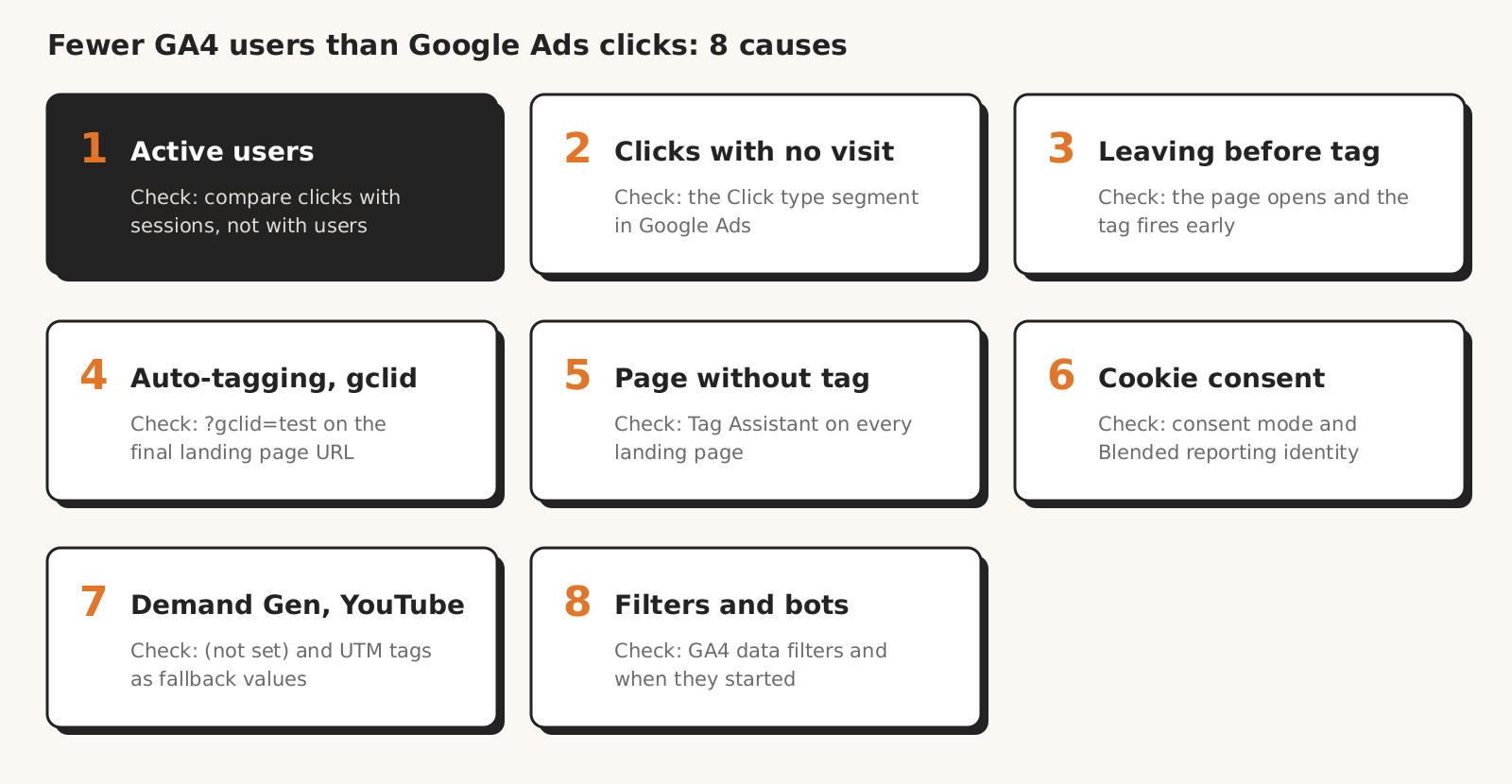
GA4 shows fewer users and sessions than Google Ads clicks in eight situations from Google Help: you compare with active users, the click doesn't lead to the site, someone leaves before the tag loads, gclid gets lost, the page has no tag, consent is missing, a Demand Gen campaign produces (not set), or a GA4 filter cuts the traffic.
| Cause | Which way | How it shows | How to check |
|---|---|---|---|
| 1. Comparing with active users | fewer users than sessions and clicks | clearly more sessions than users | compare clicks with sessions in the campaigns report |
| 2. Clicks with no visit | fewer sessions than clicks | many calls, driving directions or app clicks | "Click type" segment in Google Ads |
| 3. Leaving before the tag loads | fewer sessions | the gap grows when the site is slow or down | whether the page opens and when the tag fires |
| 4. Auto-tagging off or gclid lost | fewer campaign sessions, more in another source | ad traffic shows as direct, organic or (not set) | auto-tagging setting and a ?gclid=test check |
| 5. Landing page without a tag, or a blocker | fewer sessions | one landing page gets no campaign traffic | Tag Assistant and DebugView on every landing page |
| 6. No cookie consent | fewer sessions and users | the gap starts on the day the banner launched or changed | consent mode and reporting identity |
| 7. Demand Gen, YouTube, WBRAID and GBRAID | fewer campaign sessions, more (not set) | (not set) in Google Ads campaign dimensions | manager account link and UTM tags as fallback values |
| 8. Data filters and bot exclusion in GA4 | fewer sessions | the gap starts on the day a filter was created | data filters in the GA4 property settings |
1. You are comparing clicks with active users
The "Users" column in GA4 reports means active users, not everyone who clicked. According to GA4 Help on user metrics, GA4 reports show only active users, while data exported to Google Ads includes inactive users too.
A user counts as active with an engaged session (at least 10 seconds, a conversion, or 2 page views), a first_visit event or an engagement_time_msec parameter. A returning user who stays under 10 seconds and does nothing ends up only in "Total users".
The second part of the gap between clicks and users comes from repeat clicks by the same person. According to Google Ads Help on missing data, when someone clicks several times in one session, Google Ads records several clicks and Analytics one visit. Google Ads Help on missing data calls these clicks legitimate behavior, for example when people compare offers.
The help on user metrics adds that thresholding in GA4 can also affect user counts.
How to check: compare clicks with sessions in the Google Ads campaigns report, not with users. If you need a count of people, use "Total users", not "Active users".
2. Clicks that don't lead to the site
Some Google Ads clicks never open the site at all: calls from the ad, driving directions and app clicks. Google Ads Help on clicks counts a tap on the phone number in an ad as a click, and according to the help on call assets, those clicks cost the same as headline clicks.
Older help on ad formats, written for Universal Analytics, said plainly that click-to-call ads and driving directions don't start a session because they don't lead to the website. A call or directions click is in Google Ads, but GA4 has no website session after it.
How to check: in the campaigns table, click the segment icon and select "Click type". According to Google Ads Help on segments, you will see values such as mobile clicks-to-call, driving directions and app deep links. Subtract call, directions and app clicks before you compare the rest with sessions.
3. People leave before the tag loads
A click without a session happens when someone closes the tab, goes back or stops loading before the GA4 tag fires. That is how help on click-session discrepancies and Google Ads Help on missing data describe it, and Google Ads Help on clicks adds that a click is counted even if the site is temporarily unavailable.
Google Ads Help on data discrepancies lists pages that don't fully load as one of the factors. Google gives no load-time threshold at which you start losing sessions. In older help on technical issues, written for Universal Analytics, Google said that placing the tracking code in the head section can greatly improve the clicks-to-sessions ratio.
How to check: following the help on discrepancies, check that the site's server is up, that the page loads for all users and IP addresses, and that the tracking code is installed. Then see whether the GA4 tag waits for the page to finish loading.
4. Auto-tagging is off or gclid gets lost on the way
When gclid, the click identifier that auto-tagging adds to the URL, doesn't reach the page, GA4 can't connect the visit to the campaign. According to the help on discrepancies, with auto-tagging off GA4 may not record Google Ads traffic at all or may attribute it to the wrong source: organic, direct or (not set).
GA4 Help on (not set) lists auto-tagging turned off and unlinked accounts among the reasons for (not set) in Google Ads dimensions.
In Google Ads you check auto-tagging in Admin > Account settings > Auto-tagging. The help on auto-tagging adds that in GA4 auto-tagging takes priority over manual UTM tags, and that with redirects gclid has to reach the final landing page.
GA4 Help on aggregate identifiers also says not to remove gbraid and gad_* parameters from the URL and to keep gad_* through redirects. Some sites show an error page when parameters are added to the URL, as the help on discrepancies notes.
How to check: add ?gclid=test to the landing page URL and open it. According to the help on discrepancies, the parameter should survive the redirect and stay in the final page URL, and the Google tag should fire before the redirect. We describe the same gclid test for the conversion page in our post on conversions that don't match.
5. The landing page has no tag or the browser blocks it
A landing page without the GA4 tag produces clicks in Google Ads and no campaign data in GA4. The help on discrepancies says to track every landing page used by Google Ads ads. A single new landing page without the tag is enough to make some clicks disappear from GA4.
The help on click and session discrepancies also covers blockers: when the browser has an add-on that blocks Analytics, Google Ads records the click and GA4 may not record the visit.
How to check: open every landing page from your ads with the Tag Assistant extension on and watch the events in DebugView, which according to GA4 Help on DebugView shows them in real time. If the tag has disappeared from the site entirely, we describe the symptoms in Google Ads in our post on conversions dropping to zero.
6. No cookie consent
The consent banner runs on the site, while Google Ads counts the click earlier, at the ad, so missing consent only shows in GA4. According to GA4 Help on behavioral modeling, once a banner is in place Analytics loses data from people who didn't consent and can't tell whether events without consent come from 1 user or from 10.
GA4 Help on consent mode describes two implementations. In advanced, tags without consent don't store cookies and send pings instead. In basic, tags wait for consent and GA4 gets no modeled data to fill the gaps. What consent mode changes in Google Ads conversions is covered in our post on Consent Mode v2.
The help on behavioral modeling also covers the Reporting identity setting (Admin > Data display). Without "Blended", reports include only users who consented to identifiers. We compare the thresholds for GA4 modeling in our post on conversions that don't match.
How to check: see whether the gap grew from the day the banner launched or changed, ask which consent mode implementation the site uses, and check the reporting identity. Google doesn't say what share of sessions a banner removes.
7. Demand Gen campaigns, YouTube, and WBRAID and GBRAID identifiers
With Demand Gen campaigns the gap between clicks and sessions can be bigger. According to the help on discrepancies, this applies especially to YouTube, due to the nature of ad interactions. With privacy-preserving parameters such as WBRAID and GBRAID, campaign dimensions can show "(not set)".
For (not set) in Demand Gen campaign sessions, the help on discrepancies also advises checking whether the manager account running the campaigns is linked to the GA4 property. When a campaign gets fewer sessions and (not set) gets more, Google suggests adding UTM parameters as fallback values alongside auto-tagging, for example ?utm_source=google&utm_medium=cpc&utm_campaign=CampaignName.
How to check: in the Google Ads campaigns report in GA4, see how many sessions are (not set) and compare that with the clicks of your Demand Gen campaigns. We found no separate description of this discrepancy for Performance Max in Google Help.
8. Data filters and bot exclusion in GA4
GA4 can cut part of your ad traffic before it reaches reports. According to GA4 Help on bot traffic, traffic from known bots is excluded automatically, and you can't see how much of it there was. Google Help doesn't say whether both tools reject the same visits.
The second way GA4 cuts ad traffic is data filters. GA4 Help on data filters describes an internal traffic filter by IP address and warns that a data filter's effect is permanent. If you or your client click ads from an address covered by the filter, Google Ads counts those clicks and GA4 shows no session.
How to check: in the GA4 property settings, see which data filters are active and since when, and compare that date with when the gap started.
When GA4 shows more sessions than clicks
GA4 sometimes shows more Google Ads sessions than clicks, and according to Google that isn't necessarily an error. Help on click-session discrepancies describes two such cases:
- Returns and bookmarks. Someone comes back later, or from a bookmark with gclid in the URL, so sessions grow without a new click. Google says that more sessions than clicks is an indication of positive engagement.
- Invalid clicks. Google Ads filters them out, while GA4 initially reports all sessions. You can see the filtered clicks in the "Invalid clicks" and "Invalid interactions" columns.
Several domains without shared measurement work differently: according to GA4 Help on multiple domains, one person then counts as 2 users in 2 sessions, so GA4 users and sessions go up, not necessarily the ones attributed to Google Ads.
Clicks that Google Ads rejected as invalid add sessions in GA4, they don't remove them. GA4 excludes known bots automatically, with no view of how many there were, and Google doesn't say whether both tools reject the same visits.
If someone explains a shortage of GA4 users with bots, ask which way those bots would move the numbers. Fake form submissions are a separate topic, covered in our post on spam leads.
What gap between clicks and sessions is normal
Google doesn't publish a normal gap between Google Ads clicks and GA4 sessions. The current help on discrepancies only says that some discrepancy is normal.
In Google Help on clicks and sessions we found "20%" only as a question in the archived Universal Analytics troubleshooter: is the discrepancy under 20% in most campaigns? That is a diagnostic question from an old tool, not a standard for GA4.
The 20% figure that Google Ads Help gives for conversions comes from different attribution models and doesn't apply to clicks or sessions. We cover it in our post on conversions that don't match.
You will find thresholds on blogs, for example UK agency KRM Digital writes that a gap above 10-15% probably means a setup issue. That is an opinion, not a Google rule.
Instead of looking for a threshold, compare campaigns with each other and the gap over time. Even Google's archived question was about most campaigns. If one campaign stands out from the rest of the account, or the gap grew from a specific day, look for a change in that campaign, its landing page or the banner.
Checklist: Google Ads clicks vs GA4 users
Compare Google Ads clicks with GA4 users after ten checks, in the order we run them: dates, account link, report, click type, gclid, tag, consent, page loading, Demand Gen campaigns and filters.
- 1Have 24-48 hours passed since the end of the compared period, and do Google Ads and GA4 use the same time zone?
- 2Does the whole period fall after Google Ads and GA4 were linked?
- 3Are you comparing clicks with sessions in the Google Ads campaigns report, not with active users or another acquisition report?
- 4How many clicks in the "Click type" segment are calls, driving directions and app clicks?
- 5Is auto-tagging on, and does ?gclid=test survive the redirect to the final page?
- 6Does every landing page from your ads show the GA4 tag in Tag Assistant and DebugView?
- 7Which consent mode implementation does the site use, and is the reporting identity set to "Blended"?
- 8Does the page open for all users, and does the tag fire before people have time to leave?
- 9How many sessions from Demand Gen and YouTube campaigns are (not set) in GA4?
- 10Which data filters are active in the GA4 property, and since when?
If after these ten checks one campaign still stands out from the rest of the account, start with its landing page. Tell your client which parts of the gap come from definitions (active users, clicks with no visit), which are outside your control (blockers, no consent), and which could be fixed.
What this post on clicks and users doesn't cover
This post on clicks and users gives no normal gap in percent, because Google doesn't publish one. We also don't say how many sessions a consent banner removes or at what page load time sessions start to drop: Google Help describes only the mechanisms, without numbers.
We don't cover Performance Max separately, because we found no description of the click and session discrepancy for it in Google Help. We also don't cover conversion discrepancies, attribution or server-side tagging setup.
Menu paths and names come from English Google Help as read on November 13, 2026. Google renames reports and settings, so they may look different in your account.
How Marketing Workspace helps compare Google Ads and GA4
Marketing Workspace, our AI assistant for Google Ads, Meta Ads and GA4 accounts, reads data from both sides of the click and session gap, as long as the client has both accounts connected:
- The GA4 module answers questions about users, sessions, engagement, and traffic sources and channels, and fetches data at the moment you ask (GA4 module docs). The GA4 assistant is instructed to end comparisons the day before yesterday, because data from the last 24-48 hours is incomplete.
- The Google Ads module answers questions about campaign cost, clicks and conversions for any period (Google Ads module docs).
- The PM module prepares a report for a selected client and period based on the data available in the system (PM module docs), so data from connected GA4 and Google Ads accounts ends up in one report.
- When the client card has a website address, the GA4 module reads the public code of that one page and records which GTM, GA4 and Google Ads IDs are visible in it.
Marketing Workspace doesn't check consent, redirects or whether gclid reaches the page. It doesn't run the site's scripts, so it can't tell you whether the tag fires on every landing page, and it doesn't change anything in GA4. The ?gclid=test check, Tag Assistant, the banner and the filters from the checklist are yours to check.
See how Marketing Workspace works

Founder of Roition, independent Google Ads API developer
Founder of Roition, with almost 3 years of Google Ads experience. Designs and builds process automation for Polish companies: system integrations, handling enquiries and quotes, AI assistants working on company data.
Frequently asked questions
Where do I start when Google Ads clicks far exceed GA4 users?
With how you compare, not with the tag. Wait 24-48 hours, check time zones and the account link date, then compare clicks with sessions in the Google Ads campaigns report, not with active users. Then check click type, gclid, the landing page tag, consent and filters.
Why does GA4 show fewer users than Google Ads clicks?
First, because GA4 reports show active users, and several clicks by one person are one user. Beyond that, Google Help lists clicks with no visit, leaving before the tag loads, lost gclid, pages without a tag, blockers, consent, (not set) in Demand Gen campaigns and GA4 filters.
Should Google Ads and GA4 numbers match?
No. According to Google Help, clicks and sessions are different metrics and some discrepancy is normal. Google doesn't say how big a gap is still normal.
Can GA4 show more sessions than clicks?
Yes. Returns to the site and bookmarks with gclid produce sessions without a new click, and Google Ads filters out invalid clicks while GA4 initially reports all sessions. Google says that more sessions than clicks is an indication of positive engagement.
Are several clicks by one person one session in GA4?
They can be. According to Google Help, GA4 may record 2 clicks within 30 minutes without closing the browser as one session, while Google Ads counts 2 clicks.
Which GA4 report should I compare Google Ads clicks with?
The Google Ads campaigns report: Acquisition > Overview, the "Sessions by Session Google Ads campaigns" card and the "View Google Ads campaigns" button. Compare clicks with sessions. The User acquisition report is scoped to new users and Traffic acquisition to new sessions, and Google advises against comparing their values.
Does a big gap between clicks and users mean bots?
Not on its own. Invalid clicks filtered out by Google Ads are initially reported as GA4 sessions, so they add sessions. GA4 excludes known bots automatically, but Google doesn't say whether both tools reject the same visits. With too few sessions, check click type, gclid, the tag and consent first.
Do I pay for clicks that have no GA4 session?
For some of them, yes. A click is counted even when the site is temporarily unavailable, and taps on the phone number cost the same as headline clicks. Google Ads filters out invalid clicks and shows them in separate columns.
Why does a Google Ads campaign show (not set) in GA4?
GA4 Help lists, among other reasons, unlinked accounts, auto-tagging turned off, traffic from unlinked Google Ads accounts, and WBRAID or GBRAID identifiers. For Demand Gen campaigns, Google advises adding UTM tags as fallback values.