
This post is about access and writes. Where wrong numbers in the AI answers themselves come from, we explain in the post on wrong numbers from AI.
What an AI agent sees and can do in Google Ads through MCP
An AI agent connected through MCP sees and changes as much in Google Ads as the MCP server's tools and the permissions of the Google account you authorize it with allow. Google's official MCP server only reads, while some non-Google servers have write tools, for example burnr8 has tools for changing budgets and pausing campaigns.
MCP (Model Context Protocol) is, according to the description on the project site, an open standard for connecting AI applications such as Claude or ChatGPT to external systems. An MCP server gives the model tools, for example "run a query against the Google Ads account" or "change the campaign budget".
Google provides its own MCP server for the Google Ads API. According to the Google Ads MCP server documentation (updated 30 September 2026), the current version is read-only. It has three tools: list_accessible_customers lists the accounts, search runs GAQL queries (the Google Ads API query language) and get_resource_metadata describes resources. Google's MCP server will not change bids or pause campaigns.
When an AI agent writes, an error stops being a wrong sentence in a report and becomes a change in the client's account. That is why the MCP tools specification recommends that there should always be a human who can deny a tool call.
5 things that go wrong when an AI agent gets access to Google Ads
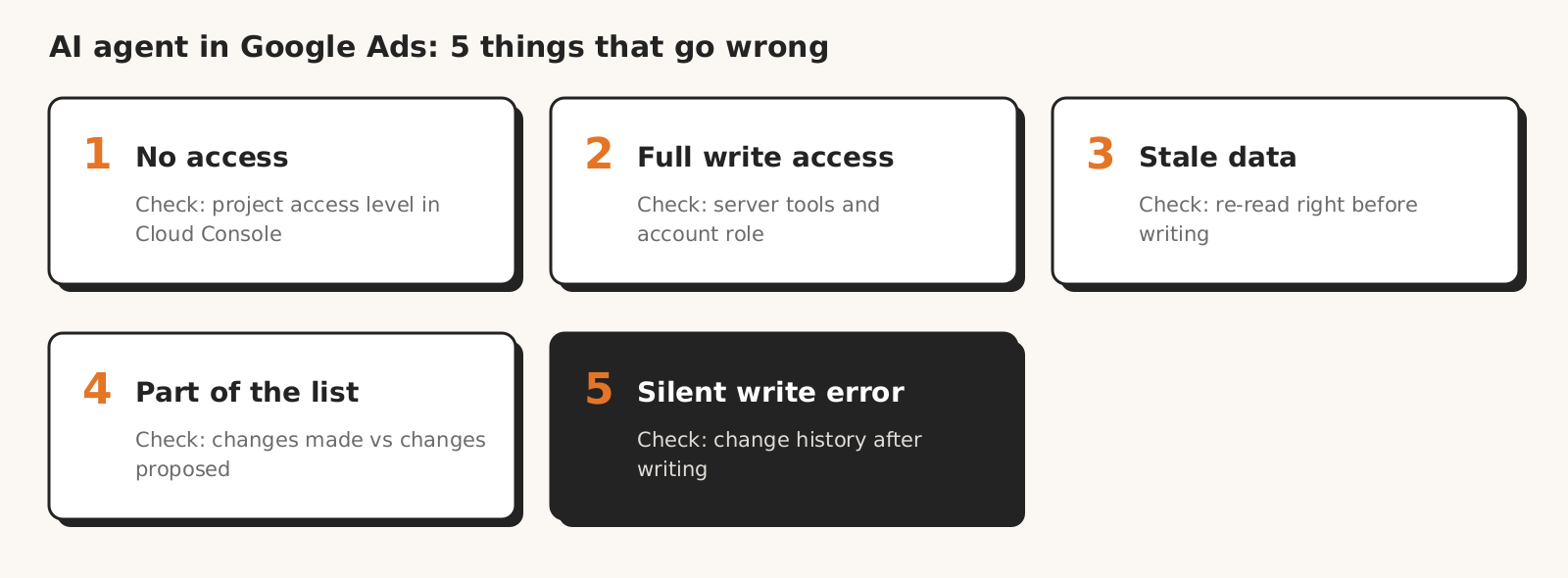
An AI agent with access to Google Ads can fail in five places: the Google Cloud project has no access to real accounts, the agent has full write rights, it changes the account based on a stale read, it carries out only part of the list, or it reports a write as successful when it failed.
| Cause | How to spot it | How to check |
|---|---|---|
| 1. Project with no access to production accounts | CLOUD_PROJECT_NOT_APPROVED_FOR_PRODUCTION or ACTION_NOT_PERMITTED error; the agent sees account numbers, but no names or data | the project's access level on the Google Ads API page in Cloud Console |
| 2. Full write rights | the MCP server has tools for changing budgets, bids or statuses | the server's tool list and the access level of the Google account you authorize with |
| 3. Change based on stale data | the "before" value in the agent's proposal does not match the UI | a read of the value right before the write |
| 4. Lost part of the list | the account has fewer changes than the agent proposed | comparing the number of items on the list with the change history |
| 5. Write failure reported as success | the agent says "done", but there is nothing in the change history | the change history or a fresh read of the changed value |
1. The Google Cloud project has no access to production accounts
An AI agent will not pull data from a real Google Ads account if the Google Cloud project has only test access.
Since 9 September 2026 the Google Ads API no longer uses developer tokens. According to Google's developer token retirement docs, the access level now depends on the Google Cloud project the OAuth credentials come from. A new project gets test access by default, meaning test accounts only.
With test access, a query to a real account ends with the CLOUD_PROJECT_NOT_APPROVED_FOR_PRODUCTION error (in API v25; older versions return ACTION_NOT_PERMITTED). The agent may then reply that it "has no access to the account", even though the Google account has full permissions to it.
| Access level | Accounts | Daily operations limit |
|---|---|---|
| Test | test only | up to 15,000 on test accounts |
| Explorer | test and production | up to 2,880 on production, up to 15,000 on test |
| Basic | test and production | up to 15,000 |
| Standard | test and production | no daily limit |
Table source: Google Ads API access levels. You can apply for Basic only after the project's brand verification. Google's official MCP server requires at least the Explorer level.
From our practice: before Google granted us Basic Access on 21 August 2026, our system on a test developer token (before the 9 September change) saw only the numbers of two accounts, with no names and no data.
How to check: look up the project's access level on the Google Ads API page in Cloud Console before you start looking for a bug in the agent.
2. The agent has full write rights, though it only needed to read
An AI agent with an OAuth token for the Google Ads API gets the adwords scope, the only one in the Google Ads API OAuth documentation, so the token scope cannot limit the agent to reading. Whether it only reads depends on the MCP server's tools and the permissions of the Google account you authorize it with.
A "read-only" tool description is no guarantee either. According to the MCP specification schema, tool annotations such as readOnlyHint are only hints and do not have to describe the tool's behavior faithfully. The write boundary is set by the server's code and the Google account's role, not by the tool's label.
From our practice: when Google verified our OAuth app (September 2026), GA4 got a read-only scope (analytics.readonly) and Google Ads got the adwords scope, because the documentation does not list a narrower one. That is why the list of allowed changes in Marketing Workspace is set by code.
How to check: read the MCP server's tool list before connecting it. For testing, authorize a Google account with "Read-only" access: according to Google Ads Help on access levels, this access lets you view campaigns and reports, and editing campaigns starts at the "Standard" level.
3. The agent changes the account based on stale data
An AI agent prepares a change in Google Ads based on a read taken at the time of the conversation. If someone changed the budget in the UI between the read and the write, the write will overwrite the newer value with a plan based on the old one.
The change history will not always show this right away. According to change history in the API, a change appears in the results with a delay of up to 3 minutes, and a query reaches back at most 30 days.
From our practice: since the first version of changes in Marketing Workspace (21 August 2026), a proposal expires after 24 hours, and right before the write the system reads the account again and holds the change if the value differs from the proposal.
How to check: before you approve a change, compare the "before" value with the UI or ask the agent to read it again right before the write.
4. The agent applies only part of its own list
Asked to "apply the proposed changes", an AI agent carries out only the part of its own list that it can see, when the tool trims the conversation history or the response is cut off at the length limit. This affects long lists of Google Ads changes, such as negative keywords, spanning several conversation turns.
From our practice: up to version 1.1.0 (29 September 2026) the Marketing Workspace assistant remembered only the beginning of its previous response, and long responses could get cut off. Since that version it remembers the whole response, so the command "apply the proposed negative keywords" covers the full list (changelog).
How to check: count the items on the list the agent proposed and the changes it made. If the numbers differ, ask for a list of the missing items instead of repeating the command.
5. A write failure reported as success
An AI agent that does not read the whole Google Ads API response can say "done" about changes that are not in the account. By default, the API executes all operations in one request together or not at all. According to the MutateGoogleAdsRequest reference, with partial_failure enabled, valid operations are executed and failed ones come back as errors.
The same request can be sent with the validate_only option: Google then checks it without executing it and returns only errors. This is a good test before the write, but it does not replace checking after the write.
From our practice: since version 1.0.7 (4 September 2026), the "Approve all" button in Marketing Workspace executes changes one by one, checks each separately and leaves failed ones on the list instead of reporting the whole batch as done.
How to check: after every change, read the changed value again or check the account's change history. Through the API, the history also shows whether a change came from the Google Ads API or from the UI.
Checklist before connecting an AI agent to a client account
Before an AI agent gets access to a client's Google Ads account, check seven things: the project's access level, write tools, account permissions, approval, a fresh read, list completeness and a read after the write.
- 1Does the Google Cloud project have at least Explorer access (if you set up the MCP server yourself)?
- 2Do you know which of the MCP server's tools write changes to the account?
- 3Do you start by authorizing an account with "Read-only" access?
- 4Does every change wait for your approval, and can you reject it?
- 5Is the "before" value read right before the write?
- 6Does the number of changes made match the list of proposed ones?
- 7After the write, do you check the change history or read the value again?
If the answer to any question is "I don't know", the agent stays read-only. The first changes are best tested on a test account, for which Test access is enough.
How Marketing Workspace limits writes in Google Ads
Marketing Workspace, our AI assistant for Google Ads, Meta Ads and GA4 accounts, limits Google Ads writes with safeguards in code, not in the prompt: approval of every change, a closed list of changes, a 30% budget limit, a fresh read before and a read after the write. We describe them in the Google Ads module documentation:
- The assistant only proposes, and a change goes live after your approval, with the before and after values in the log.
- Only budgets, bids, statuses and negative keywords can be changed, and new campaigns are created in a single write, all or nothing, after a dry-run check by Google.
- You can change a budget by at most 30% in one operation, and nothing is deleted, only paused.
- A proposal expires after 24 hours, and before the write the system reads the account again and holds the change if the value has changed.
- After the write, the system reads the change back from the account and records it in the log.
You do not need your own Google Cloud project: you connect the account by signing in with Google. We do not promise that the assistant will never make a mistake. We promise that nothing in the account changes without your approval.
The model itself matters too, but it will not replace safeguards: in our test of 8 AI models, every model made mistakes, just in different places.
See how Marketing Workspace works

Founder of Roition, independent Google Ads API developer
Founder of Roition, with almost 3 years of Google Ads experience. Designs and builds process automation for Polish companies: system integrations, handling enquiries and quotes, AI assistants working on company data.
Frequently asked questions
Is there an official MCP server for Google Ads?
Yes. Google describes it in the Google Ads API documentation (code in the googleads/google-ads-mcp repository). According to the documentation as of 30 September 2026, the current version is read-only: it lists accounts, runs GAQL queries and describes resources. It will not change bids or pause campaigns.
What does the CLOUD_PROJECT_NOT_APPROVED_FOR_PRODUCTION error mean in the Google Ads API?
That the Google Cloud project the OAuth credentials come from has Test access, while the query concerns a real account. This is the API v25 response; older versions return ACTION_NOT_PERMITTED. You can check the project's access level on the Google Ads API page in Cloud Console.
Do I need a developer token for a Google Ads MCP server?
No. Google retired developer tokens on 9 September 2026. You need a Google Cloud project with at least Explorer access, because a project with Test access can query only test accounts.
Can an AI agent change Google Ads campaigns on its own?
It can, if the MCP server has write tools and the Google account you authorize it with has edit rights. The MCP specification recommends that a human should be able to deny any tool call.
How many operations per day can an agent perform through the Google Ads API?
On production accounts, up to 2,880 with Explorer access, up to 15,000 with Basic and no daily limit with Standard. The access level belongs to the Google Cloud project, not to the agent.
How do I check what an AI agent changed in a Google Ads account?
In the account's change history. Through the API, the history reaches back 30 days, a change appears in it with a delay of up to 3 minutes, and you can see whether it came from the Google Ads API.
How do I give an AI agent read-only access to Google Ads?
Not through the OAuth token scope, because the Google Ads API documentation lists one scope, adwords. Use an MCP server without write tools, for example Google's official server, and authorize it with a Google account with "Read-only" access, which lets you view campaigns and reports.
What is the difference between validate_only and partial_failure in the Google Ads API?
With validate_only, Google checks the request without executing it and returns only errors. With partial_failure, valid operations are executed and failed ones come back as errors. Without partial_failure, the operations in one request go through together or not at all.
Is a "read-only" label on an MCP tool enough?
No. The MCP specification treats tool annotations as hints. Two things are more reliable: a server that has no write tools in its code, and a Google account with "Read-only" access, which has no right to edit campaigns in Google Ads.