
An example of how this looks in practice (numbers made up for illustration): you ask an AI chat how much the brand campaign spent last month. You get a confident answer: PLN 4,312. The Google Ads UI shows PLN 3,980.
The model is not lying on purpose. It filled a gap in the data with something that sounds plausible, and without checking you do not know which of the six causes is behind it. Answers like this, confident in tone and without support in the data, are called hallucinations.
How AI gets data from a Google Ads account
A language model does not see your Google Ads account until someone gives it the data: a pasted report, a file or a connection through the API. In a regular chat, ChatGPT or Claude see only what you paste, and without data they answer from general knowledge. Before you paste a client report, also check what your client contract says.
If the data is incomplete, truncated or poorly described, the model will answer anyway, because it is built to answer fluently. So before you change the model, check what it got as input.
6 reasons AI gives a wrong Google Ads number
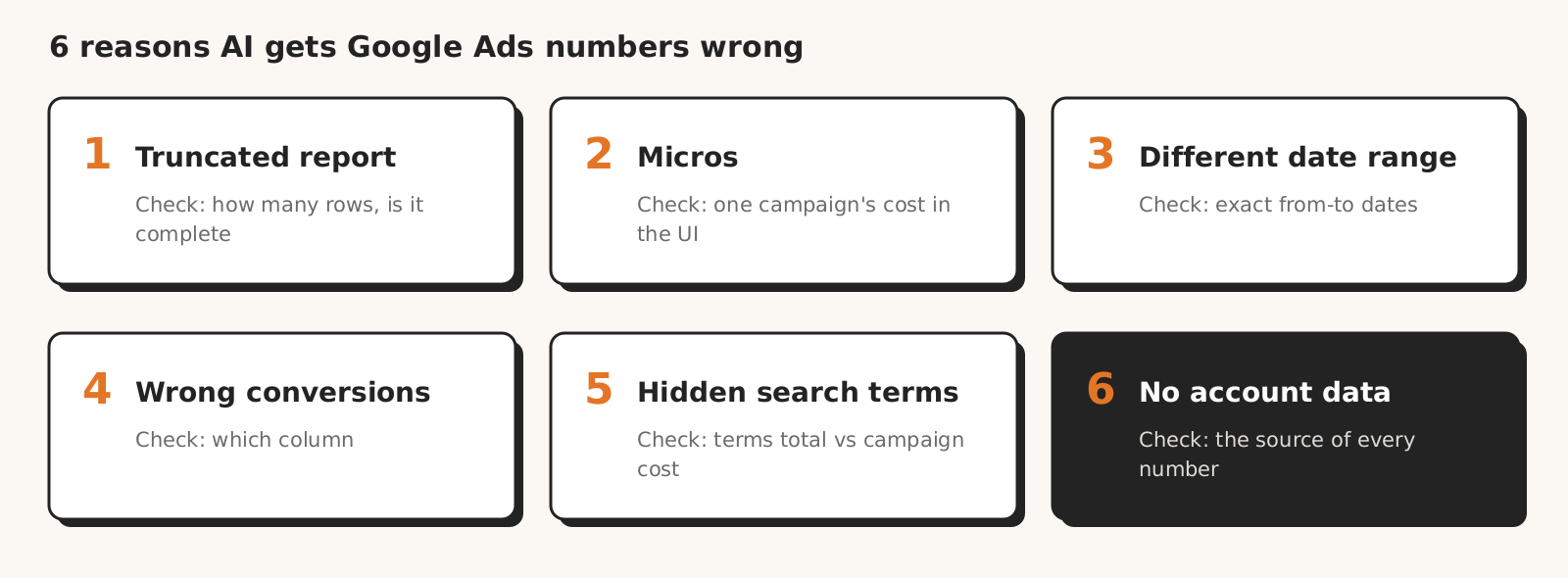
AI gives a wrong Google Ads number in six typical situations: when it got a truncated report, cost in micros, a different date range, mixed-up conversion columns, a report with hidden search terms, or when it did not pull data from the account.
| Cause | How to spot it | How to check |
|---|---|---|
| 1. Truncated report | total cost too low, the "most expensive search term" is not the most expensive at all | ask how many rows it analysed and whether that is all of them |
| 2. Micros | cost a million times too high or too low compared with the UI | compare the cost with the UI |
| 3. Different date range | "last month" turns into the last 30 days | ask for the exact from-to dates |
| 4. Mixed-up conversion columns | more conversions and a lower cost per conversion than in the main column in the UI | ask which column the conversion number comes from |
| 5. Hidden search terms | total cost of visible search terms lower than the campaign cost | compare the total with the campaign cost; do not treat the difference alone as a model error |
| 6. No data from the account | the answer sounds reasonable and has nothing to do with the account | ask which report or query each number comes from |
1. AI got only part of the report
AI gets only part of the report when the tool pulls a limited number of rows, the export has a limit, or the paste is longer than the chat accepts. On a large account, the search terms report has thousands of rows. If the model gets the first 500 rows, it will answer as if that were the whole account.
The total cost will then come out too low. If the report was not sorted by cost, the "most expensive search term" does not have to be the most expensive at all.
From our practice: when generating reports in another AI tool, every now and then the results were truncated. On a larger account there is a second problem: when looking for negative keywords, not all search terms fit into the context of one AI conversation at once, so the model judges only part of them.
How to check: ask directly how many rows it analysed and whether that is all of them.
2. Cost stored in micros
The Google Ads API gives cost in micros, meaning millionths of the currency: the cost field is metrics.cost_micros, and in the Google Ads API documentation one million equals one unit of currency.
So 12,500,000 in the cost field is PLN 12.50. A model that does not know this will divide sometimes and sometimes not.
How to check: if the cost in the answer is a million times too high or too low compared with the UI, micros are the cause.
3. A different date range than you think
A model or tool that builds the query to the Google Ads account easily turns "last month" from your question into the last 30 days.
According to the API documentation on date ranges, the "last 30 days" range in the Google Ads API means 30 days without today, counted in the account's time zone. If the account has a different time zone than you, the day boundary moves by a few hours.
From our practice: in a report for February, AI also took data from the last days of January.
How to check: ask for the exact from-to dates the numbers come from.
4. Mixed-up conversion columns
A model that takes the "All conversions" column instead of "Conversions" will usually show more conversions and a lower cost per conversion than the main column in the Google Ads UI.
According to Google Ads Help on conversion data, "Conversions" count only primary conversion actions, while "All conversions" also include secondary actions and, for example, view-through conversions. So "All conversions" is always at least as large as "Conversions".
How to check: ask which column the conversion number comes from.
5. Some Google Ads search terms are hidden
Google does not show all search terms. In its note on search terms report changes, it says the report includes only terms that had enough searches across Google.
So the total cost of visible search terms will usually be lower than the campaign cost. This is normal, but a model that does not know this will look for missing money where there is none.
How to check: compare the total cost of visible search terms with the campaign cost. Part of the difference is hidden search terms. Google does not say exactly how much, so do not treat the difference alone as a model error.
6. AI did not pull any data at all
No pulled data is the worst case and a hallucination in its purest form. The question was general, the model decided it knew the answer and wrote it from general knowledge. The answer sounds reasonable, has a nice table and has nothing to do with the account.
Even with a full data pack, in our test of 8 AI models three models assumed data that was not there, for example that "bid adjustments are 0%" when the data did not show this.
From our practice: this was our biggest problem and it happened often.
How to check: ask which report or query each number comes from. No answer means no data.
Checklist: how to check AI numbers before you send them to a client
Check a Google Ads number given by AI in six points before you send it to a client: the date range, the number of rows analysed, the cost of one campaign in the UI, the conversion column, the source of each number and a description of the difference caused by hidden search terms.
- 1Does the answer give the exact date range?
- 2Does it say how many rows were analysed and whether that is all of them?
- 3Does the cost of one campaign match the UI to the złoty? Checking one campaign takes about 30 seconds.
- 4Is it clear which conversion column the numbers come from?
- 5Does every number have a source in the data, and not in "estimates"?
- 6Is the difference between the total cost of search terms and the campaign cost described as hidden search terms, and not as an error?
If any question has no answer, the number does not go to the client. A few minutes of checking cost less than a conversation with the client about why the report does not add up.
You can ask the same questions up front, in your prompt for the chat: ask for the answer to give the date range, the number of rows analysed, the conversion column and the source of each number. An error in cost or in the number of conversions carries over to everything calculated from them, for example cost per conversion.
How Marketing Workspace guards Google Ads numbers
Marketing Workspace, our AI assistant for Google Ads, Meta Ads and GA4 accounts, guards numbers with four safeguards. We saw truncated reports and numbers with no source in the data in our own work too, so we moved some of the checks from the list into the product:
- Code converts micros before the model sees the data.
- A truncated result is flagged: a query returns up to 400 rows, and when there are more, the assistant is instructed to pull the rest of the data instead of answering from part of it.
- The assistant knows the search terms report is incomplete, so it does not look for missing money in the difference between the search terms total and the campaign cost.
- Every answer in the Google Ads, GA4 and Meta Ads modules goes through a reliability check: did the assistant pull data from the account, and do the numbers in the text have a source in it. When no data was pulled, you see a clear bar above the answer, and reporting the problem takes one click.
We do not promise that AI will never make a mistake. We promise that you will see when an answer has no support in the account data. The check will not assess the date range or the conversion column. Check these two points from the list yourself. We describe the check in detail in the answer reliability documentation.
The choice of model matters too, but it will not replace checking the input data: in our test of 8 AI models, every model made mistakes, just in different places.
For reading numbers, all models scored from 4.0 to 5.0 out of 5. Yet three of them repeatedly failed to aggregate, for example counting the same product under two titles as two different ones.
See how Marketing Workspace works

Founder of Roition, independent Google Ads API developer
Founder of Roition, with almost 3 years of Google Ads experience. Designs and builds process automation for Polish companies: system integrations, handling enquiries and quotes, AI assistants working on company data.
Frequently asked questions
Do ChatGPT or Claude pull data from Google Ads on their own?
No, not until you connect them to the account, for example through a connector, the API or a tool that does this. In a regular chat, the model sees only what you paste, and without data it answers from general knowledge.
What are AI hallucinations in Google Ads data?
They are answers that sound confident but have no support in the account data. They appear, among other cases, when the model got incomplete data or did not pull it at all.
Can AI errors in numbers be eliminated completely?
That cannot be guaranteed. What you can do is make sure every number has a source in the data, and an answer with no source is flagged.
Why does the total cost from the search terms report not match the campaign cost?
Among other reasons, because Google shows only search terms that are searched often enough. The cost of the others is in the campaign, but they do not appear as separate rows in the search terms report.
Why does AI give a Google Ads cost a million times too high?
Because the Google Ads API stores cost in micros (metrics.cost_micros), and one million micros is one unit of currency. A model that does not know this will divide the value by a million sometimes and sometimes not. Comparing one campaign's cost with the UI is enough.
How do I ask an AI chat to give the source of Google Ads numbers?
Write in your prompt that the answer must give the from-to date range, the number of rows analysed, the conversion column and the source of each number. If any of these questions has no answer, the number does not go to the client.
Will a better AI model solve the problem of wrong Google Ads numbers?
Not on its own. In our test of 8 AI models, every model made mistakes, just in different places, and three models assumed data that was not there despite a full data pack. The choice of model matters, but it will not replace checking the input data.