
A spam lead is not the same as an invalid click
An invalid click is traffic Google doesn't charge you for, while a spam lead is a fake form submission whose click you do pay for if Google considered it valid.
According to Google Ads Help on invalid traffic, invalid traffic is traffic that "doesn't represent genuine interest in your business". You aren't charged for invalid traffic detected before billing, and if Google detects it after you were billed, you get a credit on your account rather than a refund.
Leads are a different story. On its help page about invalid leads, Google writes that its invalid traffic filters "don't prevent invalid leads on their own", because most traffic checks happen after your ad serves. Bots and people can still reach your site and submit fake forms, and real users can enter fake email addresses or phone numbers.
| Invalid click | Spam lead | |
|---|---|---|
| What it is | a click without genuine interest, for example a bot or an accidental double click | a form submission with fake or worthless details |
| Who detects it | Google's systems, partly in real time | you: the form, the CRM, the call with the lead |
| Do you pay | no; after billing, Google issues a credit | yes, if the click was valid |
| Where you see it | "Invalid clicks" column, credit report | CRM, inbox, server logs; in Google Ads only as a conversion |
Google calls lead quality a shared responsibility: it protects you from charges for invalid traffic, and the form safeguards are yours to build. That is why the "Invalid clicks" column alone will not tell you how many leads in the account are spam.
6 spam lead signals in Google Ads and your CRM
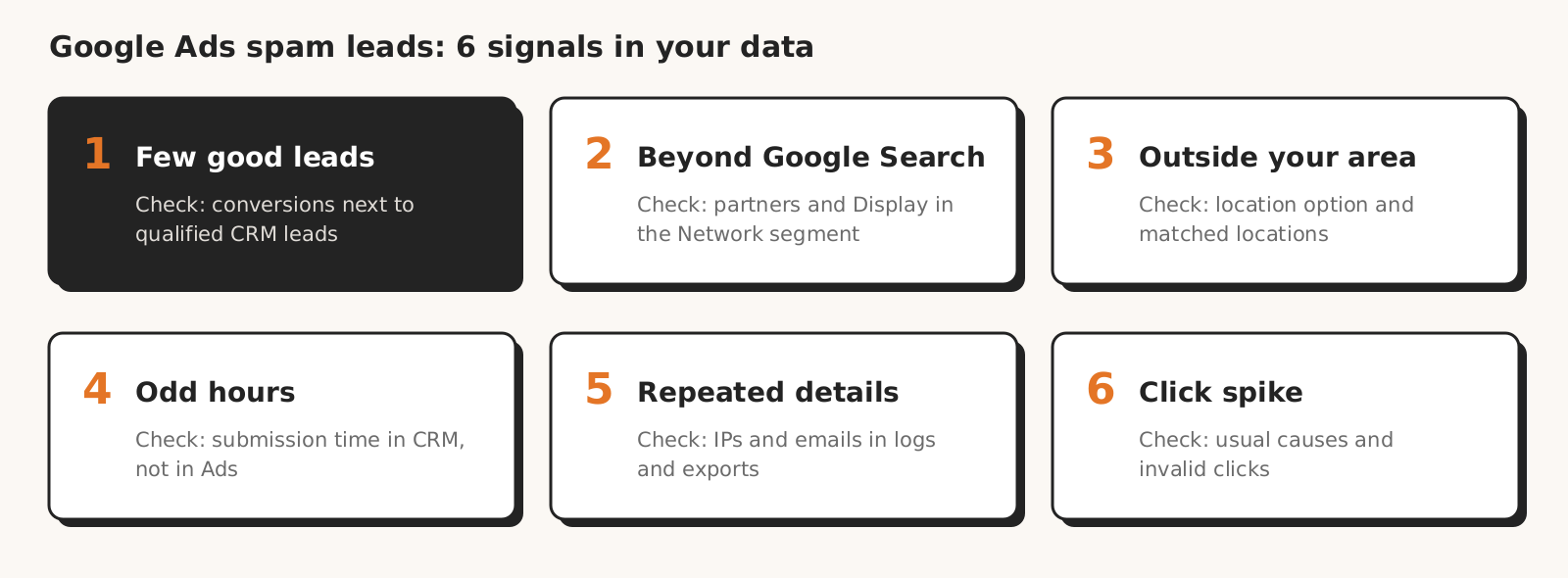
Spam leads show up in six signals: three are in Google Ads reports (networks, locations, click spikes), and three need data from outside the account, meaning the CRM, the inbox or server logs (conversions out of line with qualified leads, submission times, repeated details).
| Signal | What it looks like | How to check |
|---|---|---|
| 1. Conversions rise, qualified leads don't | more conversions and a lower cost per conversion, while sales calls it junk | Google Ads conversions next to qualified CRM leads, per campaign and week |
| 2. Conversions from search partners or the Display Network | higher conversion rate outside Google Search | "Network (with search partners)" segment, placement reports |
| 3. Leads from outside your targeted area | addresses, phone numbers and companies outside the client's region | location option and matched locations report |
| 4. Leads at odd hours | submissions at night or in bursts a few minutes apart | submission time in the CRM, "Hour of day" segment |
| 5. Repeated details in submissions | the same IPs, email domains, name or number patterns | server logs, lead export |
| 6. A sudden click spike in one place | a jump in clicks in one campaign, keyword or placement | Google's list of ordinary causes, "Invalid clicks" column |
1. Conversions rise, but qualified leads don't
The strongest spam signal is a gap between Google Ads conversions and the leads your sales team accepts as real.
According to Google Ads Help on invalid traffic, Google removes some invalid conversions if they originate from invalid traffic.
The help pages say nothing about fake forms sent after clicks Google considers valid, so assume they stay in your conversions column. When conversions go up, cost per conversion goes down and qualified leads in the CRM stay flat or drop, the difference is a spam candidate.
From our practice: we have had clients tell us their Google Ads leads were junk while conversions kept growing in the account.
What to do: put Google Ads conversions and qualified CRM leads side by side in a sheet, per campaign and week. The campaign with a growing gap gets checked first.
2. Conversions from search partners or the Display Network
A higher conversion rate from search partners or the Display Network than from Google Search is a spam signal if the CRM doesn't get more good leads from those networks.
A Search campaign can show ads outside Google Search. According to Help on the Search Network, search partners are included by default when you create a Search campaign, and you can opt out in the campaign settings.
For search partner sites that display and link to products for sale, Google itself notes that clicks from them "may not always reflect highly targeted traffic" and asks you to consider whether these networks fit your campaign goals.
The second way out of Google Search is Display Expansion. According to Help on Display Expansion (October 2026), Search campaigns opted in show ads on the Display Network according to your bidding strategy, channel priorities and any daily budget allocation, and from February 2027 they move to channel prioritization.
If spam counts as a conversion, a network full of spam looks effective in your data.
What to do: apply the "Network (with search partners)" segment to your campaigns table, described in Help on segments, and compare the conversion rate of Google Search, search partners and the Display Network with lead quality in the CRM.
Placement reports show exactly where your ads ran. According to Google's Search Partner Network announcements, since August 2025 Search, Shopping and App campaigns have full search partner placement reporting in Report Editor ("Content suitability").
For Performance Max there is a placement report that shows placements and impressions, but Google says it should not be used to evaluate performance. According to the same search partner announcements, since January 2026 the Performance Max channel report also splits out search partners.
Sites that send nothing but bad leads can be blocked with placement exclusions, which according to Google apply to, among others, the Display Network and the search partner network. Exclude them after comparing lead quality, not on click counts alone.
3. Leads from outside the area you target
Leads from cities and countries where the client doesn't operate point to targeting problems or spam. Google itself lists clicks from outside your targeted locations as an example of evidence when you report invalid traffic.
According to Google Ads Help on location targeting, the "Presence or interest" option reaches people who are in your targeted locations and also people who have shown interest in them. Leads from outside the client's region may come from this setting, not from spam. Google suggests "Presence" when you only want to reach people in specific locations.
From our practice: on the accounts we run, we don't see leads from outside the client's region, because we set location exclusions from the start. Without such exclusions, these submissions do happen.
What to do: check the location option in the campaign settings and open the matched locations report, which shows users' physical locations or their locations of interest. Compare conversions from places outside the client's area with the addresses in the submissions.
4. Leads at odd hours or in bursts
Submissions in the middle of the night, or several forms within a few minutes, can be a sign of automation, but they are not proof.
Here is the trap: according to Google Ads Help on conversion data, the main conversion columns are based on the time of the click, not the time of the conversion. Conversions in an hour-of-day segment show when someone clicked the ad, not when they sent the form.
From our practice: we have seen submissions in the middle of the night and several forms within a few minutes.
What to do: take the submission time from the CRM or the inbox. The "All conv. (by conv. time)" column in Google Ads reports conversions by conversion time, but only the CRM or the inbox shows the time of a specific form.
You can see the click distribution in the Time segment ("Hour of day" or "Day of the week") or in the "Day and hour" view on the ad schedule page.
5. Repeated details in submissions
A run of submissions from the same IP address, with the same email domains or with phone numbers in the same pattern, can be a sign of automation. Google Ads won't show you this signal: it shows the number of conversions, while the submission details sit in the form, the CRM and the server logs.
On the account side, Google offers IP exclusions.
Help on IP exclusions gives a limit of 500 addresses per campaign and account-level exclusions that cover all campaigns, including Performance Max. Google also reminds you that an IP address can have several variants and you need to exclude all of them.
According to Google Ads Help on invalid traffic, an IP address isn't always unique to one device: universities, offices and mobile carriers share addresses across many users. So exclude only addresses that keep sending spam.
What to do: export submissions from the last few weeks and sort them by IP, email domain and submission time. If the export then goes into an AI tool, first check what your client contract says, because leads are personal data.
6. A sudden click spike in one place
A click spike in one campaign, keyword or placement with no rise in sales is worth checking, but Google points out that a spike doesn't always mean invalid traffic. According to Google Ads Help on invalid traffic, it can come from seasonal trends or news, a competitor pausing ads, or your own changes to budget, keywords, audience and location settings.
If ordinary causes don't explain it, add the "Invalid clicks" column to your campaigns table.
The numbers in the "Invalid clicks" column are traffic Google has already filtered and you don't pay for, not spam that got through. If you suspect traffic Google didn't catch, you can request an investigation of activity within the last 60 days through the Click Quality Form.
According to Help on the credit report, the same form covers "poor quality form submissions", so you can send a wave of spam leads for review.
What to do: prepare what Google asks for: account ID, dates, campaigns, keywords and server logs with IP addresses, user agents and Google click IDs. As an example of evidence, Google gives a 300% spike in clicks without more conversions, or clicks from outside your targeted locations.
Clicks found invalid after the invoice show up in the Invalid Activity Credit Report. The report is available only for Search and Performance Max campaigns, breaks credits down by campaign and network, and includes metrics such as adjusted conversion rate.
How spam leads train Smart Bidding and how to cut them off
Spam leads train Smart Bidding because the strategy learns from primary conversion actions, and you can cut them off in three ways Google describes: a lead-specific goal, importing leads from your CRM, and retracting conversions.
According to Help on primary and secondary actions, primary actions appear in the "Conversions" column and are used for bidding, while secondary actions are for observation only (custom goals are the exception). If a form submission is a primary action, the strategy treats every spam lead as a successful conversion and looks for more clicks like it.
One practitioner put it this way on r/PPC: "eventually it was clear that the campaign learning had switched to finding these leads instead of good ones" (thread on r/PPC). Why Google Ads and GA4 count conversions differently, we explain in our post on Google Ads vs GA4 conversions.
Google describes three ways to give bidding a better signal:
- 1A lead-specific goal instead of the form itself. According to Google's best practices for high-quality leads, goals such as "qualified lead," "converted lead," "book appointment" or "request quote" automatically trigger invalid traffic protections built for lead generation campaigns. The action must have at least 15 conversions in the last 30 days at the account level.
- 2Importing leads from your CRM. Enhanced conversions for leads let you import a lead once it becomes a customer. In the same best practices, Google recommends uploading this data regularly, ideally daily. Since June 15, 2026, uploading these conversions through an API goes through the Data Manager API.
- 3Retracting conversions already recorded. Per Help on conversion adjustments, a retraction removes the conversion from reports, but it needs an order ID (or the Google click ID for offline conversions). No ID, no retraction. To affect bidding, retract within 7 days of the conversion being recorded; after that, up to 54 days, you only fix reports.
Google describes data exclusions for conversion tracking issues, such as a tag counting the wrong number of conversions, and says they shouldn't be used often or for long periods. Form spam is not among its examples, so using them after a wave of spam is your call, not Google's advice.
How to protect your form from spam leads: Google's advice and our practice
Against spam leads, Google recommends three form safeguards: reCAPTCHA, double opt-in and server-side validation. According to Google's help page about invalid leads, sophisticated bots can bypass browser controls and post fake data to your form, so the server should check the email domain and the phone number format before it accepts the submission and pushes it to your CRM.
Double opt-in works like this: after submitting the form, the lead gets an email with a link and only becomes a valid lead after clicking it. According to Google, this confirms the address is "real, active, and human-monitored". So the lead to import as a conversion is the confirmed one, not every form submission.
From our practice: the forms on the sites we build also have a hidden field that people don't see but a basic bot fills in (a honeypot).
If you use a lead form asset in the ad itself, Help on lead form assets mentions OTP verification. You can add lead forms to Search and Performance Max campaigns.
| Form safeguard | What it checks | Source |
|---|---|---|
| reCAPTCHA | browser traffic; sophisticated bots bypass it | |
| Server-side validation | email domain and phone format, including data posted without a browser | |
| Double opt-in | whether the address is real, active and read by a person | |
| Hidden field (honeypot) | whether a basic bot filled in the form | our practice |
| OTP verification (lead form asset, Search and Performance Max) | verifies the person submitting; Google says it helps reach highly qualified prospects |
Checklist when a client reports spam leads
When a client reports spam leads, check nine things before you change the budget or pause a campaign.
- 1Is the form submission a primary action, and can you use a lead-specific goal or an import of qualified leads instead?
- 2Do Google Ads conversions and qualified CRM leads drift apart in any campaign?
- 3Do Search campaigns have search partners or Display Expansion turned on, and what is the lead quality from those networks?
- 4Is the location option set to "Presence or interest", and do matched locations fit the client's area?
- 5Do CRM submission times show nights or bursts?
- 6Do IPs, email domains or number patterns repeat in the lead export?
- 7Does the form have reCAPTCHA, server-side validation and email confirmation?
- 8Do conversions have an order ID, so you can retract spam within 7 days, before it settles into bidding?
- 9Has the wave of spam from the last 60 days been reported to Google through the Click Quality Form?
Turning off networks or narrowing locations is a decision you make after comparing lead quality, not a reflex. Google includes search partners by default and recommends broad geo targeting on Search, so some traffic from these sources can be valuable.
What this post about spam leads doesn't cover
This post about Google Ads spam leads doesn't say what share of campaign leads is spam, because we have no such data and found none in Google's help pages. We don't review paid click fraud tools. We treat the Reddit thread as a practitioner's voice, not as proof.
How Marketing Workspace helps you find spam signals
Marketing Workspace, our AI assistant for Google Ads, Meta Ads and GA4 accounts, helps you find spam signals in account data, but it doesn't filter forms or block bots.
- The assistant reads account data through the Google Ads API, read-only, and its queries aren't limited to ready-made reports, so it has access to things like conversions split by network, hour of day and location. Before answering, it checks conversion actions with their counts and compares two equal periods.
- The "Conversion tracking" check shows primary and secondary actions, several primary actions measuring the same thing, and the counting method (every or one conversion per click).
- The "Performance Max" check shows the split by channel and the placements (Google Ads module documentation).
- Changes to the account (budgets, bids, statuses and negative keywords in existing campaigns) go live only after a person approves them.
What it doesn't do: it doesn't see lead details or your CRM, because it pulls campaign statistics, not leads. It doesn't report invalid traffic to Google and doesn't change network settings, IP exclusions or placement exclusions. Those decisions stay with you.
See how Marketing Workspace works

Founder of Roition, independent Google Ads API developer
Founder of Roition, with almost 3 years of Google Ads experience. Designs and builds process automation for Polish companies: system integrations, handling enquiries and quotes, AI assistants working on company data.
Frequently asked questions
Does Google refund spam leads?
Not for the lead itself. You aren't charged for clicks Google finds invalid, and if it finds them after billing, you get a credit, not a refund. You can report spam through the Click Quality Form, which also covers poor quality form submissions, but Google says nothing about credits for the leads.
Where do Google Ads spam leads come from?
According to Google, from bots and people who reach your site and submit fake forms, and from real users who enter fake email addresses or phone numbers. Most of Google's traffic checks happen after the ad serves, so they don't stop the form.
How do I check whether Google Ads leads are spam?
Compare Google Ads conversions with qualified CRM leads per campaign and week. Then check search partners and Display, leads from outside your area, night-time or burst submissions, repeated IPs and email domains, and click spikes. Each signal is a reason to look closer, not proof.
Should I turn off search partners?
Not by default. First compare lead quality from Search and partners in the "Network (with search partners)" segment. Google asks you to consider whether partners fit your campaign goals. If they don't, turn them off in the campaign settings, and block individual sites with placement exclusions, which also cover the search partner network.
Do spam leads hurt Smart Bidding?
Yes, if the form submission is a primary conversion action, because primary actions are used for bidding. The strategy then treats a spam lead as a successful conversion and looks for similar clicks. A better bidding signal is a lead-specific goal, such as "qualified lead," or leads imported from your CRM.
How do I report invalid clicks to Google?
Through the Click Quality Form, for activity within the last 60 days. Prepare your account ID, dates, campaigns, keywords and server logs with IP addresses and Google click IDs.
Is reCAPTCHA enough?
Not on its own, according to Google. Google recommends it together with server-side validation and double opt-in, because sophisticated bots bypass browser controls and post data straight to your form.
How do I remove spam leads from Google Ads conversions?
Retract them by uploading conversion adjustments, if your conversions have an order ID (for offline conversions, the Google click ID is enough). Retractions affect bidding only within 7 days of the conversion being recorded. Going forward, count a qualified CRM lead as the primary conversion, not the form submission itself.