
Google does not hide how the score works. Everything below comes from Google Ads Help and the Google Ads API documentation. The problem starts when someone reads the score as a grade for the specialist's work.
What Google Ads optimization score measures
Optimization score measures how much of the potential identified by Google's recommendations an account already uses, not how much it earns. According to Google Ads Help it is "an estimate of how well your Google Ads account is set to perform", on a scale from 0 to 100%, where 100% means the account can perform at its full potential.
Google shows it at campaign, account and manager account level.
The score is shown only for active Search, Display, Video action, App, Performance Max, Demand Gen and Shopping campaigns. Google calculates it in real time from statistics, settings, the state of the account and campaigns, the impact of available recommendations and recent recommendation history.
For each recommendation Google shows a score uplift from under 0.1% to 100%. That number reflects the estimated impact of the recommendation on campaign data, and the uplifts of all recommendations can add up to more than 100. According to the same page, optimization score is not used to determine Quality Score.
Google also notes in its help on the Recommendations page that the page does not predict whether your ads will do well. It uses past data to show how each recommendation might improve performance.
6 reasons a 100% optimization score does not mean better results
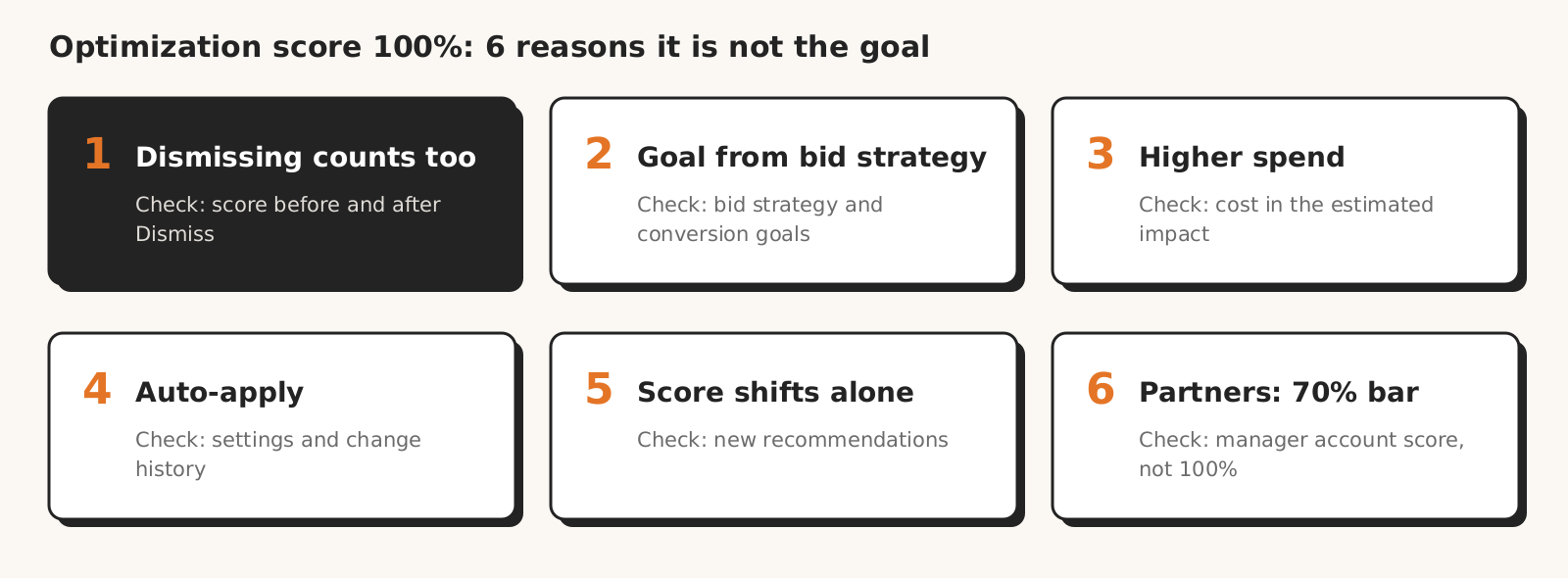
A 100% optimization score does not mean better results for six reasons: dismissing raises it like applying; its goal comes from the bid strategy, without margin; some recommendations raise spend; auto-apply does not raise budgets but changes targets; the score moves on its own; and the 70% Partners threshold applies to the manager account.
| Reason | How you notice it | How to check |
|---|---|---|
| 1. Dismissing raises the score like applying | the score goes up after you click "Dismiss" | compare the score before and after dismissing |
| 2. The goal comes from the bid strategy and margin is not in its description | "more conversions at a similar CPA" recommendations for a client who earns only on some products | bid strategy and the actions in "Include in 'Conversions'" |
| 3. Some recommendations raise spend or loosen targets | "Raise your budgets", target CPA adjustments, broad match | cost in the recommendation's estimated impact |
| 4. Auto-apply does not raise budgets, but changes targets, match types and networks | changes nobody on the team made | Recommendations > Auto-apply settings, change history |
| 5. The score moves on its own | the score changes with no change in the account | when recommendations were dismissed, new recommendations |
| 6. The 70% Google Partners threshold applies to the manager account | a notice from Google that the score fell below 70% | manager account score and individual account scores |
1. Dismissing raises the score just like applying
Optimization score goes up both when you apply a recommendation and when you dismiss it. Google Ads Help says it directly: "Your account can reach an optimization score of 100% by applying or dismissing all recommendations." The Google Partners FAQ adds that you will see a score uplift by applying and dismissing recommendations.
An account where the specialist dismissed every recommendation can be at 100%, just like an account where they applied every one. So 100% says that someone made a decision on every recommendation, not what that decision was.
When you dismiss, Google leaves the judgement to you: you know your products and goals best (help on applying and dismissing recommendations).
From our practice: on the Google Ads and Meta accounts we run, we dismiss most recommendations and we don't see campaign results suffer for it. The exception is recommendations about conversion tracking, which are usually worth implementing.
What to do: pick a reason when you dismiss, because it decides whether the recommendation comes back after 28 or 60 days. A dismissal with a reason and an applied change are two ways to 100%. Dismissing at account level stops that recommendation in all campaigns of the account for a period that depends on its type.
2. The goal comes from the bid strategy, and margin is not in its description
Optimization score measures potential against a goal it reads from the bid strategy. According to Google Ads Help the score and recommendations focus on business goals such as maximizing conversions or conversion value, and when a campaign has no such strategy, the goal comes from the recommended Smart Bidding strategy.
Margin is not in the goal description. If the account uses "Maximize conversions" and the client earns only on some products, the score still counts the potential to get more conversions.
Google gives you two ways to steer the goal: the bid strategy (for example target CPA or target ROAS) and the "Include in 'Conversions'" setting, which decides which conversions are used for optimization. When the score defaults to a conversion focus, Google Ads Help says you fix it by setting a new bid strategy.
From our practice: Google doesn't know the client's real goals, so its recommendations usually aim at maximizing conversions, and with target ROAS they often suggest a value below the client's break-even point at their margin.
What to do: before you judge recommendations, check that the bid strategy and the actions in "Include in 'Conversions'" measure what the client actually earns on.
3. Some recommendations raise spend or loosen targets
Some recommendations that raise optimization score by definition increase the budget, widen reach or loosen the bid target. Google describes them in its list of recommendation types:
| Recommendation | What it changes, per Google's description |
|---|---|
| Raise your budgets | higher budget when traffic last week could have been at least 5% higher |
| Raise your budgets for upcoming traffic increases | higher budget when simulations show a loss of more than 5% of weekly traffic |
| Adjust your budgets | more conversions with a "smaller relative increase" in CPA |
| Adjust your CPA / ROAS targets | higher target CPA or lower target ROAS |
| Add broad match keywords | broader match for existing keywords |
| Turn on AI Max, create a Performance Max campaign | new features or a new campaign |
| Google search partners, Display Expansion | traffic outside Google Search |
| Turn on Smart Bidding Exploration (beta) | traffic at a defined lower target ROAS |
Each of these changes can make sense. A higher budget for a campaign that makes money and loses traffic to its budget is a good decision. The same higher budget in a campaign whose cost per conversion is already above the client's target means more spend on a result that misses the target.
From our own work: in our test of 8 AI models three models suggested raising the budget while the result was far below the client's target. A recommendation to spend more sounds reasonable until you hold it against the goal.
What to do: for every budget and bid target recommendation, check the estimated cost in the impact description and compare the expected cost per conversion with the client's target.
4. Auto-apply does not raise budgets, but changes targets, match types and networks
Auto-applied recommendations do not raise the budget, but they can change the bid target, keyword match types and the networks where ads show. According to Google Ads Help on auto-apply, auto-applying these recommendations will not increase your budget, and the list of types includes adjusting target CPA and ROAS, broad match keywords, Google search partners and Display Expansion.
Auto-apply can only be turned on at account level, for example with one of Google's preset recommendation sets. According to Google's help on managing auto-apply the account's change history shows who enrolled the account and when. You only get a weekly email summary after you turn on campaign maintenance notifications.
Changes made without a person in the loop are also one of the topics of our post on AI agents and MCP: on a client account, what matters is who changed what and when.
From our practice: on accounts we take over, we often find auto-apply switched on, and it had removed, among other things, keywords the client cared about.
What to do: when you take over an account, open the auto-apply settings and the change history before you start judging campaign results.
5. The score moves on its own
Optimization score can change with no change in the account. Google calculates it in real time and says that after you make changes you may see a different score and a new set of recommendations. According to the Google Ads API documentation, depending on the type, recommendations can change daily or even several times a day.
A dismissed recommendation can also come back. According to Google's help on dismissing a dismissal lasts 28 or 60 days, depending on the reason. A paused campaign, per the list of recommendation types, is still scored for 7 days at account or manager account level and for 7 to 90 days at campaign level.
A 100% score on Monday is not the state of the account, only the state of Monday's recommendation list. A different score on Thursday may only mean that the set of recommendations changed.
From our practice: when the score dropped with no change on the account, the cause was a lack of ongoing optimization, meaning an account nobody was reviewing.
What to do: before you explain a lower score to a client, check the list of new recommendations, not campaign results.
6. The 70% Google Partners threshold applies to the manager account
An agency in Google Partners has a reason to watch the score, but the threshold is 70%, not 100%, and it applies to the manager account. According to the program requirements the manager account needs a minimum optimization score of 70%, and Google adds that you are in control, with the ability to apply or dismiss recommendations.
The requirements are checked daily.
The program FAQ states that you do not need to apply all recommendations or reach 100%. When the score falls below 70%, Google notifies the Partner and gives the agency time to meet the requirements before it loses the status.
The Google Ads API documentation calculates the score for multiple accounts as a weighted average of account scores, so an account with a large weight moves it more than one with a small weight.
From our practice: we are not in the Google Partners program, but Google account reps have called us many times. They are worth listening to on technical matters such as conversion tracking, because they know it well. On recommendations, especially for smaller accounts, they often simply advise applying everything, so we take that with a grain of salt.
We also don't leave conversions to automatic settings: we set them up in the site's code, preferably with server-side tagging.
What to do: if the manager account score is getting close to 70%, make a decision on every pending recommendation in client accounts. Apply those that fit the client's goal and dismiss the rest with a reason: both raise the score.
Checklist before you click "Apply"
Before you apply a recommendation that raises optimization score, check six things: the bid target, the cost in the estimated impact, whether you can run an experiment, who suggests it, the auto-apply settings and how to undo it.
- 1Do the bid strategy and the actions in "Include in 'Conversions'" measure what the client earns on?
- 2Does the estimated impact show a cost increase, and does the expected cost per conversion fit the client's target?
- 3Can you test the bid or budget recommendation first with "Save as experiment"? Google describes this option in its help on applying recommendations.
- 4Are these "Suggested changes", which Google's list of recommendation types describes as optimizations recommended by your Google Ads account representative, which you can accept with "Apply all"? Judge each one separately.
- 5Is auto-apply turned on in the account, and who turned it on?
- 6Do you know how to undo the change? You can undo an applied recommendation on the "Change history" page within 30 days, but a partially applied recommendation cannot be undone.
After you apply some budget and target CPA or ROAS recommendations, the "Results" card, per Google Ads Help, compares campaign performance a week later with an estimate of what would have happened without the change. It measures clicks, conversions or conversion value, so you work out profit yourself.
Treat optimization score as a list of decisions to make, not as a grade for the account.
Google says that advertisers who used recommendations to raise their account-level score by 10 points saw a 14% higher median number of conversions (Google's page on recommendations, Polish edition). The page gives no method or period, and the number is about conversion volume, not their cost, so you check cost per conversion against the target yourself.
How Marketing Workspace handles recommendations
Marketing Workspace, our AI assistant for Google Ads, Meta Ads and GA4 accounts, does not apply or dismiss Google's recommendations for you: you decide on every recommendation that changes optimization score. Every change it proposes itself is shown for approval.
- Every change to the account goes in only after a person approves it, and the system reads it back after writing and records it in the log (Google Ads module documentation).
- You can change a budget by at most 30% in one operation. In existing campaigns Marketing Workspace changes only budgets, bids, statuses and negative keywords.
- The "Changes made without you" check shows the change history for the last 4 weeks by source (interface, Google recommendations, rules, scripts, other tools) and any auto-apply that is switched on.
- The assistant's knowledge includes the rule that optimization score measures adoption of recommendations, not results, and that each recommendation is judged against the business goal.
What it does not do: it does not grade the account by optimization score (the score is not in its checks or reports), and it does not know the client's margin until you enter it in the client card.
Want every change to your client accounts to go in only after you approve it, and changes made without you to show up in one check?
See how Marketing Workspace works

Founder of Roition, independent Google Ads API developer
Founder of Roition, with almost 3 years of Google Ads experience. Designs and builds process automation for Polish companies: system integrations, handling enquiries and quotes, AI assistants working on company data.
Frequently asked questions
Does optimization score affect Quality Score?
No. According to Google Ads Help, optimization score is not used to determine Quality Score. It is an estimate based on recommendations and their estimated impact.
Does dismissing a recommendation lower the optimization score?
No, it raises it just like applying. Google says that applying or dismissing recommendations changes the score, and that after applying or dismissing all of them the account can reach 100%.
How do I raise my optimization score?
Make a decision on every recommendation: apply those that fit the client's goal and dismiss the rest with a reason. According to the Google Partners FAQ, the score rises with both applying and dismissing.
What is a good optimization score?
Google gives no threshold for a regular account. For agencies in Google Partners the minimum is 70% on the manager account, and the program FAQ says 100% is not required.
Why did my optimization score drop when I changed nothing?
Because Google calculates it in real time, recommendations can change daily, and dismissed ones can come back after 28 or 60 days. Check the list of new recommendations first.
Does a paused campaign affect optimization score?
Yes. According to the list of recommendation types, Google keeps scoring a paused campaign for 7 days at account or manager account level and for 7 to 90 days at campaign level.
Does optimization score take margin into account?
Margin is not in the goal description. Google describes the score's goal as, for example, maximizing conversions or conversion value and reads it from the bid strategy, so the score does not know your margin unless it is reflected in the bid target.
Can auto-applied recommendations increase the budget?
According to Google's help, no. They can, however, change target CPA and ROAS, add broad match keywords and turn on Google search partners or Display Expansion.
How do I undo an applied recommendation?
On the "Change history" page within 30 days. A partially applied recommendation cannot be undone.
Does Google check whether an applied recommendation worked?
For some budget and target CPA or ROAS recommendations, yes: a week after you apply it, the "Results" card compares campaign performance with an estimate of what would have happened without the change. It measures clicks, conversions or conversion value, not profit.
What happens when a Google Partners manager account falls below 70%?
Google notifies the Partner and gives the agency time to meet the requirements before it loses the status. Program requirements are checked daily.
A Google representative suggests changes to the account. What should I do with them?
Google shows them as "Suggested changes" on the Recommendations page. Judge each one like any other recommendation: against the client's goal and the estimated cost, and test bid and budget recommendations as an experiment first.
A client asks why their account is at 78% and not 100%. What do I say?
That the score shows the estimated impact of Google's recommendations waiting for a decision, not how much the account earns. Show which recommendations you dismissed and why, and describe the account's result as cost per conversion against the target.