
We used to paste client data into AI chats ourselves, so we write for someone who wants to clean that up today. This guide covers personal accounts (Free, Go, Plus, Pro) and the Business plan. Why this is a contract issue in the first place, we explain in our post on what your client contract says.
This is not legal advice. We take settings paths and retention rules from OpenAI's help center, checked on October 14-15, 2026. OpenAI renames options from time to time, so a label in the app may read slightly differently.
What goes and what stays after you delete a ChatGPT chat
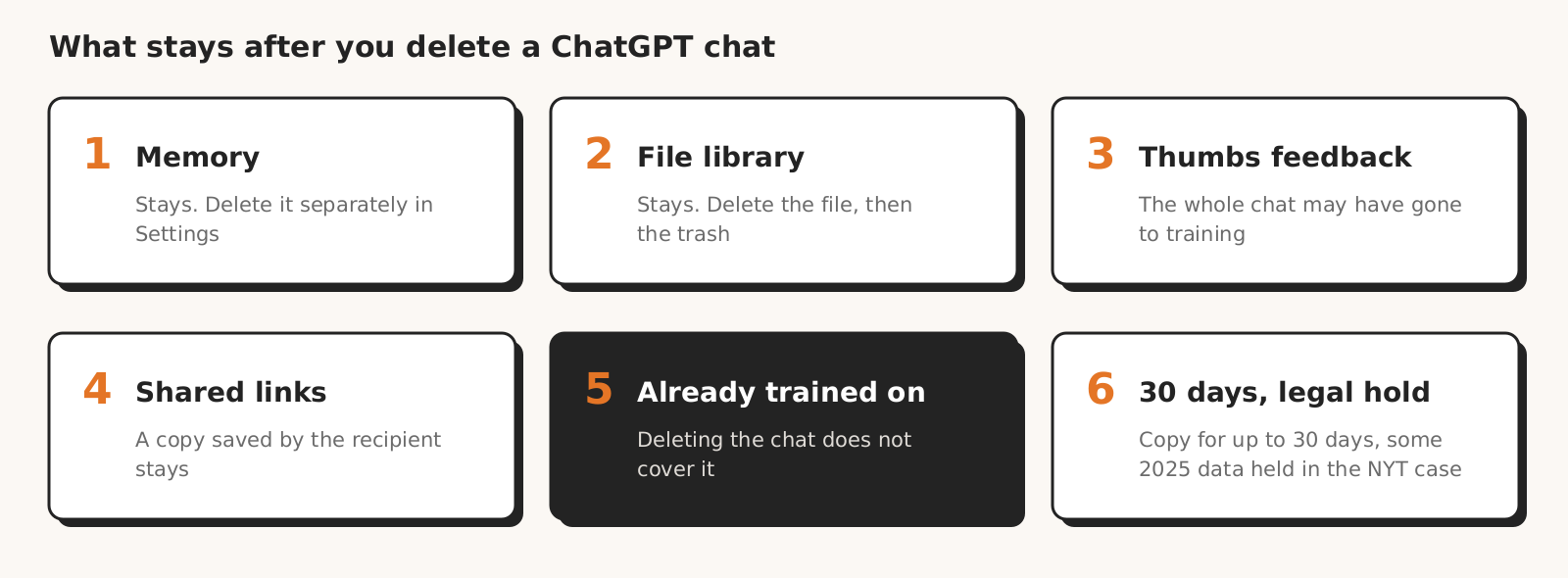
When you delete a ChatGPT chat, the conversation itself goes, while things stored separately stay: memory, files in your Library and in custom GPTs, copies of shared links saved by recipients, and content already used for training.
According to OpenAI's help article on deleting chats, a deleted conversation is scheduled for permanent deletion within 30 days, unless it was already de-identified and disassociated from your account or OpenAI must retain it longer for security or legal reasons.
| Item | What happens after you delete the chat | Can you delete it, and how |
|---|---|---|
| The conversation | gone from view right away, from systems within 30 days | yes, step 2 (OpenAI help) |
| A chat you never delete | stays in your account until you delete it | yes, step 2 (OpenAI help) |
| Archived chat | archiving is not deleting, the chat is still searchable | yes, in "Archived chats" |
| Saved memories (Memory) | stay, because they are stored separately from chat history | yes, separately in Memory settings (OpenAI help) |
| Library files | stay in your account until you delete them manually | yes, separately, then from "Recently deleted" (OpenAI help) |
| Custom GPT knowledge files | stay while the GPT exists | yes, in the GPT editor (OpenAI help) |
| Shared link | the link goes with the conversation, but a copy saved by the recipient stays | the link yes, the recipient's copy no (OpenAI help) |
| Conversation rated with a thumb (Free, Plus, Pro) | the whole conversation may have been used for training, even with training turned off | OpenAI's help does not describe how to withdraw feedback (OpenAI help) |
| Content already de-identified and disassociated from your account | deletion does not cover it | no |
| Data in a connected app (Gmail, Drive) | stays in the app | only in the app itself |
| Temporary chat | OpenAI may keep a copy for up to 30 days | it goes on its own after that (OpenAI help) |
| Some data from April to September 2025 | preserved in the New York Times lawsuit | no |
According to OpenAI, fully removing one piece of information takes several separate actions: delete the memory, the chat where you shared it, files in the Library and data in the connected app. That is how the help article on memory describes removing remembered information.
The least obvious row is content disassociated from your account. OpenAI's help article on deleting chats lists this exception without conditions, while OpenAI's EU privacy policy adds that it applies to content you allow OpenAI to use to improve its models. OpenAI's help does not describe how to remove data from a model that has already been trained on it.
Step 1. Find every conversation with client data
To delete client data from ChatGPT, first find out where it is: in conversations, the archive, projects, custom GPTs, the Library, memory and the accounts of everyone on your team. You can delete everything at once, but that also wipes other clients' conversations, so the list helps even then.
| Where to look | What to check | How |
|---|---|---|
| Data export | your whole chat history in a ZIP file | Settings > Data controls > Export data > Export > Confirm export |
| Chat search | client name, domain, Google Ads account ID, campaign names | the "Search" feature; it also covers archived chats |
| Projects | chats and files stored only in a project | the project list in the sidebar |
| Custom GPTs | files uploaded as knowledge | GPT editor |
| Library | files uploaded in chats (reports, CSV exports) | chatgpt.com/library |
| Memory | what ChatGPT remembers about the client | Settings > Personalization > Memory |
| Team accounts | personal accounts of people who worked with the client | each person checks their own account |
You request the export in Settings, under "Data controls", as described in OpenAI's help article on exports. The link arrives by email or text message, can take up to 7 days and expires 24 hours after you receive it. Request the export before you delete anything, because an export cannot restore deleted chats.
The ZIP file is one more copy of client data, this time on your drive. Search it for the client name, the Google Ads account number and lead email addresses, and delete it after the cleanup.
The shared_conversations.json file in a personal-account export lists your shared conversations (help article on shared links), and the export does not include scheduled task links.
According to the help article on memory, the memory summary is a high-level view and may omit details. OpenAI suggests you can also ask ChatGPT what it remembers about you.
Personal and work accounts are separate worlds: according to the help article on managed accounts, switching accounts does not move chats, files or settings. In ChatGPT Business, self-service export is not available, and a member's data is exported by the workspace owner (step 4).
Step 2. Delete conversations, then memory, files and links
Deleting client data from ChatGPT happens in six places, in order: conversations and the archive, memory, the Library, projects and custom GPTs, shared links, connected apps. You delete each one separately, because deleting a chat does not reach the others.
Conversations and the archive
You delete a single conversation from the more options menu (•••) next to the chat by selecting "Delete" (OpenAI help). Neither you nor OpenAI Support can restore a deleted chat.
Settings > Data controls > "Delete all chats" deletes all conversations at once. "Delete all chats" also covers chats in projects and cannot be undone, so with several clients on one account, request an export first and delete one client's conversations one by one.
You check archived chats in Settings > Data controls > "Archived chats" ("View archived chats" on some devices), then "Manage" (if it appears) and "Delete". Archiving only hides a chat from the sidebar.
Memory
You open memory in Settings > Personalization > Memory (OpenAI help). Depending on your memory experience, you will see options such as "Saved memories", "Manage" or "Memory summary", and in the summary's menu (•••) the option "Delete and turn off memory".
"Delete and turn off memory" deletes the remembered information shown in the summary, but it does not delete chats. "Don't mention this again" deletes nothing; it only reduces future references.
Turning off "Reference chat history" schedules what ChatGPT remembered from past chats for deletion within 30 days. Deleting a saved memory does not remove mentions in past conversations, and OpenAI may keep logs of deleted memories for up to 30 days.
Library
ChatGPT automatically saves files uploaded in chats to the Library, and deleting a chat does not delete them (OpenAI help on the Library). It works the other way too: content from a file brought into a conversation can remain there after you delete the file (help article on files), so delete both the file and the chat.
In the Library, select the file and choose "Delete" or the trash icon next to it. If your Library has a "Recently deleted" section, the file can still be restored until you choose "Delete forever" or "Delete all" there.
Deleted files are scheduled for permanent deletion from OpenAI's systems within 30 days. You cannot delete connected Google Drive files from ChatGPT, only in Drive.
Projects and custom GPTs
You delete a project from the project's more options menu (•••) with "Delete project" (OpenAI help on projects). This permanently deletes its chats, instructions and files stored only in the project, but files saved separately in the Library stay.
You remove a custom GPT's knowledge file in the GPT editor (OpenAI help), and the whole GPT from the more options menu (•••) in the editor (help article on creating GPTs). While the GPT exists, its knowledge files stay.
Shared links
You find your links in Settings > Data controls > Shared links > "Manage" (OpenAI help on shared links). Select "Delete shared link" next to an item, or delete them all via "More actions" > "Delete all shared links".
A link from a personal account can be opened by anyone who has it and has no expiration date. Search engines are not meant to index it, but any recipient can forward it.
Deleting a link does not delete a copy the recipient has already saved. A scheduled task link survives deleting the conversation; you remove it in the "Share task" dialog with the trash icon and "Delete share".
Connected apps
Deleting a chat does not delete data in a connected app such as Gmail or Google Drive, and disconnecting the app does not delete past conversations that used its data (OpenAI help). Delete the conversations first, then disconnect the app if you no longer need it.
Step 3. Turn off training and change habits
You turn off training on your conversations in ChatGPT under Settings > Data controls > "Improve the model for everyone" > turn off > "Done", but it only applies to new conversations. According to the help article on data controls, in the mobile app you select your profile icon, then "Data controls", and turn off the same option.
The "Improve the model for everyone" setting applies to your account on all devices.
"Do not train on my content" in the Privacy Portal has the same effect. OpenAI says either option is enough. On personal plans, opting out also covers uploaded files and data from connected apps, but it does not delete or hide saved chats or shared links.
Opting out does not cover feedback. On Free, Plus and Pro, clicking a thumb can send the whole conversation to training, even with training turned off (OpenAI help on training). A simple team rule: in conversations with client data, we do not rate answers.
For work you do not want to keep in your history, use a temporary chat: a new chat, the "Temporary" option, and "Unpersonalized" before the first message (OpenAI help). Such a chat does not use memory, custom instructions or plugins, does not appear in your history and does not train models.
Temporary chat has two catches. OpenAI may keep a copy for up to 30 days for safety purposes. If you save it, it becomes a regular chat, and uploaded files may end up in the Library.
If you work with memory, a project set to "Project-only memory" (Project settings > Memory) separates context: chats in the project cannot reference conversations outside it, and the other way round (help article on projects). It is not a separate account or separate retention, just order in memory.
The simplest habit sits outside the settings: do not paste columns with emails, phone numbers and names. You do not need them to analyze campaign stats.
Step 4. If you use ChatGPT Business: what the admin can do and what the DPA gives you
In ChatGPT Business, OpenAI does not train on workspace content by default, the workspace owner exports a member's data, and you can sign a data processing agreement (DPA) with OpenAI. So the admin can take over part of the cleanup, and the DPA covers deleting data after the contract ends.
OpenAI's pages differ on how much the admin sees. The business privacy page says admins can view, access, export and delete members' conversations, the Business help article says members' chats are not automatically visible to others, and the help article on managed accounts says the admin may be able to access them where the organization's configuration allows it.
| What | Personal account (Free, Go, Plus, Pro) | ChatGPT Business |
|---|---|---|
| Training on conversations | possible until you opt out | not by default |
| Thumbs on an answer | can send the whole conversation to training (help names Free, Plus and Pro) | does not permit training; the admin can turn feedback off |
| Data export | yourself, in Settings | done by the workspace owner |
| Who can access conversations | you, and for specific purposes OpenAI employees and contractors | also the admin: per the business privacy page, they can view, export and delete them; per the Business help article, they do not see them automatically |
| Shared link | anyone with the link | only members of the same workspace |
| Account deletion | yourself, in Settings | not available as self-service |
| Data processing agreement (DPA) | we did not find one | yes, via OpenAI's form |
| Data stored in the EU | no | OpenAI's pricing says "no", while the help center describes choosing a region at checkout, rolling out gradually; a copy of every prompt and response is still stored in the US for a limited time |
Table sources: OpenAI business privacy, help on data controls, help on training, help on Business, help on Business data storage and business plan pricing, read on October 14-15, 2026.
The workspace owner exports a member's data on the Members page (chatgpt.com/admin/members), in the three-dot menu next to the person, with "Export data", if available.
The admin turns off thumbs feedback in "Workspace settings" > "Allow response feedback". According to OpenAI business privacy, deleted or unsaved conversations in Business are removed from its systems within 30 days, unless the law or protecting its services requires longer.
On your list of who has access to client data pasted into ChatGPT Business, add the workspace admin too.
You sign a DPA for Business, Enterprise and the API through the form linked on the OpenAI business privacy page. If your company is based in the EEA, the party to the OpenAI DPA is OpenAI Ireland Ltd, and OpenAI transfers data outside the EEA on the basis of standard contractual clauses or a European Commission adequacy decision.
When the contract ends, OpenAI returns or deletes the data and its copies on the customer's instruction, unless the law requires keeping them. The same DPA states that the customer, meaning your organization, is responsible for part of the configuration, including retention periods and deletion.
Does the New York Times court order still keep deleted ChatGPT chats
Not for new ChatGPT conversations: according to OpenAI, its obligations under the order in the New York Times lawsuit ended on September 26, 2025, and deleted and temporary chats are again removed within 30 days. OpenAI still preserves some data from April to September 2025.
The earlier order required OpenAI to keep even chats deleted by users. It covered ChatGPT Free, Plus, Pro, Team (now Business) and the API without a Zero Data Retention agreement, and did not cover Enterprise or Edu.
In its October 22, 2025 update, OpenAI says it is no longer required to indefinitely retain new user data or any conversations originating from the EEA, Switzerland or the UK, but "we will securely store limited historical April–September 2025 user data". That sentence does not make clear whether this includes EEA conversations from that period.
The practical takeaway: if client data went into ChatGPT Free, Plus, Pro or Team (now Business) between April and September 2025, some of it may be preserved despite deletion. No button deletes that copy, so do not promise your client it does not exist.
Do you have to tell your client about data in ChatGPT, and what to write
Whether you have to notify your client about their data pasted into ChatGPT depends on your contract and role: if your client contract makes you a processor and personal data went into the chat, telling the client may be an obligation, not a courtesy. This is not legal advice; leave the assessment to a lawyer who knows the contract.
On personal accounts, OpenAI Ireland is a separate controller for EEA users, not a processor acting on your behalf (OpenAI's EU privacy policy). A copy of the conversation at OpenAI follows its rules: you can delete the conversation in the app, but you have no contract that obliges OpenAI to delete every copy.
If you are a processor, Article 28 GDPR in paragraph 3(g) requires you to delete or return the data at the end of the services, at the client's choice, and delete existing copies. With a consumer chat, you can only do that as far as the buttons in step 2 allow.
If you are a processor, passing personal data to another controller, for example pasting leads into ChatGPT Plus, requires the client's documented instructions (Article 28(3)(a) GDPR). Pasting personal data without such instructions may have been a personal data breach, which a processor reports to the client without undue delay (Article 33(2) GDPR).
The right to erasure under Article 17 GDPR belongs to the data subject, for example your client's lead, not to the agency or the client as a company. OpenAI accepts requests to exercise GDPR rights through the Privacy Portal and at dsar@openai.com.
A person without a ChatGPT account can use the portal to ask OpenAI to remove their personal data from ChatGPT responses; the portal does not say whether this covers conversations in an agency's account.
OpenAI takes requests on behalf of another person at privacy@openai.com, and the portal itself does not apply to ChatGPT Business, Enterprise, Edu or the API.
Message template for your client
The template is for a personal account (Free, Go, Plus, Pro). Fill in the brackets and remove sentences that do not apply:
On [date], we deleted from our ChatGPT accounts all conversations, files, saved memories and shared links that contained [client name] data. According to OpenAI's help center, deleted conversations and files are removed from its systems within 30 days, unless OpenAI had already de-identified them and disassociated them from the account, or must retain them longer for security or legal reasons. We have no tool, however, to withdraw from training conversations previously rated with a thumb (OpenAI may have used them to train its models) or content already used for training. [If applicable: OpenAI also preserves some user data from April to September 2025 in connection with a US lawsuit.] Since [date], we [do not paste personal data into AI chats / work on a business plan with a data processing agreement / have turned off training].
The message does not promise more than OpenAI says. Do not write "all data has been permanently deleted", because nobody can verify or guarantee that.
The most common mistakes when deleting data from ChatGPT
The most common mistake when deleting data from ChatGPT is assuming that a deleted or archived chat takes everything with it. The table lists the traps described in OpenAI's help center.
| Mistake | What happens | What to do |
|---|---|---|
| You archive instead of deleting | the chat stays in your account and is searchable | Archived chats > Manage > Delete |
| You delete the chat, not the memory | the saved memory stays | delete it in Settings > Personalization > Memory |
| You choose "Don't mention this again" | the information stays, ChatGPT just refers to it less | delete the memory and the chat it came from |
| You turn off Memory without deleting chats | when you turn it back on, memory can rebuild from history | delete the chats, then decide on Memory |
| You delete a project | files saved separately in the Library stay | delete them in the Library and in "Recently deleted" |
| You click "Delete all chats" with several clients | other clients' conversations go too, with no undo | delete one by one or export first |
| You save a temporary chat | it becomes a regular chat, files may go to the Library | do not save chats with client data |
| You keep the export ZIP | a copy of client data sits on your drive | delete the file after the cleanup |
| You only clean your own account | data stays in other people's personal accounts | everyone on the team goes through steps 1-3 |
How Marketing Workspace handles client data
Marketing Workspace, our AI assistant for Google Ads, Meta Ads and GA4 accounts, pulls data from client accounts through the API, not by pasting it into ChatGPT or another chat. Claude models (Anthropic) analyze it, and Google models (Gemini), with OpenAI as a fallback, prepare some of the assistant's answers, always through paid APIs, with no training on that data.
We describe how we store this data in the MW security documentation.
Deleting data from ChatGPT means deleting conversations, memory, files and links separately, and OpenAI removes them from its systems within 30 days, with the exceptions below.
What this guide does not cover
This guide to deleting data from ChatGPT is based on OpenAI's help center and documents checked on October 14-15, 2026, not on our own measurement, so we do not say how long each step takes. OpenAI renames options, and the help center itself notes that memory features vary by plan, region and platform.
We do not cover deleting Canvas, because we did not find a current help article on it. We also do not cover retention settings in ChatGPT Business, because OpenAI's pages describe them inconsistently: check in the admin console what your plan lets you set.
We give the status of the New York Times lawsuit as of OpenAI's latest update from October 22, 2025. The legal consequences of pasting data into a chat are for a lawyer who knows your client contract to assess.
Work on client data without a chat
See how Marketing Workspace works: an AI assistant for Google Ads, Meta Ads and GA4 accounts that pulls data through the API, without pasting it into ChatGPT.

Founder of Roition, independent Google Ads API developer
Founder of Roition, with almost 3 years of Google Ads experience. Designs and builds process automation for Polish companies: system integrations, handling enquiries and quotes, AI assistants working on company data.
Frequently asked questions
Does deleting a ChatGPT chat delete the data from OpenAI's servers?
Yes, but within 30 days, not right away. OpenAI may keep a conversation longer for security or legal reasons, and deletion does not cover content already de-identified and disassociated from your account. You delete memory and Library files separately.
How long does ChatGPT keep conversations you do not delete?
With no time limit: according to the help article on chat retention, regular and archived chats remain in your account until you delete them or a workspace retention policy removes them. Turning off training does not change that, and OpenAI may keep a temporary chat for up to 30 days.
Is archiving a chat the same as deleting it?
No. An archived chat stays in your account under the same retention rules as other saved chats and is still searchable. You delete it in Settings > Data controls > Archived chats.
Does deleting a ChatGPT account delete all data?
Not all of it. According to the help article on deleting your account, OpenAI deletes data within 30 days, but may keep a limited set of data longer where required or permitted by law. According to OpenAI's EU privacy policy, a record of the deletion request itself also stays, and OpenAI may keep payment and transaction information. You delete the account in Settings > Account > "Delete account" > "Delete", then enter your email or phone number, type DELETE and select "Permanently delete my account".
Is a temporary chat safe for client data?
Partly. A temporary chat does not appear in your history, does not create memories and does not train models, but OpenAI may keep a copy for up to 30 days. It also does not change what your client contract says about sharing data.
Will OpenAI remove client data from a trained model?
OpenAI's help does not describe that. Deletion does not cover content already de-identified and disassociated from your account, and OpenAI only says it takes steps to reduce the amount of personal information in training datasets. So turn off training before you paste data, not after.
Does turning off training delete old conversations?
No. "Improve the model for everyone" only applies to new conversations and does not delete or hide saved chats. You delete old conversations separately, and those you rated with a thumb earlier may already have been used for training.
Can you restore a deleted chat?
No. You cannot restore a deleted chat in ChatGPT or through OpenAI Support, and a data export will not bring it back either. That is why you request the export for your inventory before deleting.
How long does deleting data from ChatGPT take?
A conversation disappears from view right away and from OpenAI's systems within 30 days; the same applies to deleted files, projects and GPTs. A data export for your inventory can take up to 7 days to arrive.