
We used to paste client data into AI chats ourselves, so we write for someone who wants to clean that up today. This guide covers the Gemini app on a personal Google Account and in Google Workspace.
Why this is a contract issue in the first place, we explain in our post on what your client contract says, and the same for ChatGPT and Claude in our guides on deleting client data from ChatGPT and deleting client data from Claude.
This is not legal advice. We take settings paths and retention rules from Google's help center, checked on October 26, 2026. On four points Google's help is inconsistent: public links, deleting chats on a work account, temporary chats on a work account and the requirements for instructions for Gemini. We say so where it matters.
What goes and what stays after you delete your Gemini activity
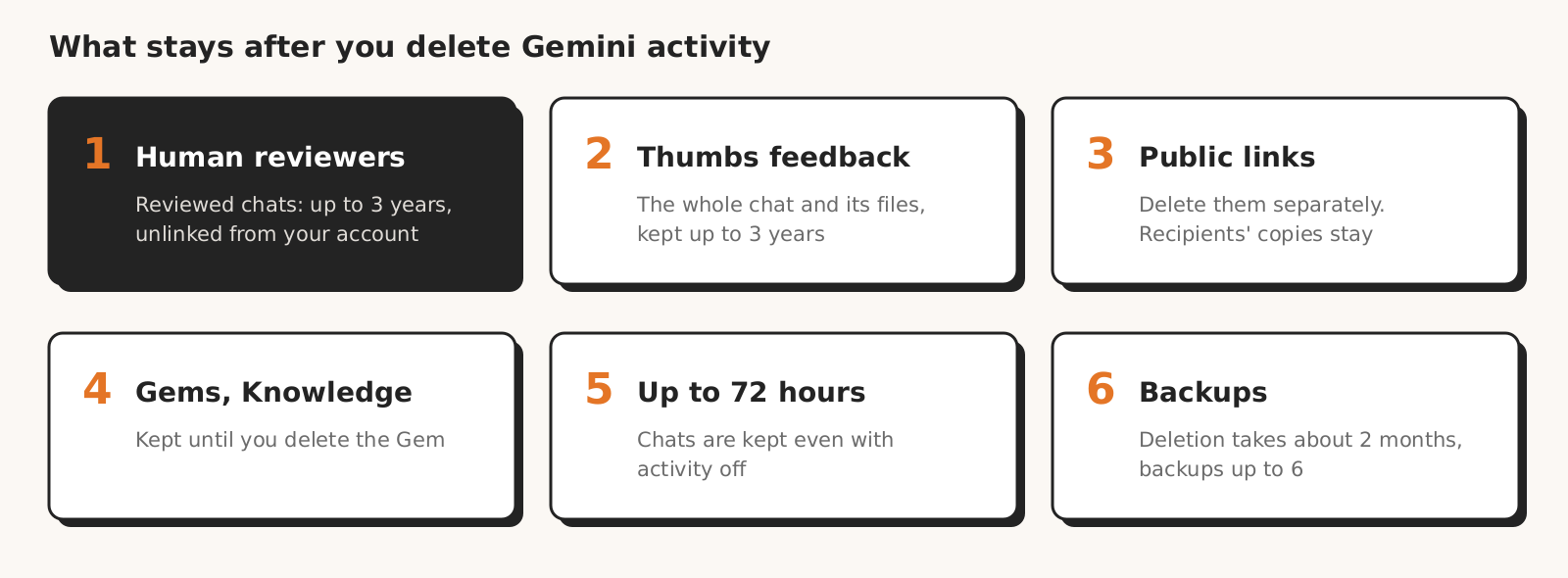
When you delete a Gemini chat, the conversation itself leaves your activity, while things stored separately stay: chats checked by reviewers, feedback, Gems, instructions, public links and data in connected apps.
According to Google's help on Gemini activity, deleted activity first leaves your view, and then Google starts deleting it from its systems. According to how Google retains data, this process generally takes around two months, and data can remain in encrypted backups for up to six months.
| Item | What happens after you delete the chat | Can you delete it, and how |
|---|---|---|
| The conversation | gone from view right away, from systems usually within about 2 months, from backups within up to 6 months | yes, step 2 (Google help) |
| A chat you never delete | stays until auto-delete, by default after 18 months | yes, steps 2 and 3 (Google help) |
| Files and screenshots uploaded to a chat | saved in your activity together with the chat | yes, together with the activity (Gemini Apps Privacy Hub) |
| Chat checked by reviewers | not deleted with your activity, kept for up to 3 years, disconnected from your account | no (Gemini Apps Privacy Hub) |
| Conversation rated with a thumb | the whole conversation with files goes into feedback, and after review stays for up to 3 years, disconnected from your account | Google's help does not describe how to withdraw feedback (Google help) |
| Chat with "Keep Activity" off, and temporary chat | stays with your account for up to 72 hours | leaves your account after that (Gemini Apps Privacy Hub) |
| Public link | one help article says it stays after you delete the chat, another says it goes | yes, separately in "Your public links" (Google help) |
| Gem and files in the "Knowledge" section | stay, even with "Keep Activity" off | yes, separately under "My Gems" (Google help) |
| Instructions for Gemini | stay until you delete them | yes, separately in "Personal context" (Google help) |
| Memory of past chats | Gemini may still use a deleted chat for a while | delete all chats with that info (Google help) |
| Data in a connected app (Gmail, Drive) | stays in the app | only in the app itself (Gemini Apps Privacy Hub) |
| Data other apps received from Gemini | stays under those apps' rules | not from Gemini (Gemini Apps Privacy Hub) |
| Anonymized data from chats | Gemini settings do not cover it | no (Gemini Apps Privacy Hub) |
| Info about how often you use Gemini | stays until you delete your Google Account | only with the account (Gemini Apps Privacy Hub) |
The key row is reviewers. According to the Gemini Apps Privacy Hub, human reviewers, including trained reviewers from Google's service providers, check some chats. Chats reviewed this way, together with feedback and data on language, device and location, are not deleted when you delete your activity.
Google's reason is that these chats are not connected to your Google Account. Google's help does not describe how to check which chats went to reviewers, so you do not know whether a conversation with client data is among them.
Google itself, in the Privacy Hub, asks you not to enter confidential information that you would not want a reviewer to see.
Step 1. Find every conversation with client data
To delete client data from Gemini, first establish which account you worked on and where the data is: in chats, activity, Gems, instructions, public links, connected apps and the accounts of everyone on your team. You can delete all your activity at once, but that also wipes other clients' conversations.
Check the account type first. A personal Google Account follows the rules in this step and the next one, while on a Google Workspace work account your administrator controls the activity settings (Google help), so some steps look different (step 4).
| Where to look | What to check | How |
|---|---|---|
| Data export (Google Takeout) | all your Gemini activity and Gems in a downloadable file | takeout.google.com > "Deselect all" > check "Gemini" and "My Activity" > "All activity data included" > "Deselect all" > "Gemini Apps" > "Ok" > "Next step" |
| Chat search | client name, domain, Google Ads account ID, campaign names | "Menu" > "Search" |
| Activity | prompts from the whole period, including Gemini Live | gemini.google.com > "Activity" or myactivity.google.com/product/gemini |
| Gems | instructions and files in the "Knowledge" section | "Open Sidebar" > "Gems" > "My Gems" |
| Instructions | facts about the client saved permanently | "Settings & help" > "Personal context" > "Your instructions for Gemini" |
| Public links | shared conversations | "Settings & help" > "Your public links" |
| Connected apps | whether Gemini read Gmail or Drive with client data | in the sidebar, "Customize" > "Connectors" |
| Team accounts | personal accounts of people who worked with the client | each person checks their own account |
You request the export in Google Takeout, as described in Google's help on data downloads. The link to the archive arrives by email, usually the same day, though it can take a few days, and stays active for 7 days.
Downloading your activity does not delete it from Google's servers, so the export is an inventory, not a cleanup.
The archive is one more copy of client data, this time on your drive. Search it for the client name, the Google Ads account number and lead email addresses, and delete it after the cleanup.
Two kinds of chats are easy to miss. You delete a branched chat and the chat it came from separately (Google help). Chats imported from other AI platforms, such as ChatGPT, go into your activity, and according to the Gemini Apps Privacy Hub you can delete them one by one or all at once for a given .zip file.
Step 2. Delete conversations, then memory, Gems, links and connected apps
Deleting client data from Gemini happens in five places, in order: conversations and activity, memory and instructions, Gems, public links, connected apps. You delete each one separately, because deleting a chat does not reach the others.
Conversations and activity
You delete a single chat in the side panel: if your chats are hidden, click "Menu", hover over the chat and select "More" > "Delete" (Google help on recent chats). This also deletes the chat from your activity, along with any docs and apps created in it.
You delete a wider range under "Activity" on gemini.google.com or at myactivity.google.com/product/gemini (Google help). Above your activity, click "Delete" and choose "Last hour", "Last day", "Custom range" or "All time". "Delete all activity from [day]" deletes a single day, and "Delete activity item" a single entry.
"All time" deletes the activity from every conversation, including those with other clients' data, so with several clients on one account, export first and delete one client's conversations one by one. Recordings, transcripts and videos from Gemini Live chats go together with the deleted activity.
Memory and instructions
You turn off memory of past chats in "Menu" > "Settings & help" > "Personal context" > "Memory" (Google help on memory). Turning it off deletes nothing: for Gemini to forget info about a client, delete all chats that contain it.
The same help warns that after you delete a chat, there might be a delay before Gemini stops using it to personalize responses. Memory only works on a personal account of someone 18 or over, and only with "Keep Activity" on.
You delete instructions for Gemini in "Personal context" > "Your instructions for Gemini" > "More" > "Delete" (Google help on instructions). Telling Gemini to "forget this" is not enough: according to Google, instructions to forget topics do not always work, and deleting the chats is what makes sure.
This page lists a Google AI plan and availability only in the US as requirements, and a sentence later says all users can add instructions. If you see the "Your instructions for Gemini" section, check it.
Gems
You delete a Gem via "Open Sidebar" > "Gems" > under "My Gems", next to the Gem, "Options" > "Delete" (Google help on Gems). You remove a single file by editing the Gem and deleting the file from the "Knowledge" section.
Deleting a conversation with a Gem does not delete the Gem itself, and Gems stay in your account even with "Keep Activity" off (Google help). A file added to a Gem from Google Drive is used in its most recent version, so the Gem also reads changes you make to that file later.
Public links
You delete links on gemini.google.com in "Settings & help" > "Your public links": "Delete public link" next to a link, or "Delete all links" for all of them (Google help on sharing chats).
Google's help is inconsistent here. The activity article says deleting a shared chat does not delete the public link, while the sharing article says the link is deleted once any part of the chat is deleted from your activity. Do not count on the link going with the chat: delete it manually.
Anyone with the link can read it, and an image uploaded to the chat can be downloaded from it. The recipient can also continue the chat on their own. Deleting the link does not delete the chat from those people's activity, or posts with the link on other sites.
Connected apps
You disconnect an app in the sidebar via "Customize" (if you do not see it, first "More") > "Connectors" > next to the app "More options" > "Disconnect" (Google help on Connected Apps). In early October, the same help pointed to "Settings" > "Connected Apps", so you may see either path in the app.
According to the help article on memory, you need both steps: disconnecting alone is not enough, because the info stays in past chats, and deleting the chats alone is not enough, because Gemini will find it in the app.
Disconnecting an app deletes nothing from your Gemini activity. Deleting or updating data in the app itself, such as an email in Gmail, may not affect Gemini until days later (help article on memory).
Step 3. Turn off Keep Activity and change habits
You stop Gemini from saving conversations under "Activity" > "On" > "Turn off" or "Turn off and delete activity" (Google help). "Turn off" alone only applies to future conversations, and old ones go only with the second option or a manual deletion under "Activity".
On a personal account of someone 18 or over, "Keep Activity" is on by default. In that case, according to the Gemini Apps Privacy Hub, Google uses your activity for purposes including training generative AI models, and reviewers check some chats.
Once it is off, future chats do not go into your activity or training, unless you send feedback. They are still kept with your account for up to 72 hours, though, and Google may check them for safety, including with help from human reviewers. With the setting off, connected apps such as Gmail and Drive do not work either.
If you keep activity on, shorten how long it is kept. Under "Activity", click "Deleting activity older than … months" or "Choose an auto-delete option", choose 3 months instead of the default 18 and click "Next".
Turning it off does not cover feedback. According to the help article on feedback, clicking "Good response" or "Bad response" adds the whole conversation to your feedback: prompts, responses, uploaded files and data from connected apps. With activity off, Google also collects the last 24 hours of your chats for the feedback.
One thumb in a chat with client data can hand the whole conversation to reviewers for 3 years, even with activity off. A simple team rule: in conversations with client data, we do not rate answers.
If a rating is needed, Google's help lets you choose not to include files and images, but prompts and responses go into the feedback anyway.
For work you do not want to keep in your history, use a temporary chat. It does not go into your activity and does not train models, but Google keeps it for up to 72 hours and may check it for safety (Gemini Apps Privacy Hub).
To start one, Google's help says to click "Temporary chat" next to "New chat". In a temporary chat you cannot use Gems, connected apps or feedback, and the feature only works on a personal account. The Workspace admin help, however, describes a setting that allows temporary chats on work accounts.
The simplest habit sits outside the settings: do not paste columns with emails, phone numbers and names. You do not need them to analyze campaign stats.
Step 4. If you work on a Google Workspace account: what the admin can do and what the agreement gives you
On a work account where the Gemini app is a core Workspace service, Google does not show chats to reviewers or use them to improve models, and the data falls under a data processing agreement with Google.
The admin, however, sets how long conversations are kept and whether you can delete chats yourself and use temporary chats, and if your company uses Google Vault, conversations you delete stay under Vault rules.
According to the help on work accounts, Gemini is a core service in editions including Business Starter, Business Standard, Business Plus, Enterprise Standard and Enterprise Plus. Gemini is an additional service in editions including Business Base, Essentials Starter, Workspace Individual and G Suite: consumer terms apply then, and reviewers may check chats.
| What | Personal Google Account | Workspace, Gemini as a core service |
|---|---|---|
| Training on conversations | yes, when "Keep Activity" is on | not without the customer's permission or instruction |
| Reviewers | check some chats, copies for up to 3 years | chats and files are not reviewed |
| Thumbs feedback | up to 3 years, disconnected from the account | up to 18 months, not used to train Workspace models |
| Conversation history | 18 months by default, you choose 3, 36 or no auto-delete | 18 months by default, the admin chooses 3, 18, 36 or turns history off (then new chats for up to 72 hours) |
| Deleting chats | yourself | depends on admin settings and Vault |
| Memory of past chats | available | not available |
| Temporary chat | available | if the admin allows it |
| Agreement with Google | Google's terms, Google Ireland as data controller | Workspace agreement with the data processing addendum (CDPA) |
Table sources: help on work accounts, Workspace generative AI Privacy Hub, Gemini Apps Privacy Hub, help on memory and admin settings for temporary chats, read on October 26, 2026.
Google's pages differ on whether you can delete a chat yourself on a work account. The help article on recent chats says you cannot delete chats, while the admin help says users can delete them if "Allow users to delete conversations" is on (without Vault, the setting is on by default).
In the mobile app, a work account cannot delete chats or create public links.
The admin changes this in the Admin console: "Menu" > "Generative AI" > "Gemini app" > "Gemini conversation history", where they check "Allow temporary chats" and "Allow users to delete conversations", then "Save". According to the help article on Vault, the admin also decides in the conversation history setting how long before conversations are automatically deleted.
If your company uses Google Vault for Gemini, a deleted chat only leaves your view, and Vault keeps it under its own rules. According to the help article on Vault, Vault retention rules and holds take precedence over admin and user settings, and the retention period is 1 to 36,500 days or indefinite.
So on your list of who has access to client data pasted into Gemini in Workspace, add the domain admins and Vault users too. According to the admin help, Google then shows a message in the Gemini app that your activity might still be visible to them for the period set by the retention rules.
According to the Workspace Privacy Hub, prompts are customer data under the Cloud Data Processing Addendum (CDPA), and Google only processes them in line with the customer's instructions.
Under the CDPA, deleting data in the service that the company can no longer recover is an instruction to Google, which Google carries out within 180 days at most, unless EU law requires storage.
When the agreement ends, Google deletes the remaining data and its copies after a recovery period of up to 30 days and within 180 days at most, unless the law requires keeping it.
Gemini in Gmail and Docs is a separate product with a separate history: according to the Workspace Privacy Hub, the admin sets its retention from 90 days to indefinite, and users can delete conversations unless the admin prohibits it.
Do you have to tell your client about data in Gemini, and what to write
Whether you have to notify your client about their data pasted into Gemini depends on your contract and role: if your client contract makes you a processor and personal data went into the chat, telling the client may be an obligation, not a courtesy. This is not legal advice; leave the assessment to a lawyer who knows the contract.
On a personal account, Gemini Apps in the EEA are provided by Google Ireland Limited, which according to the Google Privacy Policy is the data controller for EEA users. So Google does not process these conversations on your behalf.
Google uses Gemini information to improve and develop its machine learning technologies based on the legitimate interests of Google and third parties (Gemini Apps Privacy Hub). You can delete a chat in the app, but you have no contract that obliges Google to delete the copies held by reviewers.
If you are a processor, Article 28 GDPR in paragraph 3(g) requires you to delete or return the data at the end of the services, at the client's choice, and delete existing copies. With a personal Google Account, you can only do that as far as the delete buttons in the Gemini app allow.
If you are a processor, passing personal data to another controller, for example pasting leads into Gemini on a personal account, requires the client's documented instructions (Article 28(3)(a) GDPR). Pasting personal data without such instructions may have been a personal data breach, which a processor reports to the client without undue delay (Article 33(2) GDPR).
The right to erasure under Article 17 GDPR belongs to the data subject, for example your client's lead, not to the agency or the client as a company.
The Gemini Apps Privacy Hub only says in general terms that you can ask for content to be removed under Google's policies or applicable law, and does not describe a separate route for a request to delete data from a conversation.
The Gemini Apps Privacy Hub describes a route for two rights: objecting to processing and asking for inaccurate data in Gemini's responses to be corrected, through a request in the Help Center or under a response via "More" > "Report legal issue". It does not say whether this covers conversations in an agency's account.
Message template for your client
The template is for a personal Google Account. Fill in the brackets and remove sentences that do not apply:
On [date], we deleted from our Google accounts the Gemini chats, Gems, instructions and public links that contained [client name] data. According to Google's policies, deleted data leaves view right away and Google's systems usually within about two months, and backups within up to six months. We have no tool, however, to delete chats that Google's reviewers have already checked, or conversations sent as feedback: Google keeps them for up to 3 years, disconnected from our account. We also do not know whether any of these conversations was reviewed. Since [date], we [do not paste personal data into AI chats / work on a Google Workspace account with a data processing agreement / have turned off Keep Activity].
The message does not promise more than Google says. Do not write "all data has been permanently deleted", because with a personal account nobody can verify or guarantee that.
The most common mistakes when deleting data from Gemini
The most common mistake when deleting data from Gemini is assuming that deleted activity takes everything with it. The table lists the traps described in Google's help center.
| Mistake | What happens | What to do |
|---|---|---|
| You only click "Turn off" for "Keep Activity" | old chats stay in your activity | "Turn off and delete activity" or "Activity" > "Delete" |
| You delete the chat but keep the public link | according to part of the help, the link still works | "Your public links" > "Delete public link" |
| You rate an answer with a thumb while activity is off | the last 24 hours of chats, with files, go into feedback | do not rate answers in chats with client data |
| You delete a conversation with a Gem | the Gem and files in the "Knowledge" section stay | "My Gems" > "Options" > "Delete" |
| You disconnect Gmail but do not delete chats | Gemini still uses info from past chats | delete the chats and disconnect the app |
| You ask Gemini to forget the client | an instruction to forget does not always work | delete the chats with that info |
| You delete a chat but keep its branch | the branched chat stays | delete both separately |
| You click "All time" with several clients | other clients' conversations go too | delete one by one or export first |
| You keep the Takeout archive | a copy of client data sits on your drive | delete the file after the cleanup |
| On a work account you assume a deleted chat is gone | with Vault, the chat stays with the admin | ask your admin about Vault rules |
| You only clean your own account | data stays in other people's personal accounts | everyone on the team goes through steps 1-3 |
How Marketing Workspace handles client data
Marketing Workspace, our AI assistant for Google Ads, Meta Ads and GA4 accounts, pulls data from client accounts through the API, not by pasting it into Gemini or another chat. Claude models (Anthropic) analyze it, and Google models (Gemini), with OpenAI as a fallback, prepare some of the assistant's answers; the type of question is also recognized by the TypeSafe service (the Jev model), which receives only the question text; all through paid APIs, with no training on that data.
We describe how we store this data in the MW security documentation.
Deleting data from Gemini means deleting conversations, Gems, instructions, links and app connections separately, and Google removes them from its systems usually within about two months. The exception is chats checked by reviewers and conversations sent as feedback, which stay for up to 3 years.
What this guide does not cover
This guide to deleting data from Gemini is based on Google's help center and documents checked on October 26, 2026, not on our own measurement, so we do not say how long each step takes. Google renames menus: in October the path to connected apps changed, and the memory articles give different names for the same menu.
We do not cover the memory summary, because according to Google's help it currently only works in the US, in English and with a Google AI plan. We also do not cover the Gemini API or Google Cloud services, because those are different products with different retention rules, or Workspace edition pricing.
The legal consequences of pasting data into a chat are for a lawyer who knows your client contract to assess.
Work on client data without a chat
See how Marketing Workspace works: an AI assistant for Google Ads, Meta Ads and GA4 accounts that pulls data through the API, without pasting it into Gemini.

Founder of Roition, independent Google Ads API developer
Founder of Roition, with almost 3 years of Google Ads experience. Designs and builds process automation for Polish companies: system integrations, handling enquiries and quotes, AI assistants working on company data.
Frequently asked questions
Does deleting a Gemini chat delete the data from Google's servers?
Yes, but not right away and not all of it. The chat leaves your view right away, while deletion from systems usually takes around two months, and up to six in backups. Deletion does not cover chats checked by reviewers or conversations sent as feedback: they stay for up to 3 years.
How long does Gemini keep conversations you do not delete?
18 months by default: according to the Gemini Apps Privacy Hub, activity is auto-deleted after that time, unless you change the period to 3 or 36 months or turn off auto-delete. With "Keep Activity" off, chats stay with your account for up to 72 hours.
Do Google employees read my Gemini conversations?
Some of them, yes. Human reviewers, including trained reviewers from Google's service providers, check part of the chats, disconnected from the account beforehand. On a Workspace account where Gemini is a core service, reviewers do not check chats.
Does turning off "Keep Activity" delete old chats?
No. "Turn off" only applies to future conversations, and old ones go with "Turn off and delete activity" or a manual deletion under "Activity". Neither option deletes chats that reviewers have already checked.
Does deleting your Google Account delete all Gemini data?
Not all of it. You delete the account in "Data & Privacy" > "Your data & privacy options" > "More options" > "Delete your Google Account" (Google help). Copies held by reviewers and in feedback are not connected to the account, so Google's help gives no grounds to assume they go with it.
Is a temporary chat in Gemini safe for client data?
Partly. A temporary chat does not go into your activity and does not train models, but Google keeps it for up to 72 hours and may check it for safety, including with help from human reviewers. It also does not change what your client contract says about sharing data.
Does Gemini in Google Workspace train on company data?
No, if Gemini is a core service in your Workspace edition: prompts are then customer data, and Google does not train on them without permission or instruction. In editions where Gemini is an additional service, such as Business Base or Workspace Individual, consumer terms apply.
Can you restore a deleted Gemini chat?
Gemini's help does not describe a button to restore a deleted chat, so do not assume you can get it back yourself. How Google retains data does say, however, that the deletion process often includes up to a month-long recovery period for accidentally deleted data, so during that time the data is still in Google's systems. That is why you export for your inventory before deleting.
How long does deleting data from Gemini take?
A chat leaves your view right away, and the whole process of deleting it from Google's systems usually takes around two months; data can remain in backups for up to six months. In Workspace where Gemini is a core service, without Vault rules, the CDPA obliges Google to delete within 180 days at most from the moment the company can no longer recover the data, unless EU law requires storage; if the company uses Vault for Gemini, the chat stays under Vault rules.