
The model does not know the account, the client's goal or what you agreed at the last meeting. It sees a file. If something is missing from the file, it will answer anyway, and both OpenAI and Anthropic say in their help pages that their models can sound convincing when they are wrong.
What ChatGPT sees when a client pastes a report
ChatGPT mainly reads what can be extracted from the file as text or a table. According to OpenAI's help on file uploads, only ChatGPT Enterprise reads images embedded in PDFs, while other plans extract only the text from the document. A chart saved in a PDF as an image is invisible to a client on the Free or Plus plan.
Claude and the Gemini API read charts in PDFs, but take only text from other formats. According to Anthropic's help, Claude analyzes charts in PDFs of up to 100 pages and takes only text from other documents, such as DOCX. According to the Gemini API documentation, Gemini reads charts in PDFs and loses them in other formats.
You don't know which chat and plan your client uses. The safe assumption: what survives is text and a simple table.
6 reasons a report doesn't hold up in ChatGPT
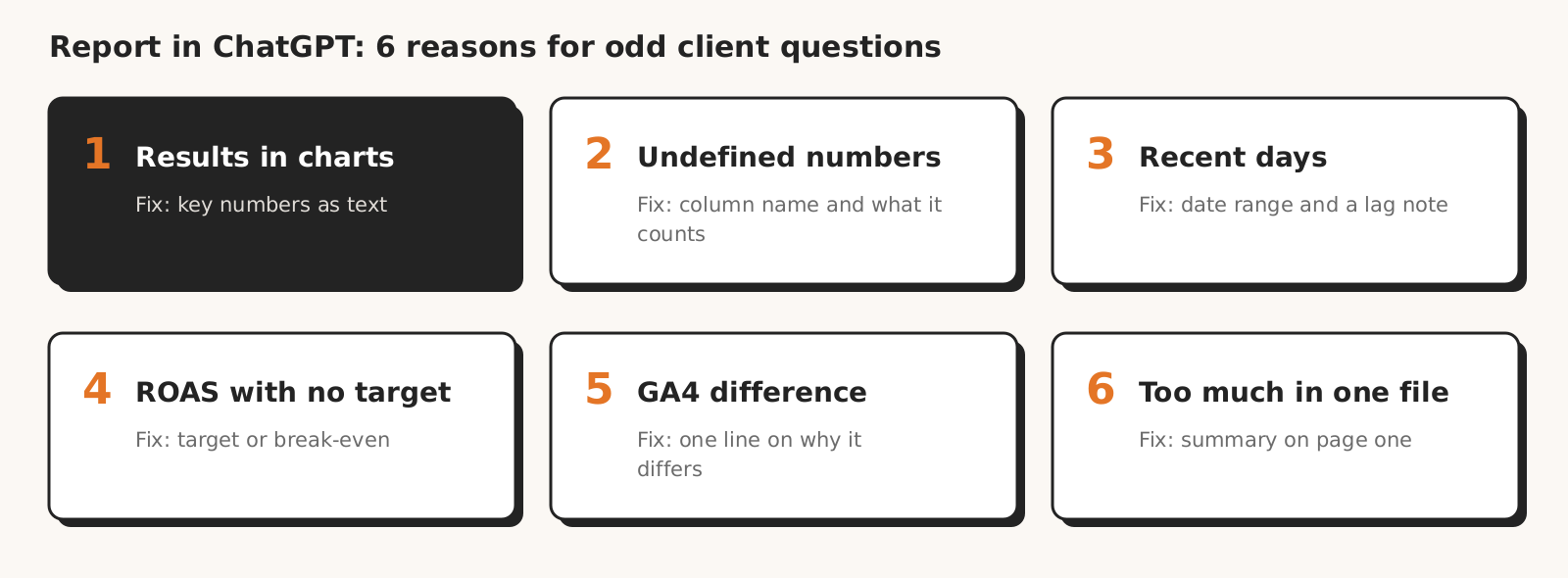
A report doesn't hold up when pasted into ChatGPT for six reasons: results are in images, columns have no definitions, recent days are incomplete, ROAS has no target, the GA4 gap is not explained and the file holds too much at once.
| Reason | How you spot it in the client's question | What to change in the report |
|---|---|---|
| 1. Results in charts and screenshots | the client asks about a number that is in the chart | key numbers as text or a table |
| 2. A number with no definition | e.g. "why are conversions 40 in one place and 52 in another?" | column name and one sentence on what it counts |
| 3. Recent days with no note on conversion lag | "why was last week so weak?" | exact date range and a sentence on conversion lag |
| 4. ROAS with no target or margin | "is a ROAS of 4 good or bad?" or an idea to double the budget | ROAS target or break-even next to the number |
| 5. GA4 gap with no explanation | "which number is the real one?" | a sentence on where the gap comes from and which number you report |
| 6. Too much in one file | questions about details that are in the report but the model skipped | a one-page summary at the start |
1. Results in charts and screenshots
A result shown only in a chart inside a PDF is no result at all for ChatGPT outside the Enterprise plan, and from a screenshot the model may not read exact values.
In its help on data analysis, OpenAI says ChatGPT may not reliably extract exact values from image-based tables, scanned files and files with complex layouts, and advises uploading a spreadsheet or text file instead.
The client doesn't know the model never saw the chart. They only see an answer that may sound confident and skip the most important number.
From our practice: in our test of 8 AI models, each model received account data as Google Ads API query results, so as text and tables, and scored 4.0 to 5.0 out of 5 for reading costs and conversions.
What to change: write spend, conversions, cost per conversion and sales value in the report as text or in a plain table. Keep the chart as an extra.
2. A number with no column definition
A number without a column name lets the model guess what it means. In Google Ads, "Conversions" and "All conversions" are two different numbers: the first counts primary conversion actions, the second also secondary ones. If a report shows one in one place and the other elsewhere, the model may treat them as one metric.
In its help on data analysis, OpenAI recommends descriptive headers in the first row and plain-language column names. An abbreviation like "Conv." or "CPA" with no explanation makes the model guess and the client trust the guess.
From our practice: in our test of 8 AI models, three models counted the same product, which had two titles in the data, as two different products. The data did not say outright that it was one item.
What to change: next to each number, the Google Ads column name and one sentence on what it counts, e.g. "conversions = paid orders".
3. Recent days with no note on conversion lag
The last few days in a Google Ads report may look worse than they will a month later. According to Google Ads Help on conversion time, conversions can be reported up to 90 days after the click, depending on the conversion window, so costs from recent days are already visible while some conversions are not.
Google advises that a report with complete conversion data should end at least 30 days before today.
A model that gets a daily chart without this information may see a drop and invent a cause for it.
From our practice: in a report for February, AI also pulled in data from the last days of January. That is why you should always write exact start and end dates, not just the month name.
What to change: the date range at the top of the report and a sentence: "the last few days may still receive conversions, because Google assigns them to the click date". Google describes the click-date rule in its help on conversion data.
4. ROAS with no target or margin
ROAS without the client's target is a number the model has nothing to compare with. Google Ads defines conversion value per cost as conversion value divided by cost and says it estimates return on investment. It is revenue per unit of ad spend, not profit.
Example (numbers made up for illustration): a store with a 25% margin at a ROAS of 4 spends on ads exactly what it earns in margin. Break-even ROAS is 1 divided by the margin. A model that doesn't know the margin may call this result good and suggest more budget.
A model that lacks a piece of information may fill it in itself. In our test of 8 AI models, three models assumed data that was not in the package, and the weakest one added free shipping to an ad, although it was neither in the data nor in the client description.
A target alone is not enough either: in the same test, three models suggested increasing the budget while results were far below the client's target, even though the target was in the client description. Without a target in the report, the model has nothing to compare the result with at all.
What to change: next to ROAS, the client's target or break-even point and one sentence on whether the result meets it.
5. GA4 gap with no explanation
A report that shows conversions from Google Ads and GA4 without explaining the gap may lead the model to conclude that one of the numbers is wrong.
Yet in its help on conversion data, Google says that discrepancies with Google Analytics, often up to 20%, are expected because of different attribution models. Google Ads calculates the primary conversion columns by click time, while Google Analytics uses data-driven attribution by default.
What to change: one sentence on which number you report as the main one and why the other differs. If the gap is clearly larger than the 20% Google calls expected, it is a signal to check tracking, not a sentence for the report.
Why Google Ads and GA4 show different conversions, we explain in our post on Google Ads vs GA4 conversions.
6. Too much in one file
A long report with many tables may be read only partly. According to Gemini Apps Help, if a file is too large, the response may miss connections or details in the content. OpenAI says a file may upload successfully and still be too large, complex or image-heavy for complete analysis, and advises against several unrelated tables in one sheet.
From our practice: when generating reports in another AI tool, results were cut off from time to time.
What to change: a summary of a few sentences with the key numbers on the first page. Campaign details further down or in a separate file.
Checklist: a report that holds up when pasted into ChatGPT
A report holds up when pasted into ChatGPT if it has seven things: a date range, numbers as text, column names with definitions, a target next to ROAS, a sentence on conversion lag, a sentence on the GA4 gap and a summary on the first page.
- 1Is there an exact date range at the top and the period you compare with?
- 2Are spend, conversions, cost per conversion and sales value written as text or in a table, not only in a chart?
- 3Does each number have its Google Ads column name and one sentence on what it counts?
- 4Is there a client target or break-even point next to ROAS?
- 5Is there a sentence saying the last few days may still receive conversions?
- 6Does the gap between Google Ads and GA4 have one sentence of explanation?
- 7Does the summary fit on the first page?
The simplest test before sending: paste the report into an AI chat and ask three questions your client would ask. For example: "are the campaigns profitable?", "why was last week weaker?", "what should change next month?". If the answer is wrong, you fix the report instead of explaining yourself to the client afterwards.
If the report contains client data, use a chat your contract with the client allows for this test. What to check in the contract and the AI provider's plan, we cover in our post on client data.
How Marketing Workspace writes a client report
Marketing Workspace, our AI assistant for Google Ads, Meta Ads and GA4 accounts, has a "Client report" quick check in its Google Ads module. According to the Google Ads module docs, it describes the previous full month compared with the month before, in plain language, as text ready to paste into an email.
- The system calculates the numbers from account data and the assistant only describes them, so the table holds no values made up by the model.
- The table shows spend, clicks, conversions, cost per conversion, conversion value and ROAS with the month-over-month change in percent.
- The assistant is instructed to explain ROAS in one sentence, without jargon.
- It writes "next steps" only when they follow from the numbers; otherwise it notes that the specialist will complete the plan.
The report is text and a table, so a client who pastes it into a chat passes numbers to the model, not a picture. The report won't add the client's target and margin by itself, nor the sentences on conversion lag and the GA4 gap.
The ROAS target or break-even, the lag sentence and the GA4 sentence are yours to add.
The lag sentence matters most when you write the report for the previous month in the first days of the new one. Why AI on your side also gets numbers wrong, we cover in our post on wrong numbers from AI.
See how Marketing Workspace works

Founder of Roition, independent Google Ads API developer
Founder of Roition, with almost 3 years of Google Ads experience. Designs and builds process automation for Polish companies: system integrations, handling enquiries and quotes, AI assistants working on company data.
Frequently asked questions
Does ChatGPT read charts in PDFs?
According to OpenAI's help, only ChatGPT Enterprise reads images embedded in PDFs. On other plans, including Free and Plus, ChatGPT extracts only the text from the document, so a chart in a PDF doesn't make it into the answer. According to OpenAI's PDF FAQ, even in Enterprise a PDF uploaded as a project file is read as text only.
Do Claude and Gemini read charts in a report?
In PDFs, yes: Claude up to 100 pages, Gemini according to its API documentation. From other formats they take only text (Claude e.g. from DOCX, the Gemini API e.g. from TXT and HTML), and charts are lost.
What format should I send the report in so AI doesn't twist it?
Key numbers as text in the email body or on the first page, tables as plain tables, details in a spreadsheet with descriptive headers. For exact values, OpenAI advises a spreadsheet or text file instead of an image.
Why does ChatGPT tell my client that last week was weak?
Because in the last few days the costs are already there and some conversions are not. Google says conversions can come in up to 90 days after the click, depending on the conversion window. One sentence about this in the report settles it.
Is a ROAS of 4 a good result?
It depends on the margin. In Google Ads, ROAS is conversion value divided by cost: revenue per unit of ad spend, not profit. Break-even is 1 divided by the margin: at a 25% margin (example numbers), a ROAS of 4 means ads cost as much as the store earns in margin.
Which conversion number is the real one, Google Ads or GA4?
A gap alone doesn't mean an error. Google Ads calculates the primary conversion columns by click time, Google Analytics uses data-driven attribution by default, and Google calls discrepancies often up to 20% expected. Before comparing, Google advises allowing for a 24-48 hour processing delay. In the report, say which number is your main one.
What if a client returns with a question from ChatGPT?
Find what the model was missing in the report: a number from a chart, a column definition, the lag note, the ROAS target, the GA4 explanation or a detail from a long file. That is your answer to the client and a fixed item in the next report.
Should I forbid my client from pasting the report into AI?
You can't check it, and the client will ask anyway. It is better to write the report so the model gets the numbers, definitions and target, and then test it in a chat yourself.
Can AI misread even a good report?
It can. OpenAI and Anthropic say their models can be wrong and sound confident while doing so. A good report narrows the room for guessing, but it does not replace talking to the client.
Can I paste a client report into an AI chat to test it?
It depends on your contract with the client and the AI provider's plan. We cover six places to check in our post on client data.