
We went through this while building Marketing Workspace, an AI tool for Google Ads accounts. Below you will find our timeline with dates, the 4 access levels, the application step by step based on Google's October 2026 documentation, and the pitfalls we hit ourselves or that Google lists as known issues.
How long Google Ads API access takes: our timeline
From our Basic application for the Google Ads API to Google's decision, 17 calendar days passed (Aug 4 → Aug 21, 2026), on the old developer token path. We passed brand verification on Aug 25, and Google verified our OAuth app on Sep 7, 34 days after the Basic application.
| Date (2026) | What happened | Days since application |
|---|---|---|
| until Aug 4 | test developer token: the system saw only the IDs of two accounts, with no names and no data | before the application |
| Aug 4 | Basic application: a description of the tool and a design document in PDF; the same day we moved the app to a new Google Cloud project under a Google account in the roition.com domain | 0 days |
| Aug 4 | automated brand verification rejected the app: the home page "does not explain the purpose of the app" | 0 days |
| Aug 21 | Google granted Basic Access (tool type: creation, management and reporting) | 17 days |
| Aug 25 | brand verified after we changed the home page | 21 days |
| Sep 7 | OAuth app verified: the "Google hasn't verified this app" screen disappeared | 34 days |
| Sep 9 | Google retires developer tokens, access moves to Google Cloud projects | 36 days |
| Oct 7 | tool change submitted ("tool change" form, 12-page design document); Google replied the same day | 64 days |
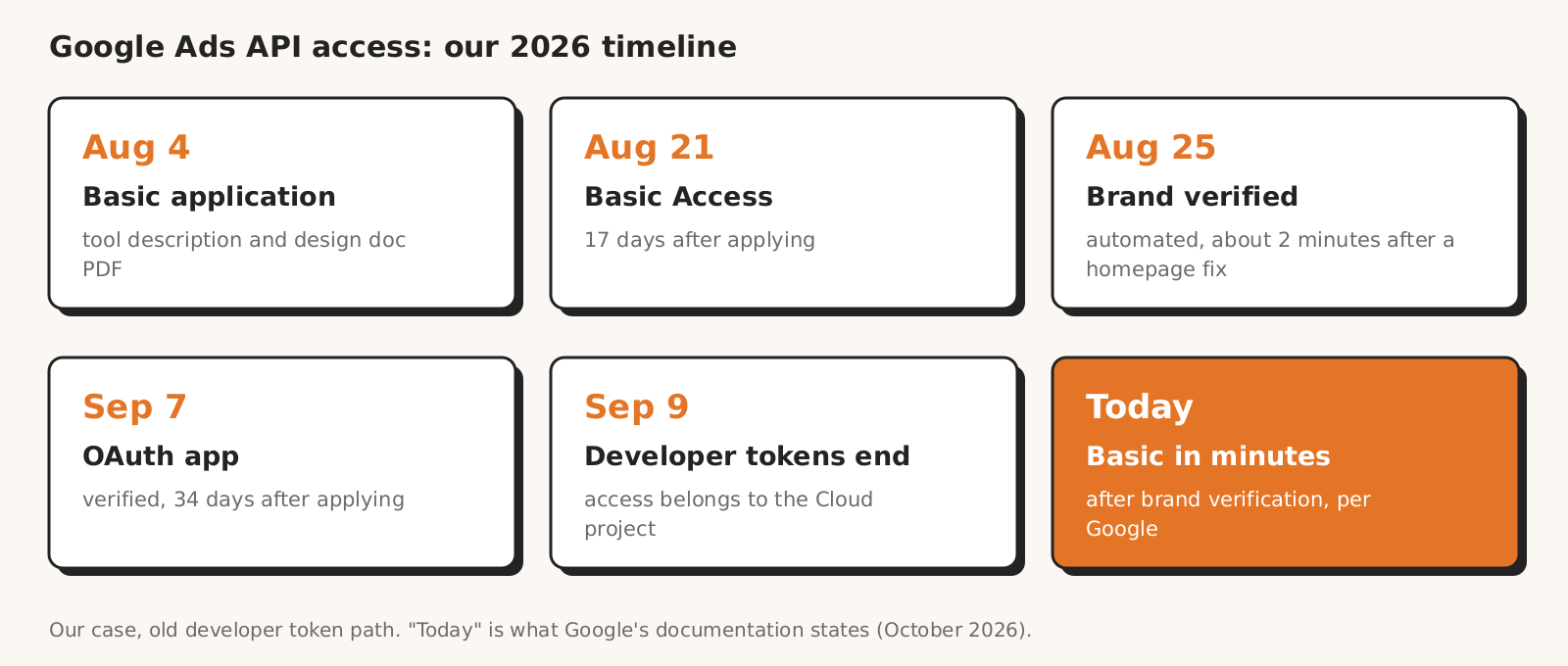
Our 17 days are no longer a benchmark for new applications. In July 2026 Google piloted a faster path: after brand verification, a Basic application was to be reviewed "within a few hours". We verified our brand only 4 days after we got Basic, so we did not use that path.
We were not the only ones complaining about slow reviews of Google Ads API access applications. In February 2026 Google wrote in a post about access applications that it was hearing from developers about applications taking longer than usual, and that it rejects unclear applications.
| Stage | For us (August 2026) | Today according to Google (October 2026) |
|---|---|---|
| Test | test developer token | right after you enable the Google Ads API in the project |
| Explorer | we never had it (we applied from Test) | automated review, approved "in most cases" |
| Brand verification | rejected by the automated check on Aug 4; after we fixed the home page, the automated check passed on Aug 25 in about 2 minutes | usually a few minutes, 2-3 business days with manual review |
| Basic | 17 days | automatic, "within minutes" of brand verification |
| Standard | we did not apply | manual audit, 10 business days |
Sources for the "today" column: Google Ads API access levels, the end of developer tokens and brand verification in Google Cloud.
The 4 Google Ads API access levels: what each one gives you
The Google Ads API now has four access levels: Test, Explorer, Basic and Standard. They differ in which accounts you can reach and in the daily operation limit.
| Level | Accounts | Operations per day | How to get it |
|---|---|---|---|
| Test | test only | 15,000 | enable the Google Ads API in your Google Cloud project |
| Explorer | test and production | 2,880 on production, 15,000 on test | "Apply for access" button, automated review, no brand verification |
| Basic | test and production | 15,000 | only from Explorer, after brand verification, automated review |
| Standard | test and production | no daily limit (rate limits apply) | only from Basic, manual audit, 10 business days |
Source: Google Ads API access levels. According to Google, a day is a rolling 24-hour window. According to the quota description, an operation is every Search and SearchStream request, every single change (mutate) operation and every other request to API services.
At every level, Standard included, all operations are subject to Google's system rate limits. According to the Google Ads API limits, a single mutate request can contain at most 10,000 mutate operations.
Explorer does not give you Keyword Planner. According to Google, this level blocks account creation, user management, planning (including KeywordPlanIdeaService and ReachPlanService) and account billing. Campaigns, reports and changes on production accounts work.
Standard is only for those who need unlimited API access, for example large companies or tools with many users. Only this level comes with RMF (Required Minimum Functionality), the list of features a tool for other users must have.
How to apply for Basic step by step (after Sep 9, 2026)
Today you apply for Basic access to the Google Ads API in the Google Cloud Console, in two steps: first Explorer, then Basic after brand verification. The API Center page in the manager account no longer accepts applications.
- 1Google Cloud project and the Google Ads API. Create a project (or pick an existing one) and enable the Google Ads API in it. The project gets Test level.
- 2Google Ads API Overview page. In Cloud Console, open the Google Ads API overview page, expand "Upgrade access level" and check that the next level is Explorer.
- 3Explorer application. Click "Apply for access". Google may raise the project to Explorer right away. You do not need brand verification for this.
- 4Brand verification. In "APIs & Services > OAuth consent screen", set the app to External and In production (Google requires this for Basic even for an internal tool), complete the Branding tab, click "Verify Branding" and, once verified, "Publish branding". The domains on the consent screen must be verified in Search Console.
- 5Basic application. When the page shows Explorer level, apply for Basic. According to Google, the review takes a few minutes.
- 6Standard, only if 15,000 operations are not enough. You apply for Standard from Basic. Google runs a manual audit, asks about the tool's features and audience and, for a tool with external users, asks for a demo account. Under the Google Ads developer policy you provide the demo account within 7 days of the request.
The steps follow the access levels documentation and the brand verification guide. According to Google, the Owner, Editor, Quota Administrator and Service Usage Admin roles in the project can manage the access level.
You no longer need a manager account (MCC) to get started. Google says you need one only if you link and manage multiple accounts through the API, which for an agency usually means you have one anyway.
Brand verification and OAuth: two mistakes we made
Verifying our Google Ads API app, we made two mistakes: the home page did not explain the app's purpose, and the console did not declare the OAuth scopes the app requested.
Because of the first, the automated check rejected brand verification on Aug 4 (it passed on Aug 25). The unverified app screen, caused by the second, went away only after OAuth app verification on Sep 7.
The automated brand verification rejected us because we had entered a documentation page as the home page. The check decided it showed neither the app name nor a description of its purpose.
What helped on Aug 25: a separate public home page with the app name in the header, a description of its purpose, a list of modules and links to the documentation, privacy policy and terms of service. We also opened it to crawlers, because the server settings were adding a noindex header to it.
With the second mistake, users saw the "Google hasn't verified this app" screen, and we had no scopes declared in the console, even though the app requested the adwords scope and Analytics scopes.
According to the sensitive scope verification documentation, you must declare every scope your app requests in the console on the Data Access page, and for sensitive scopes add a justification and a demo video. For us the declaration alone was not enough: the screen disappeared only after OAuth app verification on Sep 7.
According to the brand verification documentation, the automated check usually takes a few minutes, and when it cannot decide, a manual review takes 2-3 business days.
What changed on September 9, 2026: the end of developer tokens
Since September 9, 2026 the Google Ads API access level belongs to the Google Cloud project, not to a developer token. According to Google's documentation on retiring developer tokens:
- What counts is the project that issued the credentials. With user sign-in (OAuth) it is the project with the OAuth client ID; with a service account it is that account's project.
- Your existing level moved to projects automatically, based on API usage in the 90 days before Sep 9. A token that was approved but never used did not move anywhere.
- Google closed Basic applications submitted in API Center before Sep 9. It keeps reviewing Standard applications.
- The developer-token header in requests is optional and ignored. In a future API version, with no date given, Google will start rejecting it.
- A new project with no history has Test level. A request to a production account then fails with CLOUD_PROJECT_NOT_APPROVED_FOR_PRODUCTION (v25 and later) or ACTION_NOT_PERMITTED (v24 and earlier).
- You can have several projects with different levels.
- You can no longer move an old token's level to another project: Google switched that option off on Sep 9, 2026.
- Google will send administrative and mandatory messages only to the owners and editors of the Google Cloud project.
In our case the token with Basic level worked for only 19 days before the change (Aug 21 → Sep 9). In its reply to our Oct 7 submission, Google confirmed Basic Access for our tool.
Is Explorer enough for an agency with 5-20 accounts
Google Ads API Explorer access is enough for an agency's reports and simple automations on a few accounts, but not for Keyword Planner or a tool that reads data from many accounts often. Google writes in its access level description that Explorer is enough for most developers to get started and for basic automation.
2,880 operations a day averages 2 a minute or, with 20 accounts, 144 per account per day.
An example for illustration: a reporting script that runs 10 queries once a day on each of 20 accounts uses 200 operations, or 7% of the daily limit. An AI agent that runs a dozen or so queries per question will use up the limit much faster.
Google itself wrote in February 2026 that Explorer gives the same campaign management and reporting features as Basic, and that Basic is worth applying for when you regularly exceed the limit, expect to exceed it or lack features. We cover AI agents and MCP servers connected to Google Ads in our post on AI agents and MCP.
Agencies and the Google Ads API: your own project, no intermediaries
An agency that connects to the API itself (its own code, a script on a server, an MCP server) needs its own Google Cloud project with its own access level. A ready-made tool where each user signs in with their own Google account is different: the tool provider holds the access level.
The boundaries are set by the Google Ads developer policy.
Google prohibits "programmatic intermediaries": hosted interfaces, API wrappers, MCP servers and similar services that merely pass on Google Ads API capabilities.
| Situation | Under Google's policy |
|---|---|
| you share your API access with an agency or advertiser so they can skip their own application and their own Google Cloud project | prohibited |
| a hosted interface, API wrapper or MCP server that merely passes on Google Ads API capabilities | prohibited (programmatic intermediary) |
| your own automations | allowed |
| an open source tool that the user downloads and connects to Google Ads with their own credentials | allowed |
| changes on the accounts of your tool's users | only after the user signs in with their Google account |
Under the RMF policy, a tool used only inside your agency, with no third-party access, does not have to meet RMF. A tool for other users with full account management must meet RMF in full, but only at Standard level.
When you change what your tool does, for example add campaign management to a reporting tool, Google requires you to report it through the tool change form. Our submission of Oct 7, 2026 (campaign creation, 12-page design document) got a reply the same day.
In October 2026 the form still asks for the manager account "linked to the developer token", so it has not caught up with the Sep 9 change.
Google Ads API access pitfalls
We collected eight Google Ads API access pitfalls in a table. Some of them do not look like access problems: project billing, an unused project, passkeys and OAuth tokens.
| Pitfall | How you notice it | What to do |
|---|---|---|
| Project on a Free Trial or with suspended or disabled billing (known issue, as of Oct 19, 2026) | Explorer or Basic refused despite brand verification | according to Google: paid billing, removing billing (this disables other paid services in the project) or another verified project, then reapply |
| Level raised, but the API still rejects requests (known issue, as of Oct 19, 2026) | AUTHORIZATION_ERROR on production accounts in a project that worked with a test token before Sep 9 | according to Google a fix is rolling out; until then, a new project and an Explorer application (a new project means a new OAuth client, so accounts must be reconnected) |
| Project unused for 90 days | access revoked | Google may revoke unused access; you can apply again |
| New refresh token without a passkey | since Aug 5, 2026 Google has been rolling out the requirement: signing in with a password, SMS code or TOTP is not enough | a passkey on the Google account; a new passkey may need 7 days; existing refresh tokens keep working |
| Consent screen in Testing mode | refresh tokens expire after 7 days | app set to In production |
| App with unverified sensitive scopes (for us the console flagged the adwords scope this way) | "Google hasn't verified this app" screen; Google then allows 100 new users in total | sensitive scope verification in the console, with a justification for each scope |
| New OAuth client after moving the project | old connections return invalid_grant | every account has to be reconnected |
| Customer Match or offline conversion import | error for new users of these features | since Apr 1, 2026 and Jun 15, 2026 new users go through the Data Manager API |
Sources: known issues in the developer token retirement documentation, passkeys for the Google Ads API, refresh token expiration, unverified app limits, Customer Match and offline conversions.
We hit the Testing mode and new OAuth client pitfalls ourselves. In early July 2026 we found that our GA4 refresh token from Jun 4 had expired after 7 days, because the consent screen was in testing mode. After we moved the app to a new project on Aug 4, every earlier Google account connection had to be made again.
Passkeys are not just about the API. Google announced that since Aug 5, 2026 it has been rolling out the requirement in Google Ads Editor, Google Ads scripts, BigQuery Data Transfer Service and Data Studio as well. It does not apply to service accounts, which Google recommends for automation without human involvement.
When you do not need the Google Ads API: Google Ads scripts
Google Ads scripts do not require any Google Ads API access level, so they are enough when you automate your own accounts and do not want to maintain a server.
According to the scripts documentation, a Google Ads account is all you need. A script on a manager account can handle up to 50 accounts in parallel, with a 30-minute limit (up to 60 minutes with executeInParallel and a callback function).
Google recommends scripts to people who write code but do not want to manage their own infrastructure. The API makes sense when you build your own tool, connect Google Ads to other systems or need more than 30-60 minutes of run time.
Where this data comes from
The Google Ads API access timeline is our 2026 work log for Marketing Workspace: we recorded the dates of the application, Google's decisions and the verifications on the day they happened. The descriptions of levels, limits and application steps come from the Google Ads API documentation, the Google Ads Developers blog and the developer policy, read on Oct 19, 2026.
We prepared this post with the help of AI: the Claude model did the documentation research and the first draft, and we checked every number against its source. The application to Google was submitted by Robert Szymański, an independent Google Ads API developer.
What our timeline does not tell you
Our Google Ads API access timeline has four limitations: it is a single case, the old developer token path, two applications from the same day, and Google's stated times instead of our own measurements after Sep 9, 2026.
- A single case. 17 days is our result, not an average.
- The old path. We applied before Sep 9, 2026, with a developer token, from Test, without Explorer. We have not gone through the new path (Explorer, then Basic).
- Two applications. On Aug 4 we submitted an application for the old project and prepared one for the new project. We do not know which one Google reviewed, so we count the 17 days from the first.
- Google's stated times. "Within minutes" and "10 business days" are claims from the documentation. Google also lists known issues where the automated check refuses, so it may take longer for you.
What this means for Marketing Workspace
Marketing Workspace uses its own Basic access to the Google Ads API, so you do not need to create a Google Cloud project or apply: you connect your Google account on Google's consent screen.
Every change to a Google Ads account that the assistant proposes is approved by a person with permission in the organization, and every one goes into the change log. Since version 1.2.1 (Oct 8, 2026) the assistant also prepares Search campaign drafts, which are created on the account only after approval.
How we use Google APIs is described publicly in the Marketing Workspace documentation.
See how Marketing Workspace works

Founder of Roition, independent Google Ads API developer
Founder of Roition, with almost 3 years of Google Ads experience. Designs and builds process automation for Polish companies: system integrations, handling enquiries and quotes, AI assistants working on company data.
Frequently asked questions
Do I need a developer token for the Google Ads API in 2026?
No. Since September 9, 2026 access belongs to the Google Cloud project, and the developer-token header is ignored. The exception according to Google: the App Conversion Tracking API still requires a token from API Center.
What happened to the developer token I already have?
According to the token retirement documentation, Google moved its access level to Google Cloud projects automatically, based on API usage in the 90 days before Sep 9, 2026. An approved but never used token did not move to any project. You can keep sending the token header; the API ignores it.
How long does Basic Access to the Google Ads API take?
According to Google, a few minutes after brand verification and the application. On the old developer token path, we waited 17 days in August 2026.
How long does Explorer access take?
Google does not give a time in days. According to the access levels documentation, the review is automated, ends in approval "in most cases", and Google may raise the project to Explorer right after the application.
How long does Standard Access take?
Google quotes 10 business days. It is a manual audit with questions about the tool's features and its audience and, for a tool with external users, a request for a demo account.
Why does the API return CLOUD_PROJECT_NOT_APPROVED_FOR_PRODUCTION?
Your project has Test level and you are querying a production account. Check the level on the Google Ads API Overview page in Cloud Console and apply for Explorer.
Do I need brand verification for Explorer?
No. You need brand verification only when applying for Basic and Standard.
Do I need brand verification if I had Basic before Sep 9, 2026?
No. According to the developer token retirement page, existing access holders do not have to go through it, although Google encourages it. It is mandatory for new Basic and Standard applications.
Why did Google reject my Explorer or Basic application?
Basic requires a verified brand; without one, the application fails. According to Google's known issues (as of Oct 19, 2026), a project on a Free Trial or with suspended or disabled billing is also refused, despite brand verification. Google closed API Center Basic applications from before Sep 9, 2026.
Do I need a manager account (MCC)?
Not to get started. According to the Google Ads API documentation, you need a manager account only if you link and manage multiple accounts through the API.
Can I use my agency's Google Cloud project for client accounts?
Yes, for accounts the agency manages itself, for example through a manager account: Google's policy does not restrict your own API use. But you cannot give outsiders programmatic API access through your project, your own clients included, for example via an MCP server. Each would need their own application.
Do Google Ads scripts require API access?
No. A Google Ads account is enough. However, Google announced that since Aug 5, 2026 it has been rolling out the passkey requirement in scripts as well.
What happens if I do not use the API for 90 days?
Google may revoke access for an unused project. You can apply again.