
Zero for yesterday is not an outage yet
Zero conversions for the last 1-2 days can be reporting delay, not an outage. According to Google Ads Help on data freshness, conversions from the Google Ads tag show up in reports after 3 hours with last click attribution and after 15 hours with other models, while goals and transactions imported from Google Analytics take 12 or 24 hours.
Help on data in your reports gives a wider range: conversion reporting can be delayed by 15 to 48 hours, especially with non-last click attribution models. Google recommends checking click and impression data for a given day on the following day.
The main conversion columns count by click date, not conversion date, so the last few days can look worse, and conversions can be reported up to 90 days after the click (Google Help on conversion columns, on conversion reporting). To see conversions by the day they happened, add the "All conv. (by conv. time)" column.
This post is about zero for several days while you still get clicks, not a partial drop. A gap against GA4 is a different problem: we cover it in our post on conversion discrepancies.
Where Google Ads shows that conversion tracking has stopped
Google Ads shows a conversion tracking problem in three places: the conversion action status, Google tag diagnostics and the campaign status. Each of them reacts on a different timeline:
| Signal | Where you see it | When it appears according to Google |
|---|---|---|
| "Urgent" | Google tag diagnostics | among others, when a tag detected before hasn't been detected for 48 hours and data dropped to zero |
| "Awaiting conversions" | Goals > Summary, "Status" column | zero conversions in the last 7 days |
| "Eligible (Misconfigured)" | campaign status | often: zero biddable conversions in the last 28 days |
| "Misconfigured" | Goals > Summary, "Status" column | Google gives no day threshold |
Conversion action status
Go to Summary in the Goals menu and look at the "Status" column; conversion notifications are also shown at the top of the page (Google Help on conversion statuses). Google describes 5 statuses, and some of them may not be available in your account yet:
| Status | What it means according to Google |
|---|---|
| Active | conversions are recording |
| Needs attention | there is something to fix, but conversions haven't stopped recording entirely |
| Misconfigured | conversions have stopped recording because of a setup error or a broken tag |
| Awaiting conversions | zero conversions in the last 7 days; usually an action created under 48 hours ago, paused campaigns or too little traffic |
| Removed | the action has been removed |
In some accounts and on some help pages you will see other names in the "Tracking status" column: "Unverified", "Tag inactive", "No recent conversions", "Recording" (help on tag verification). According to the tag verification help, an action verified in Tag Assistant shows "No recent conversions", and "Recording" once the first conversions come in.
Google tag diagnostics
In your Google tag settings, in the "Tag quality" section, select View diagnostics. According to Tag Manager Help, the "Urgent" status appears, among other cases, when a tag detected before hasn't been seen for 48 hours and data dropped to zero. Google tag diagnostics also reports a missing conversion linker, a 0% consent rate and untagged landing pages.
Campaign status
According to Tag Manager Help, the campaign status "Eligible (Misconfigured): Your website is missing a Google tag" often means the campaign hasn't recorded any biddable conversions in the last 28 days.
Google doesn't say after how many days an action gets "Misconfigured". So don't wait for the status to change if zero conversions last longer than the reporting delay (up to 48 hours).
7 reasons your Google Ads conversions dropped to zero
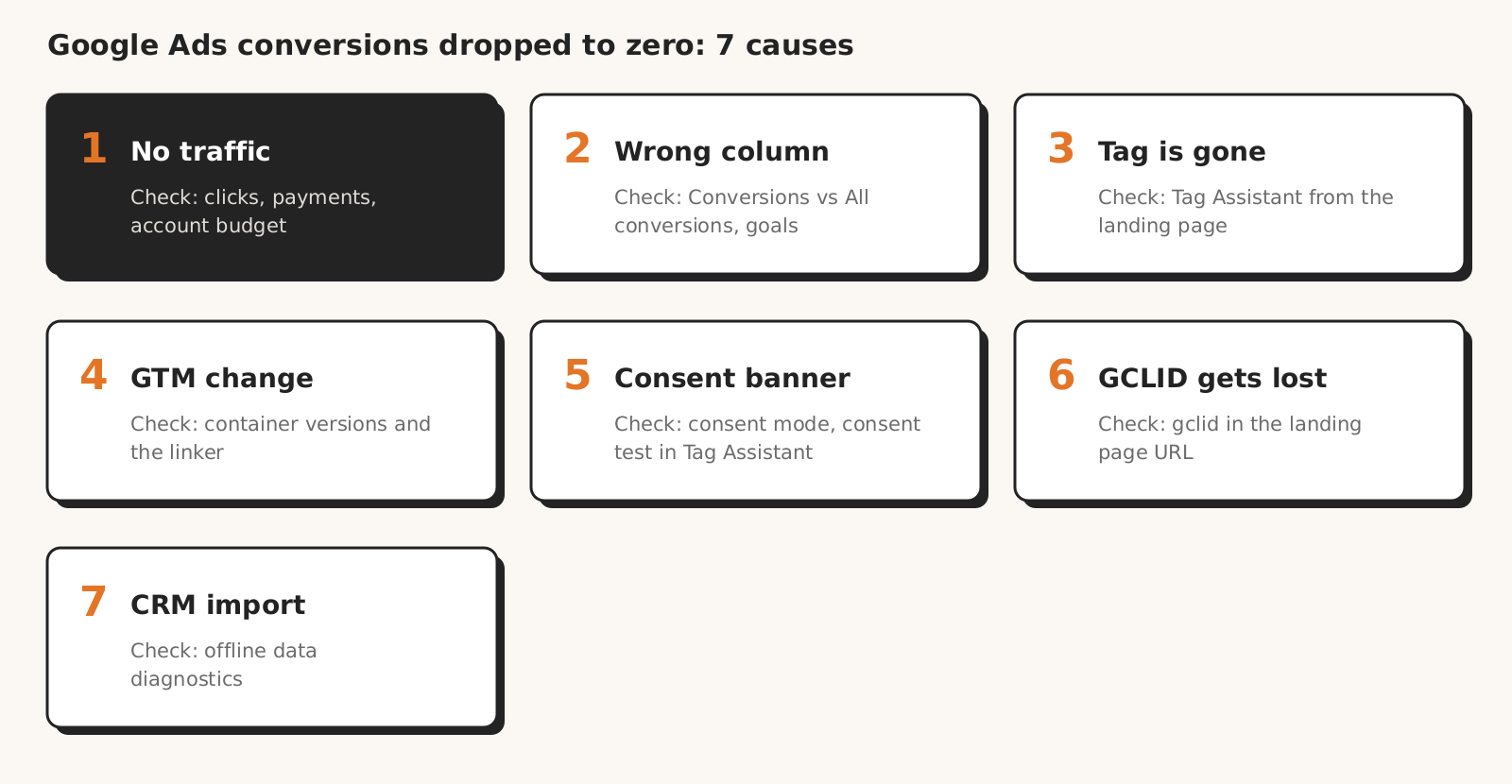
Google Ads conversions drop to zero in, among others, seven situations described in Google Help: there is no traffic, the "Conversions" column counts different actions, the tag is gone from the site, a GTM change didn't work, the consent banner blocks tags, the GCLID gets lost on the way or the CRM import stopped arriving.
| Cause | How to spot it | How to check |
|---|---|---|
| 1. No traffic | zero clicks or a sudden drop in clicks | ad status, payments and account budget |
| 2. The column counts something else | "Conversions" = 0, "All conversions" > 0 | primary and secondary actions, campaign goals |
| 3. The tag is gone from the site | "Misconfigured" status, "Urgent" in diagnostics | Tag Assistant from the landing page to the thank-you page |
| 4. A GTM change | zero from the day a new container version was published | GTM preview, conversion linker, container versions |
| 5. The consent banner blocks tags | zero since the banner was deployed or changed; consent messages in diagnostics (e.g. 0% consent rate) | consent mode, consent test in Tag Assistant |
| 6. The GCLID gets lost on the way | GA4 sees conversions, Google Ads doesn't | gclid parameter on the landing page, auto-tagging |
| 7. The CRM import isn't arriving | no new uploads in the History panel of offline diagnostics | offline data and enhanced conversions diagnostics |
1. No traffic, so no conversions
Zero conversions sometimes starts with zero clicks. Ads can stop serving for, among others, four reasons Google describes in its help: - a disapproved ad doesn't run, and you see the reason by hovering over the "Disapproved" status in the "Status" column (help on disapproved ads); - a declined payment can stop your ads, though not always immediately (help on declined payments); - a used-up account budget with monthly invoicing stops all ads in the account (help on account budgets); - paused campaigns are one of the three typical reasons for the "Awaiting conversions" status in the help on statuses.
How to check: before you look at the tag, compare clicks from the last few days with the previous week and review the Billing "Summary" and "Transactions" pages.
2. The "Conversions" column counts something different than yesterday
The "Conversions" column shows zero when the actions that are recording aren't part of the campaign's goals. According to help on primary and secondary actions, primary actions go into the "Conversions" column and into bidding (custom goals are the exception), while secondary actions are for observation only and appear in "All conversions".
The second reason for zero in the "Conversions" column is campaign-level goals. Help on conversion goals says campaign-specific goals override account-default goals, and a change to account goals doesn't reach campaigns that don't use account goals only. A goal not applied to a campaign won't appear in its "Conversions" column (help on campaign goals).
The third reason: conversions created in Google Analytics come into Google Ads as secondary by default, and changes made on the GA side show up in Google Ads only in "Change history" (help on primary and secondary actions). We also explain the difference between "Conversions" and "All conversions" in our post on wrong AI numbers.
How to check: add the "All conversions" column. If you see conversions there and zero in "Conversions", the problem is the action or goal settings, not the tag.
3. The conversion tag is gone from the site
The Google Ads conversion tag can disappear when the site changes, e.g. a new domain or a new thank-you page. Google Help on tag verification says plainly that after moving to a new domain or changing the thank-you page, you need to confirm the tag is present on the new URLs.
You check the tag in Tag Assistant, which you can launch from the conversions table for actions in the "Unverified", "Tag inactive" or "Needs attention" state.
Start the test from the landing page or home page, not the thank-you page, and go through the customer path to the end. After about 30 minutes, Google Ads updates the statuses of the actions verified in that session. Tag Assistant also shows a tag coverage summary: tagged and untagged pages (Tag Assistant Help).
How to check: go through the path from the ad to the thank-you page with Tag Assistant on and see whether the conversion tag fires on the last step.
4. A change in Tag Manager didn't work
A change in Google Tag Manager (GTM) can zero out conversions through a new container version that removed or broke the conversion tag. Check the conversion linker tag separately: according to Google Help, it helps tags measure click data and makes measurement more accurate.
GTM changes take effect on the site only after you publish them, and you can roll a faulty version back to a previous one and publish it (help on publishing and versions). Preview mode tests the draft before publishing and works only in the browser where you turned it on (help on preview).
The conversion linker tag should run on every page where people land from an ad; you don't need it if the container loads the Google tag on every page (help on the conversion linker). A missing conversion linker is reported by Google tag diagnostics.
How to check: compare the first day of zero with the publish dates in the container versions, then go through the path in preview mode: the conversion linker should fire already on the landing page, and the conversion tag after the thank-you page loads or the form is submitted.
5. The consent banner blocks tags
A consent banner zeroes out conversions when nobody gives consent or the banner blocks tags even after consent; with partial consent, conversions drop, but not to zero. According to Google Help on consent mode, in basic consent mode, when a user doesn't consent, Google tags are completely blocked and no data reaches Google.
In advanced mode, tags send cookieless pings in that case. A cookie banner doesn't measure anything by itself, and consent mode doesn't display a banner, it only passes the choice from the banner to Google.
Modeling of missing conversions doesn't fill the gap right away: Google Ads requires, among other things, 700 ad clicks over 7 days per country and domain grouping, and modeled conversions appear in reports gradually (help on conversion modeling). We compare the modeling thresholds in Google Ads and GA4 in our post on conversion discrepancies.
Even a working banner lowers the number of conversions. Help on conversion modeling says users who consent are typically 2-5 times more likely to convert, and in Google's example a 50% consent rate means a 19% drop in conversions. That is Google's example, not a norm for every site.
How to check: find out whether the first day of zero matches the deployment or change of the banner, and go through the path in Tag Assistant once accepting and once declining consent. Tag Assistant Help warns that consent management tools may block Google tags.
According to Google, a tag diagnostics message about a 0% consent rate means the site always sends a denied signal, which is a setup error.
6. The GCLID gets lost on the way
The GCLID, the Google Click Identifier that auto-tagging appends to the URL, has to reach the final page. Help on auto-tagging says that with redirects you need to make sure the parameter is passed to the final landing page, and that some browsers require auto-tagging to track conversions.
Importing conversions from GA4 has two requirements: the Analytics property linked to the Google Ads account and auto-tagging turned on (Analytics Help on importing). According to the help on auto-tagging, you find the setting in Admin > Account settings > Auto-tagging.
How to check: click your own ad once (it's a paid click) and see whether the URL of the page where the customer lands still contains gclid.
7. The CRM import or enhanced conversions stopped arriving
Conversions imported from a CRM (offline) depend on data uploads, not the conversion tag on the site. If the integration stops sending files or events, the column drops to zero with no change on the site. Enhanced conversions can use the tag, Data Manager or the API (help on enhanced conversions diagnostics), so check both the tag and the uploads.
Open diagnostics by hovering over offline data quality and clicking "Go to diagnostics". According to help on offline data diagnostics, the History panel shows uploaded events and events with errors, also by day for the last 7 days, so you see there when data stopped arriving. The "No recent data" status shows up only after 28 days without events.
Help on importing adds that processing typically takes less than 12 hours (up to 72 hours with GBRAID and WBRAID keys), Google keeps the GCLID for only 90 days, and conversions aren't reported by upload date.
For enhanced conversions, look for the "Check enhanced conversions" status and the "Diagnostics" tab at the top of the Summary page; with fewer than 20 conversions in 7 days, Google doesn't display alerts (help on enhanced conversions diagnostics). In these diagnostics, "No recent data" means 7 days without data.
How to check: look up the date of the last successful upload in the diagnostics and compare it with the first day of zero.
What to do with Smart Bidding when conversion tracking is broken
When conversion tracking in Google Ads is broken, Google Help doesn't talk about turning off the strategy, it suggests data exclusions instead. Help on data exclusions lists conversion tracking issues as a case where you can use them, so that Smart Bidding doesn't learn from a period without data.
Conditions for data exclusions according to Google Help: - exclusions work only with conversion and conversion value based strategies, in Search, Display, Shopping and Performance Max campaigns (help on creating exclusions); - the range covers click days, not conversion days: Google recommends excluding at least 90% of the affected clicks and adding the conversion delay (in Google's example, an outage on October 15-18 with a 5-day conversion delay means an exclusion for October 10-18); - you shouldn't use exclusions frequently or for long periods, and you don't remove ones already applied; - bids and spend may still drop for a brief period.
A data exclusion doesn't fix reports: excluded conversions are still visible in your reporting, so describe the data gap to the client separately. You create an exclusion in Tools > Adjustments > "Exclusions" tab.
Don't change conversion goals by trial and error during a tracking outage: according to help on conversion columns, frequent manual adjustments to budgets, targets or conversion goals reset the standard 7-14 day learning period.
After you fix tracking, judge target CPA and ROAS only after 1-2 conversion cycles; budget-limited campaigns are covered in our guide to targets under limited budgets.
Checklist: Google Ads conversions dropped to zero
When your Google Ads conversions drop to zero, check eight points in this order before you change anything in the campaign.
- 1Has the zero lasted longer than the reporting delay (up to 48 hours), and do you also see it in the "All conv. (by conv. time)" column?
- 2Are there clicks, and are the ads, payments and account budget in order?
- 3Are there conversions in "All conversions" and zero in "Conversions"?
- 4What status do the actions have in Goals > Summary, and what does Google tag diagnostics say?
- 5What changed on the day the zero started? You open Change history in the Campaigns menu; it covers 2 years, though Google notes that some account-level changes and changes made by Google representatives don't show there (help on change history). Change history covers the Google Ads account, so ask the client about changes to the site, GTM and the banner.
- 6Does the conversion tag fire on the last step of the path in Tag Assistant and in GTM preview?
- 7Does the landing page URL contain gclid, and does the banner avoid blocking tags completely?
- 8Do the CRM import or enhanced conversions have recent data in diagnostics?
If tracking was down for several days and your campaigns use a conversion-based strategy, consider a data exclusion for that period and describe the gap in the client report.
What this post on zero conversions doesn't tell you
This post on zero Google Ads conversions doesn't tell you how many conversions a specific consent banner costs you: Google's 19% example is an illustration, not a norm. We also don't say after how many days an action gets the "Misconfigured" status, because Google doesn't publish it.
We don't cover partial drops (attribution, seasonality, strategy changes) or server-side tagging setups. According to Google Help, changing the attribution model or conversion window applies only to future conversions (on the conversion window, on attribution models), so it doesn't explain zero on days before the change.
All menu paths and status names come from Google Help as read on October 27, 2026. Google changes status names, so they may look different in your account.
How Marketing Workspace helps when conversions disappear
Marketing Workspace, our AI assistant for Google Ads, Meta Ads and GA4 accounts, helps you check those causes of zero conversions that are visible in Google Ads account data: - The "Conversion tracking" check shows actions that stopped recording in the last 7 days, primary and secondary actions, several primary actions measuring the same thing, and the counting method. - The "Changes made without you" check collects change history from the last 4 weeks by source: the interface, Google recommendations, rules, scripts and other tools. - Before answering, the assistant checks, among other things, conversion actions with their counts and paused campaigns, takes conversion delay into account, and starts with measurement reliability when it is in doubt.
The check doesn't inspect the tag on the site or consent, only what Google Ads sees.
Payments, Google tag diagnostics, the path on the site, consent, gclid and offline data diagnostics are yours to check. Checks and analysis only read data and change nothing in the account; the assistant can only propose a change for your approval. Details in the Google Ads module documentation.

Founder of Roition, independent Google Ads API developer
Founder of Roition, with almost 3 years of Google Ads experience. Designs and builds process automation for Polish companies: system integrations, handling enquiries and quotes, AI assistants working on company data.
Frequently asked questions
Where do I start when Google Ads conversions drop to zero?
With traffic: check whether there are clicks. Then compare the "Conversions" and "All conversions" columns, look at the action status in Goals > Summary, check the tag on the site, consent and GCLID, and finally the CRM import. Zero for the last 1-2 days can still be reporting delay.
How long should I wait before zero conversions in Google Ads means something?
According to Google Help, conversion reporting can be delayed by 15 to 48 hours. Zero for several days with normal clicks is already a reason to check tracking.
Will Google Ads alert me to zero conversions?
In Google Help as read on October 27, 2026, we found no dedicated zero alert. Signals are in the account: notifications at the top of Goals > Summary, "Urgent" in Google tag diagnostics after 48 hours without the tag, and enhanced conversions diagnostics, which show no alerts below 20 conversions in 7 days.
Why does GA4 show conversions while Google Ads shows zero?
Check three reasons described in Google Help: the GA4 conversion is a secondary action in Google Ads (it is by default), the products aren't linked, or gclid doesn't reach the page because auto-tagging is off or a redirect drops it.
What does the "Awaiting conversions" status mean?
That the action hasn't recorded any conversions in the last 7 days. Google gives three typical reasons: the action was created under 48 hours ago, campaigns are paused, or traffic is too low.
Should I turn off Smart Bidding when tracking breaks?
Google Help doesn't mention turning off the strategy. It suggests data exclusions for the outage period, only with conversion and conversion value based strategies, and warns that frequent goal changes reset the 7-14 day learning period.
Can a cookie banner zero out conversions?
Yes, if consent mode runs in basic mode and nobody consents, or if the banner blocks tags by mistake. In basic mode without consent, Google tags are completely blocked.
When will conversions come back to reports after tracking is fixed?
Google Ads updates the statuses of actions verified in Tag Assistant after about 30 minutes. New Google Ads tag conversions show in reports after 3 hours with last click attribution or 15 hours with other models, and a CRM import typically processes in under 12 hours.
Can changing the attribution model zero out conversions?
Not retroactively: according to Google Help, changing the attribution model and conversion window applies only to future conversions, so it doesn't explain zero on days before the change.
Where can I check who changed what in the account?
In Change history in the Campaigns menu, up to 2 years back. Some account-level changes and changes made by Google representatives may not show there, and you check changes to the site and GTM outside Google Ads. See how Marketing Workspace works