
This guide is for people who run several accounts and keep growing their negative keyword lists. We take every limit and menu path from Google Ads Help and the Google Ads API documentation, read on October 21, 2026. The account interface is sometimes newer than the help pages, so where they differ, we give both names.
Google Ads negative keyword limits (as of October 21, 2026)
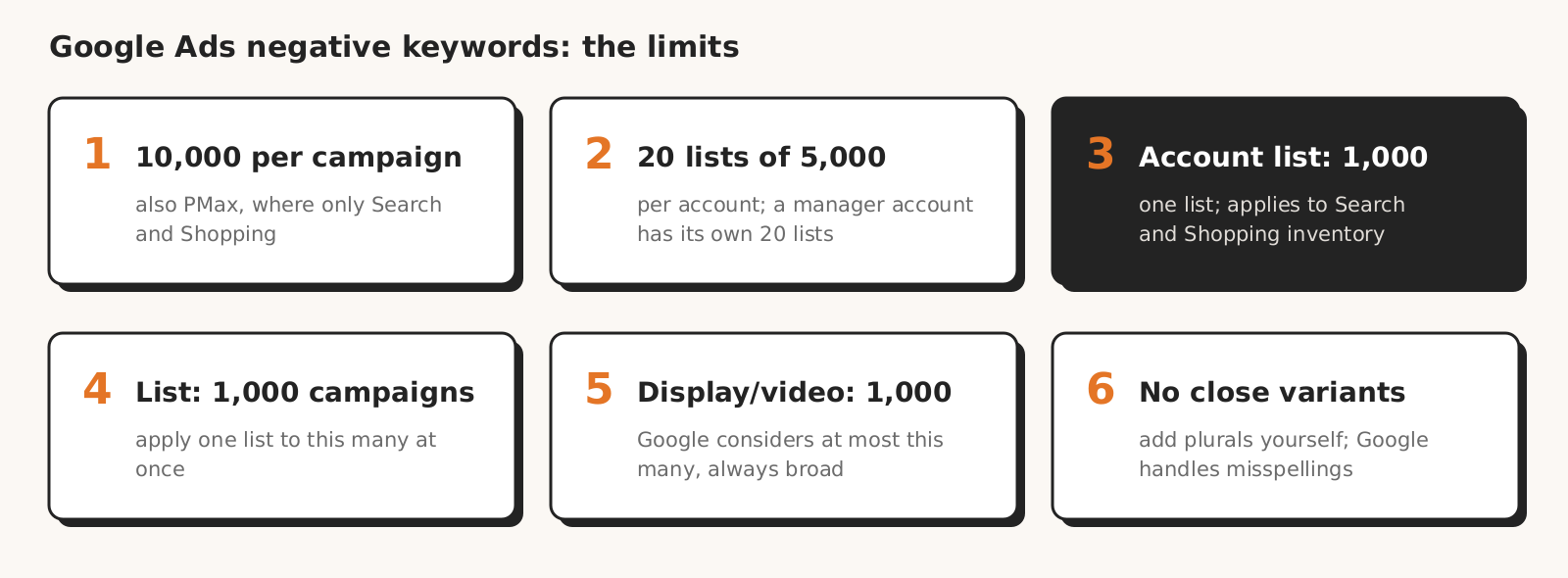
Google Ads negative keyword limits depend on the level: a campaign holds up to 10,000, an account up to 20 lists of 5,000 keywords, and the account-level list up to 1,000 keywords.
| What | Limit | Source |
|---|---|---|
| Negative keywords in one campaign | 10,000 | Google Ads account limits |
| Negative keyword lists per account | 20 (a manager account has its own 20, each client account its own 20) | account limits |
| Keywords in one list | 5,000 | account limits |
| Campaigns you can apply a list to at once | 1,000 (previously 200) | Help on adding negative keywords |
| Account-level list | 1 list, up to 1,000 keywords | Help on account-level negatives |
| Display Network and Video campaigns | Google considers at most 1,000 | account limits |
| Performance Max | up to 10,000 per campaign | Google Ads API documentation |
| Excluded content keywords (Display Network and YouTube) | up to 1,000 per account | Help on account-level negatives |
| Campaign targeting items, including negatives | 1 million per account | account limits |
| Length of one keyword in the API | 80 characters and 10 words | KeywordInfo documentation |
For the 5,000 keywords per list limit, Google itself notes that it may change and that a list sometimes accepts more keywords, which Help on adding negative keywords calls a known issue. Don't plan a list for more than 5,000 keywords, even if the interface lets you save it.
Experiments use up limits too. According to the account limits page, an experiment duplicates the keywords and targets of the base campaign, and these duplicates count toward the account limits. The example from that page: if the base campaign has 10,000 targets, launching an experiment brings the account to 20,000.
Where negative keywords work: exclusion level vs Google Ads campaign type
A negative keyword works only where Google applies it: the account-level list covers Search and Shopping inventory, Performance Max negatives don't work on YouTube or the Display Network, and on the Display Network every negative is broad.
| Level | Search | Shopping | Performance Max | Display and Video |
|---|---|---|---|---|
| Campaign | yes | yes | yes, up to 10,000, Search and Shopping inventory only | yes, broad match only |
| Negative keyword list | yes | yes | yes, in the interface you select an existing list | Display: yes, broad match only; Video: the help pages don't say |
| Account-level list (also works in App, Smart and Local campaigns) | yes | yes | yes, Search and Shopping inventory only | no |
| Excluded content keywords (account level) | no | no | the help pages don't settle it (they apply to "all campaigns running on YouTube or Display Networks") | yes, Display Network and YouTube |
Where these answers come from: Help on account-level negatives lists the campaigns the account list applies to and describes excluded content keywords.
Help on Performance Max negatives says they apply to Search and Shopping inventory only. The campaign types that accept lists are listed in the API shared sets documentation: Search, Display, Shopping, App and Local campaigns.
There are two exceptions for lists. In App campaigns you can apply a list only through your Google representative (Help on creating lists), and Smart Display campaigns have no lists, only manual negatives (Help on adding negative keywords).
A list created in a manager account works like a regular list, but only after you select it in the client account's Shared library.
Performance Max negatives won't stop ads on YouTube or the Display Network, because Google applies them only to Search and Shopping inventory. For Display and Video, Google recommends, according to Help on adding negative keywords, site categories and content exclusions rather than keywords.
AI Max doesn't bypass negatives. Help on AI Max says negative keywords are respected even with this feature turned on.
How negative keywords match in Google Ads
Negative keywords don't cover close variants, so you add plurals, other word forms and synonyms separately, while Google handles misspellings and casing on its own.
According to Help on negative keywords, there are three match types:
| Negative match type | When it blocks the ad | Example |
|---|---|---|
| Broad (default) | the search contains all the negative's words, in any order | from Google Help: the negative "flowers" blocks "red flowers" but doesn't block "red flower" |
| Phrase | the search contains these words in this order, also with other words around them | ours, following this rule: "red flowers" blocks "cheap red flowers", doesn't block "flowers red" |
| Exact | the search is exactly these words, with nothing extra | ours, following this rule: "red flowers" blocks "red flowers", doesn't block "cheap red flowers" |
The negative "flowers" doesn't block "red flower", because negatives don't match close variants the way regular keywords do. In Polish, where nouns inflect, the same rule means the negative "zamek" (castle) won't block "zamki" (castles) or "zamku" (of the castle).
From our practice: word forms also cut the other way, because an inflected form of an offer word is easy to take for junk. On a store account selling "Zamek kolorowanka" (a castle coloring book), the search "zamki" (Polish plural of "zamek") looked like junk but matched the offer. So we check offer word forms before excluding.
Five rules from the same Google Help page that are easy to miss:
- a negative that comes after the 16th word of the search may not block the ad;
- negatives allow only 3 symbols: "&", accent marks (á) and the asterisk (*), while for example a comma, "!" or "@" give an error;
- accent marks create a separate negative ("sidewalk cafe" and "sidewalk café"), and periods are ignored;
- a minus in front of a word inside a negative makes Google ignore that word: "dark -chocolate" works like "dark";
- a negative must not overlap with a regular keyword, because then the ad won't show (Help on adding negative keywords).
On the Display Network the mechanics are different. According to Help on adding negative keywords, all negatives there are added as broad match and you can't change it. Help on negative keywords adds that on Display a negative works like a topic: "women's pants" blocks a page about women's jeans, but not a page about skirts.
How to add negative keywords in Google Ads step by step
You add a negative keyword in Google Ads from the search terms report, then choose the level (ad group, campaign, list or account), and you apply a negative keyword list to campaigns, because without that it does nothing.
The paths below come from the English Google Ads Help; help pages name the same menus differently or shorten the path (steps 3, 4 and 6), so we give both versions.
- 1Add a negative from the search terms report. Help on the search terms report gives Campaigns > Insights and reports > Search terms: check the term and click "Add as negative keyword", then pick an ad group, campaign or list. In a Search campaign, a negative added this way is exact match by default, so it blocks only that search.
- 2Choose the level. One account and several campaigns with the same negatives: a negative keyword list. Negatives for all campaigns on Search and Shopping inventory: the account-level list. The same negatives across several client accounts: a list in the manager account.
- 3Create a list. Help on creating lists gives the path Campaigns > Keywords > Negative keywords tab > plus button, and Help on adding negative keywords gives Campaigns > Audiences, keywords, and content > Search keywords > "Negative search keywords" tab. You paste keywords one per line and save them to a new or existing list.
- 4Apply the list to campaigns. According to Help on adding negative keywords, the path is Tools > Shared library > Exclusion lists > "Negative keyword lists" tab > Apply to campaigns, for up to 1,000 campaigns at once. Help on creating lists puts it more briefly: "Go to Exclusion lists within the Tools menu".
- 5Create the list in the manager account, apply it in the client account. A list created in Tools > Shared library > Exclusion lists appears in client accounts' Shared library by default (Help on lists across accounts), but works only once you add it in the client account. Changes to the list apply in all campaigns using it.
- 6In Performance Max, add negatives in the campaign or select a list. Help on Performance Max negatives gives Campaigns > Keywords > Negative keywords tab > plus button > campaign, then keywords one per line or an existing list. Help on impact estimates calls the menu "Search Keywords": plus button > Preview impact, up to 10 keywords at a time, Performance Max only.
- 7At the account level, add what you don't want anywhere. According to Help on account-level negatives, the path is Admin > Account settings > "Negative keywords" section > plus button. You change the match type in the "Match type" column.
For the Performance Max impact estimate, Google warns that negatives can unexpectedly limit your reach and cost you valuable conversions. The estimate shows this as a percentage of conversions or conversion value, so check it for every keyword that isn't obvious junk.
How many negative keywords is too many: what Google says and what practitioners say
Google doesn't give a number of negative keywords that is too many; Help on negative keywords only says that if you use too many negatives, your ads might reach fewer customers.
Practitioners on r/PPC are split. In a thread on r/PPC, the top-voted answer says: "You can never have too many with how aggressive Google is with close relevants."
Another answer reads: "There's no numerical limit (besides the 10k per campaign limit plus 5k x 20 for shared negative keyword lists). The limit is when your campaign performance starts to fall off because you're excluding relevant searches."
Another answer in the thread suggests that hundreds of exact match negatives can often be replaced with a few well thought out phrase or broad match ones. These are practitioners' opinions, not data.
Instead of a number, check three things: whether a negative blocks searches with conversions, whether it blocks searches that match the offer, and whether it overlaps with a keyword.
The fourth question in the table is about list upkeep: whether hundreds of exact negatives can be replaced with one phrase negative.
| Question | What a "yes" means | How to check |
|---|---|---|
| Does the negative block searches that had conversions? | you are excluding sales | search terms report with the conversions column, before adding the negative |
| Does a general phrase or broad negative block searches that match the offer? | you cut relevant traffic along with the junk | list searches from recent weeks that contain this word |
| Does the negative overlap with a regular keyword? | the ad for that keyword won't show | compare the negative list with the campaign's keywords |
| Do you have hundreds of exact negatives with the same word? | the list grows faster than it needs to | one phrase negative instead of many exact ones, if the word never matches the offer |
We saw the general phrase trap in our test of 8 AI models: even the best models proposed excluding general phrases that also block searches that sell. The same mechanism works when you manually exclude one word in broad match: it blocks every search that contains that word.
12 mistakes with negative keywords in Google Ads
Mistakes with negative keywords in Google Ads come from the fact that negatives work differently from regular keywords: they don't catch variants, don't work outside their scope and do nothing until the list is applied to a campaign.
| Mistake | Effect | How to check |
|---|---|---|
| Singular excluded without the plural (or without other word forms) | searches with a variant still show the ad | search terms report a few days after adding the negative |
| Negative from the search terms report left as exact match, though the word never matches the offer | it blocks only that one search, other searches with the word still show the ad | match type of a negative added from the search terms report in a Search campaign |
| Adding misspellings to the list | the list grows with no effect, because Google handles misspellings on its own | review the list for spelling variants |
| Negative overlaps with a keyword | the ad for that keyword doesn't show | compare negatives with keywords |
| General word in broad or phrase match | it blocks searches that match the offer | searches with that word from recent weeks, with conversions |
| List created but not applied to campaigns | the negatives don't work | the campaigns next to the list in the Shared library (Tools > Shared library > Exclusion lists) |
| Manager account list not applied in the client account | the negatives don't work for the client | Shared library in the client account |
| Performance Max negatives as protection against YouTube and the Display Network | ads still go to those placements | PMax negatives work only on Search and Shopping inventory |
| Exact or phrase match in a Display campaign | it won't work, because on Display negatives are always broad | match type of the negative in the Display campaign |
| Negative on the account list for a Display campaign | it won't work, because the account list works on Search and Shopping inventory | whether the word is in excluded content keywords, not only on the account list |
| Minus inside a negative ("dark -chocolate") | Google ignores the word with the minus | negatives with a minus in the middle |
| Confusing 1,000 on the account list with 20 × 5,000 on lists | the account list runs out sooner than you expect | number of keywords on the account list |
What this guide to negative keywords doesn't cover
This guide to Google Ads negative keywords doesn't give a "too many" number, because Google doesn't give one and we don't have data from enough accounts to calculate it. Five things we didn't find in Google Help:
- whether the 1,000 limit for Display and Video counts per campaign or per account: Help on negative keywords says "at the account level", while the limits page talks about Display Network and Video campaigns without a level;
- whether Performance Max negative keyword lists can be applied through the API (in the interface they can);
- a negative keyword limit per ad group;
- whether the 80 characters and 10 words limit also applies to negatives added in the interface (only the API documentation gives it);
- whether Google treats Polish characters ("krakow" and "kraków") like accent marks, meaning as separate negatives.
We don't describe search terms review as a process, placement exclusions, or negatives in Demand Gen campaigns, which we didn't check. We also don't say how long each step takes, because we didn't measure it.
How Marketing Workspace helps with negative keywords
Marketing Workspace by Roition, our AI assistant for Google Ads, Meta Ads and GA4 accounts, looks for searches to exclude and proposes campaign-level negatives, which go into the account only after you approve them.
- The system pulls and calculates the account data, and the assistant only judges whether a search matches the offer; searches with conversions and brand words from the client card don't make it onto the list of proposals (version 1.2.0, October 7, 2026).
- Since versions 1.3.10 and 1.3.11 (October 14, 2026), it doesn't propose phrases that describe products from the client's store or word forms of words from the offer.
- It skips searches already blocked by campaign negatives, ad group negatives and lists applied to campaigns, calculating the match by Google's rules, without close variants.
- A word that repeats across several non-matching searches is proposed as one phrase negative, and single searches as exact.
- Every change has a review with the current and new value, and you can prepare the whole negative list for approval with one button (Google Ads module documentation). Why a person approves changes, we explain in our post on what goes wrong with AI agents with account access.
What it doesn't do: it doesn't create or edit negative keyword lists and doesn't add negatives to ad groups or the account-level list.
It takes searches to exclude from search terms data in the Google Ads API, which doesn't include Performance Max campaigns, so it doesn't look for negatives for them. When looking for candidates, it doesn't read the account-level list, so it may propose a word that is already on it. It doesn't remove negatives.
We base these answers about Google Ads negative keywords on Google Ads Help and the Google Ads API documentation, read on October 21, 2026.
See how Marketing Workspace works

Founder of Roition, independent Google Ads API developer
Founder of Roition, with almost 3 years of Google Ads experience. Designs and builds process automation for Polish companies: system integrations, handling enquiries and quotes, AI assistants working on company data.
Frequently asked questions
What are negative keywords in Google Ads?
Negative keywords are words for which your ad doesn't show. A broad negative blocks a search with all its words in any order, a phrase negative these words in this order, and an exact negative only exactly these words. You add them in an ad group, a campaign, a negative keyword list or the account-level list.
How is the account-level list different from a negative keyword list?
There is one account-level list, it holds up to 1,000 keywords and covers Search and Shopping inventory in the account's campaigns, including Search and Performance Max. You can have up to 20 negative keyword lists of 5,000 keywords, but they work only once applied to campaigns, up to 1,000 campaigns at once.
Where do I find negative keyword lists in Google Ads?
According to Google Help, under Tools > Shared library > Exclusion lists > "Negative keyword lists" tab. Another help page puts it more briefly: Exclusion lists within the Tools menu.
Why doesn't a negative keyword block my ad?
Check four reasons: the list isn't applied to the campaign or added in the client account, the search contains a variant of the word, the negative comes after the 16th word of the search (then it may not work), or the ad runs on YouTube or the Display Network, where Performance Max negatives and the account list don't work.
Does a negative cover plurals and other word forms?
No. According to Google Help, negatives don't match close variants, so you add singular, plural, other word forms and synonyms separately. The negative "flowers" won't block "red flower".
Do I need to add misspellings to negatives?
No. Google says negatives automatically account for casing and misspellings, so you don't need to add them separately.
How many negative keywords can I add in Performance Max?
Up to 10,000 per campaign, according to the Google Ads API documentation. They work only on Google Search and Shopping inventory, not on YouTube or the Display Network. You can check the impact of up to 10 keywords at a time in the estimate before saving.
Does the account-level list work on the Display Network and YouTube?
No. The account-level list works on Search and Shopping inventory, including Search, Performance Max and Shopping campaigns. For the Display Network and YouTube, Google has separate excluded content keywords, up to 1,000 per account.
Does AI Max respect negative keywords?
Yes. Help on AI Max says negative keywords are respected even with this feature turned on.
Does a manager account list work on client accounts by itself?
No. A manager account list appears in the Shared library of client accounts, but you have to apply it in the client account. The manager account and each client account have a separate limit of 20 lists.
Which match type should I choose for a negative?
Exact when you block one specific search (that's how the search terms report adds it in a Search campaign). Phrase when the word never matches the offer, for example "jobs" in a store campaign. Broad with care, because it blocks every search with all the negative's words, in any order.
Which symbols can I use in negative keywords?
According to Google Help, only three: "&", accent marks (á) and the asterisk (*). An accent creates a separate negative ("sidewalk cafe" and "sidewalk café"), Google ignores periods, and a minus in front of a word makes Google ignore it. Other symbols, such as a comma, "!" or "@", give an error.
How many negative keywords is too many?
Google doesn't give such a number, only limits: 10,000 per campaign, 20 lists of 5,000 keywords and one account list of up to 1,000 keywords. You have too many when negatives block searches with conversions or searches that match the offer.