
We used to paste client data into AI chats ourselves, so we write for someone who wants to clean that up today. This guide covers the Claude app on the Free, Pro and Max plans and on the Team and Enterprise plans. Why this is a contract issue, we explain in our post on what your client contract says.
We cover the same for other chats in our guides on deleting client data from ChatGPT and deleting client data from Gemini.
This is not legal advice. We take settings paths and data retention rules from Anthropic's help and documents, checked on October 29, 2026. We give button names in English, as in Anthropic's help. If your interface is in another language, the names may differ.
What goes and what stays after you delete a Claude chat
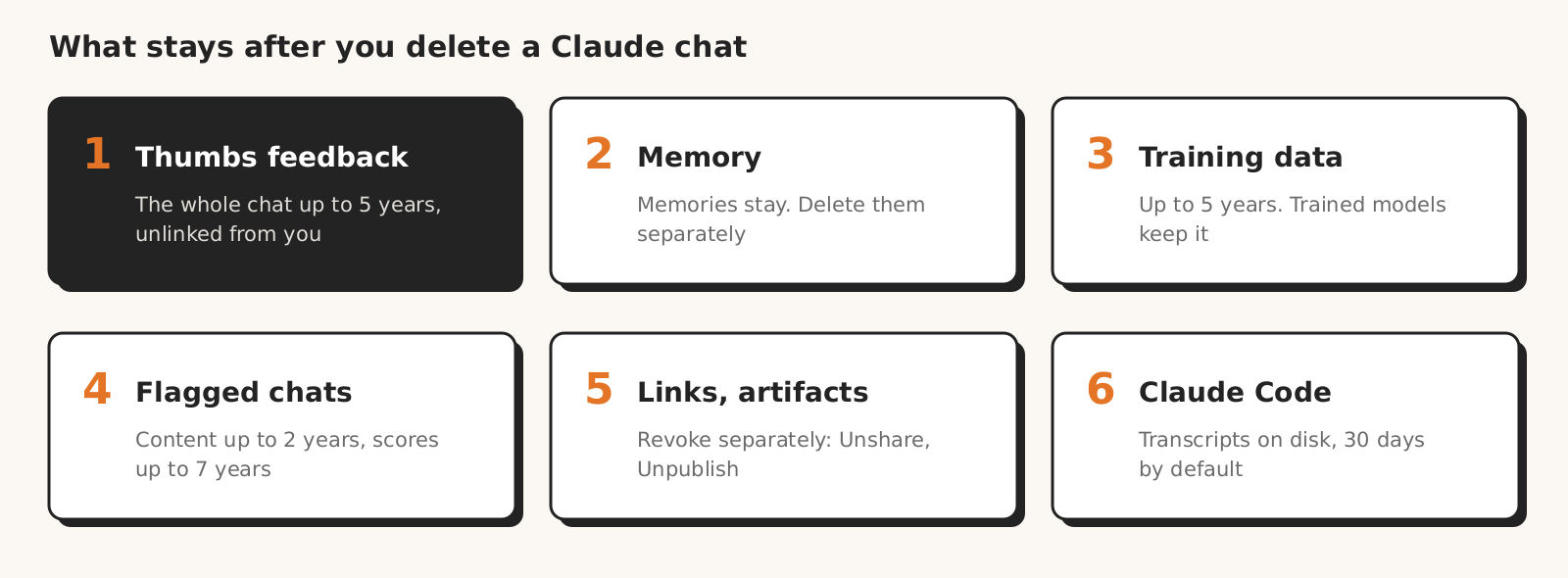
When you delete a Claude chat, the conversation itself goes, while things stored separately stay: conversations rated with a thumb, memories, data already used in training, links, artifacts, exports and copies on your computer.
According to Anthropic's help on data retention, a deleted conversation leaves your history right away and the servers within 30 days.
A conversation flagged by automated safety systems as violating Anthropic's policies is kept for up to 2 years, and classifier scores for up to 7 years. Anthropic may also keep data longer when the law or a dispute requires it, and keep anonymized data for research and statistical purposes.
| Item | What happens after you delete the chat | Can you delete it, and how |
|---|---|---|
| The conversation | gone from history right away, from the servers within 30 days | yes, step 3 (Anthropic help) |
| Conversation rated with a thumb | the whole conversation stays for up to 5 years, disconnected from your account, and may train models | the help does not describe how to withdraw a rating (Anthropic help) |
| Memories | deleting the conversation does not delete them | yes, separately in memory settings (Anthropic help) |
| Data with model improvement on | up to 5 years in training pipelines, not linked to your account; training runs in progress and trained models keep it | no, deleting the chat only excludes it from future training (Anthropic help) |
| Conversation flagged by safety systems | content for up to 2 years, classifier scores for up to 7 years | no (Anthropic help) |
| Incognito chat | not in your history, but stays on the server for 30 days | gone after that, unless safety systems flag it (Anthropic help) |
| Shared chat | the help does not say whether the link goes with the chat | yes, separately: "Unshare" (Anthropic help) |
| Published artifact | anyone with the link can open it | yes, separately: "Unpublish" or a change of access (Anthropic help) |
| Project and files in its knowledge | stay until you delete the project | yes, separately (Anthropic help) |
| Claude Code transcripts on your disk | 30 days by default in the `~/.claude/projects/` folder | yes, on your computer, step 4 (Claude Code docs) |
| Data export | a copy on your disk or with the organization owner | only where the file is |
The key row is the thumb. According to Anthropic's help on training, after you rate a response, Anthropic stores the whole conversation, with its content, styles and preferences, for up to 5 years. Before using it, Anthropic disconnects it from your identifier, such as your email address, and does not link it to your other conversations.
Anthropic's help does not describe how to withdraw a rating you sent, and the conversation is disconnected from your account, so deleting the chat does not cover it.
Anthropic's pages differ here by one word: the data retention page says "5 years", the training page "up to 5 years". In its help on personal data, Anthropic itself encourages you not to process personal data in its products.
Sending feedback also changes who can see the conversation. According to Anthropic's help on data protection, on the Free, Pro and Max plans Anthropic employees cannot access your conversations by default. The exceptions are data you share in feedback and a review needed to enforce the Usage Policy; then only designated members of the Trust & Safety team have access.
Step 1. Check your plan and training setting for the period when you pasted the data
Before you start deleting client data from Claude, establish two things: which plan you worked on and whether model improvement was on. This decides whether the data could have gone into training, whether it can still be withdrawn from it and which agreement links you to Anthropic.
Free, Pro and Max are consumer plans. Team and Enterprise are business plans on commercial terms, where Anthropic does not train by default on conversations. If the agency pays for a Pro or Max plan, it is still a consumer plan.
On consumer plans, you find the setting in the menu with your name: "Settings" > "Privacy" > the "Help Improve our AI models" toggle (Anthropic help). Anthropic announced it on August 28, 2025, and the setting applies to new and resumed conversations; old conversations with no new activity do not go into training.
If the toggle was on when you pasted the data, new and resumed conversations from that period may have gone into training and may stay there for up to 5 years, and you cannot withdraw them from trained models. Turning it off or deleting the chat only affects future training. You will need this when you write to the client.
Step 2. Find every conversation with client data
To delete client data from Claude, first list every place it sits: conversations, projects with files, memory, shared links, artifacts, exports, Claude Code sessions and the accounts of everyone on your team. Anthropic's help does not describe a "delete all conversations" button, so the deletion goes one by one anyway.
| Where to look | What to check | How |
|---|---|---|
| Data export | all conversations and memory in a downloadable file | "Settings" > "Privacy" > "Export data" |
| Conversation list | the client's name, domain, Google Ads account ID | left edge > "Recents" > "View all" |
| Projects | files in project knowledge and chats in the project | "Projects", including archived projects |
| Memory | facts about the client saved as memories | "Settings" > "Your Claude" > "Manage" next to "Your memory" |
| Shared chats | links to conversations with the data | "Settings" > "Privacy" > "Manage" next to "Shared chats" (Free, Pro, Max) |
| Artifacts | published reports and tables | "Artifacts" in the sidebar |
| Computer | Claude Code sessions and downloaded exports | the `~/.claude/projects/` folder, your downloads folder |
| Team accounts | accounts of people who worked with the client | each person checks their own account |
According to Anthropic's help on exporting, you request the export in the browser or the desktop app, not in the mobile app. The link arrives by email and works for 24 hours. According to the help on memory, the export also includes all memory data.
The export is only an inventory: it creates another copy of the client's data, this time on your disk. Search it for the client's name, Google Ads account number and lead email addresses, and delete the file after the cleanup.
On a Team or Enterprise plan, a member can export their own chats only if the owner turns on "Allow members to export their own data", and such an export does not include the content of uploaded files (Anthropic help). Only the Primary Owner can export the whole organization.
Step 3. Delete conversations, then memory, projects, links and artifacts
Deleting client data from Claude covers five places in order: conversations, memory, projects, shared chats, artifacts. You delete each one separately: according to Anthropic's help, memories stay after you delete a conversation, and the help does not say that shared links and artifacts go with it.
Conversations
To delete a single conversation, open it, click its name at the top of the screen and select "Delete" (Anthropic help). To delete several at once, hover over the left edge of the window, select "Recents" > "View all", check the conversations and click "Delete Selected".
With several clients on one account, select one client's conversations, not everything. Anthropic's help does not describe restoring a deleted conversation, so make the export before you delete.
Memory
Memory works separately from conversations. According to Anthropic's help on memory, memories generated from a conversation stay after you delete it, so you delete facts about the client from memory by hand. On the Free, Pro and Max plans, memory is on by default.
You review memories in "Settings" > "Your Claude" > "Manage" next to "Your memory", or in "Settings" > "Memory" in the older settings layout. Everything Claude remembers is under "Topics": select a topic and click the edit icon or "Delete". You can delete individual memories while memory is on.
To delete all memory, click the "Memory from chats" toggle (in the older layout, "Generate memory from chats") and select "Reset memory". This option permanently deletes all memories, including project memories, and cannot be undone. The other option, "Pause memory", deletes nothing: Claude only stops using memory.
You can also tell Claude in a chat what to forget; the help says the change takes effect from the next conversation. Then check in "Topics" that the entry is really gone.
Projects
You delete a project on the "Projects" page: "..." next to the project > "Delete" > "Yes, delete" (Anthropic's help on projects). You cannot delete an archived project: select "Unarchive" first. Claude uses files from project knowledge in every chat in that project.
The help for the Free, Pro and Max plans does not say whether deleting a project deletes the chats in it. So before you delete a project, delete its chats separately.
Shared chats
A shared chat is a snapshot of the conversation that anyone with the link can see.
You turn the link off in the chat: "Share" > the visibility list > from "Public" to "Private". On the Free, Pro and Max plans, you find a list of all links in "Settings" > "Privacy" > "Manage" next to "Shared chats", where you click "Unshare" next to each one (Anthropic help).
On the Team and Enterprise plans, you can share a chat only with members of the same organization, not publicly.
Files uploaded to the chat do not go into the snapshot, but the whole conversation, responses and artifacts do. Anthropic's help does not say whether deleting the chat turns off the link, so click "Unshare" first and only then delete the conversation.
Artifacts
Artifacts, such as tables and reports that Claude creates next to the conversation, start out private. An artifact shared with the "Anyone with the link" option can be opened by anyone signed in to Claude who has the link.
You turn the link off in the artifact: "Share" > "Who has access" > "Only you" on the Pro and Max plans or "Only people invited" on Team and Enterprise (Anthropic's help on artifacts). On Pro and Max, people invited by email keep their access, so remove them separately ("Remove" next to their access) or delete the whole artifact.
An older artifact published with the "Publish" button can be opened by anyone with the link, even without a Claude account. You withdraw it with the "Unpublish" button: access ends, data saved by the artifact is permanently deleted, and you cannot publish it again.
On Team and Enterprise, a shared artifact from a chat also gives access to attachments from that chat; you revoke this in the artifact: "Share" > "Unshare".
Step 4. Copies outside claude.ai: Claude Code on your computer
If you worked on client data in Claude Code, copies of the conversations also sit on your computer. According to the Claude Code docs, the program saves session transcripts in plain text in the `~/.claude/projects/` folder, for 30 days by default, and the `cleanupPeriodDays` setting changes the period.
The same docs say that transcripts of sessions started or most recently continued in Claude Desktop or Cowork are exempt from that limit by default.
According to the description of the `~/.claude` folder, everything that passes through tools ends up in the transcript, such as file contents, command output and pasted text, and the files are not encrypted. Review the folder and delete sessions with client data, also on your team's computers.
Anthropic keeps a transcript sent via `/feedback`, `/bug` or `/share` for 5 years, just like a thumb rating in a chat. Agreeing in the post-session survey ("Yes" to the question about reviewing the transcript) sends the transcript and session log, which are kept for up to 6 months.
Step 5. Settings for the future
To keep client data from staying in Claude longer, turn off model improvement, do not rate responses in conversations with the data, and use incognito or a chat with memory turned off for one-off analyses.
On the Free, Pro and Max plans, turn off "Help Improve our AI models" in "Settings" > "Privacy". According to Anthropic's help, conversations flagged by safety classifiers may still be used to improve safety models.
Turning off training does not cover feedback. According to the Claude terms of use (the same clause is in the EEA version and the general version), even after you opt out of training, Anthropic uses for it the materials you rate and conversations flagged for safety review.
One thumb in a conversation with client data gives Anthropic the whole conversation for up to 5 years, even with training turned off. A simple team rule: in conversations with client data, we do not rate responses. If you want to report an error, describe it in a new conversation, without the data.
For work you do not want to leave in your history, use an incognito chat: a new chat outside a project and the ghost icon in the top right corner (Anthropic help).
An incognito chat does not go into history, memory or training, but Anthropic keeps it for 30 days, and longer if safety systems flag it. Incognito does not work in projects, and once you close it you cannot open it again.
If you want to keep a conversation in your history but without memory, before the first message click "+" and turn off "Memory". Claude will then not use memory in that conversation and will not remember anything from it.
A separate project per client does not fully separate memory. According to Anthropic's help on projects, in a project Claude also uses memory from chats outside projects, and with memory on it can use project memory outside the project. To keep project memory fully separate, turn off "Use account memory" in the memory section of the project page.
The simplest habit sits outside the settings: do not paste columns with emails, phone numbers and names. You do not need them to analyze campaign statistics. According to the help on training, raw data from connectors, such as Google Drive, does not go into training or feedback unless you copy it into the conversation.
If you work on a Team or Enterprise plan: what the owner can do and what the agreement gives you
On the Team and Enterprise plans, Anthropic is the processor and your organization is the controller: Anthropic does not train on conversations by default, and the data processing addendum (DPA) is part of the commercial terms. The account owner still decides about ratings, memory, exports and, on Enterprise, how long data stays.
According to Anthropic's help on its processor role, the customer, meaning the organization, has access to its users' conversation history and can export it. So add the Claude account owner to the list of who has access to the client's data.
| What | Free, Pro, Max | Team | Enterprise |
|---|---|---|---|
| Training on conversations | yes, when "Help Improve our AI models" is on | not by default | not by default |
| Conversation rated with a thumb | up to 5 years, may train models | up to 5 years, may train models; the owner can turn off ratings | as on Team |
| Deleted conversation | off the servers within 30 days | off the servers within 30 days | off the servers within 30 days |
| Conversations not deleted | stay until you delete them | stay in the product, no custom retention | no limit by default; the owner sets retention from 30 days |
| Incognito chat | 30 days | 30 days or longer, in the owner's export | as on Team, also in the Compliance API |
| Memory | on by default | when the owner makes it available and the member turns it on | as on Team |
| Audit log | no | no | yes |
| Agreement with Anthropic | consumer terms, Anthropic Ireland as data controller | commercial terms with DPA, in the EEA with Anthropic Ireland | commercial terms with DPA, in the EEA with Anthropic Ireland |
Table sources: organization data retention, training on business plans, Enterprise retention, incognito chats, memory, Claude pricing and commercial terms, read on October 29, 2026.
The owner (Owner or Primary Owner) turns off thumb ratings in "Organization settings" > "Data and Privacy" > "Rate chats" (Anthropic help).
According to the help on memory, turning off memory for the organization permanently deletes memory for everyone, and the owner cannot see members' memories. In the few organizations with the older version of memory, deleting a conversation also removes it from the memory summary.
On incognito chats in business plans, Anthropic's help says two things. The incognito chats page: it stays for 30 days or longer, in line with the organization's retention. The organization data retention page: it is deleted automatically within 30 days, unless flagged as a policy violation.
On Enterprise without a retention period set, data stays with no limit, and chat retention does not delete chats in projects, because projects are kept indefinitely by default. According to the help on retention, the owner sets it in "Organization settings" > "Data and Privacy", with a minimum of 30 days.
The same help lists exceptions: retention does not delete artifacts published with a public link and does not cover, among others, the separate Claude Design or features that run Claude Code in the cloud.
Shortening retention permanently deletes older data, except content flagged by safety systems or required by law, and with large amounts of data the process can take several days.
According to the help on memory, chat retention on Enterprise also covers members' memories, except project memory, when the organization has the "new unified Claude experience" turned on. This includes memories saved before the retention period was set.
The owner removes team members. According to the help on deleting commercial accounts, a removed person's data still goes into exports made by the Primary Owner. An export made before a conversation was deleted contains it, so ask the owner whether such a file exists.
According to Anthropic's DPA, after the agreement ends Anthropic deletes all copies of customer data within 30 days, unless the law, a dispute between the parties or preventing harmful use of the services requires keeping them. The help does not say whether the owner can delete a single team member's chat.
Do you have to tell your client about data in Claude, and what to write
Whether you have to notify your client about their data pasted into Claude depends on your contract and role: if your client contract makes you a processor and personal data went into the chat, telling the client may be an obligation, not a courtesy. This is not legal advice; leave the assessment to a lawyer who knows the contract.
On the Free, Pro and Max plans, according to Anthropic's privacy policy, the data controller for users in the EEA is Anthropic Ireland, Limited. So Anthropic does not process these conversations on your behalf. You can delete a chat, but you have no agreement that obliges Anthropic to delete copies from thumb ratings.
If you are a processor, Article 28 GDPR in paragraph 3(g) requires you to delete or return the data at the end of the services, at the client's choice, and delete existing copies. On a consumer plan, you can only do that as far as the delete buttons in Claude allow.
If you are a processor, passing personal data to another controller, for example pasting leads into Claude Pro, requires the client's documented instructions (Article 28(3)(a) GDPR). Pasting personal data without such instructions may have been a personal data breach, which a processor reports to the client without undue delay (Article 33(2) GDPR).
The right to erasure under Article 17 GDPR belongs to the data subject, for example your client's lead, not to the agency or the client as a company.
Anthropic's privacy policy describes the right to deletion of data collected from the user, with exceptions, and the address privacy@anthropic.com.
For data about people who are not users, including data entered by someone else, it refers to a separate privacy policy for non-users; that policy describes, among other things, a deletion request filed by the person or their authorized agent.
Message template for your client
The template covers the Free, Pro or Max plan. Fill in the brackets and remove sentences that do not apply to you:
On [date] we deleted from our Claude accounts the conversations, memories, projects, shared links and artifacts that contained [client name] data. [We also deleted Claude Code transcripts from our computers and the export files.] According to Anthropic, deleted conversations leave its servers within 30 days, unless safety systems flagged them (then up to 2 years). We have no tool to delete conversations rated with the feedback button: Anthropic keeps them for up to 5 years without a link to our account. [Model improvement was on for us, so some conversations may have gone into training and cannot be withdrawn from models already trained.] Since [date] we [do not paste personal data into AI chats / work on a plan with a data processing agreement / have turned off model improvement and response ratings].
The message does not promise more than Anthropic says. Do not write "all data has been permanently deleted" if anyone on the team rated responses or had model improvement on, because that can be neither checked nor guaranteed.
The most common mistakes when deleting data from Claude
The most common mistake when deleting data from Claude is assuming that a deleted conversation takes everything with it. The table collects the pitfalls described in Anthropic's help.
| Mistake | What happens | What to do |
|---|---|---|
| You delete the conversation but leave memory | memories about the client stay | "Topics" > topic > "Delete" |
| You click "Pause memory" | memory stays, Claude just does not use it | delete topics or use "Reset memory" |
| You rate a response with a thumb when client data is in the chat | the whole conversation stays for up to 5 years, even with training off | do not rate responses in conversations with the data |
| You turn off training and consider the matter closed | training runs in progress and trained models keep the data | tell the client |
| You delete the conversation but leave the link | the help does not say whether the link goes | "Unshare" first, then delete |
| You leave a published artifact | anyone with the link can open it, without an account | "Unpublish"; new artifact: "Only you" and "Remove" next to invited people |
| You assume a project per client isolates memory | project memory can work outside it | turn off "Use account memory" in the project |
| You try to delete an archived project | there is no "Delete" option | "Unarchive" first |
| You delete a project and expect it to take the chats | the help for Free, Pro and Max does not say so | delete the project's chats first |
| You keep the export file | a copy of client data sits on your disk | delete the file after the cleanup |
| You skip Claude Code | transcripts sit in plain text in `~/.claude/projects/` | delete sessions with client data |
| On Enterprise you rely on chat retention | chats in projects stay indefinitely | set project retention or delete by hand |
| You clean up only your own account | the data stays on other people's accounts and computers | each person finds and deletes client data on their account and computer |
How Marketing Workspace handles client data
Marketing Workspace, our AI assistant for Google Ads, Meta Ads and GA4 accounts, pulls data from client accounts through the API, not by pasting it into Claude or another chat. Claude models (Anthropic) analyze it, and Google models (Gemini), with OpenAI as a fallback, prepare some of the assistant's answers; the type of question is also recognized by the TypeSafe service (the Jev model), which receives only the question text; all through paid APIs, with no training on that data.
We describe how we store this data in the MW security documentation.
Deleting data from Claude means deleting conversations, memories, projects, links and artifacts separately, and Anthropic erases deleted conversations from its servers within 30 days. The exceptions are conversations rated with a thumb (up to 5 years), data already used in training and conversations flagged by safety systems (up to 2 years).
What this guide does not cover
This guide to deleting data from Claude is based on Anthropic's help and documents checked on October 29, 2026, not on our own measurement, so we do not say how long each step takes.
Anthropic renames menus: the help on memory now describes a new settings layout next to the older one, and the description of project memory has changed since our previous reading on October 14.
We do not cover the Anthropic API, zero data retention agreements or Claude in Slack, because those are different products with different rules. From Anthropic's separate privacy policy for people who are not users, we give only the route for a deletion request, without analyzing the rest of the document. We also do not give plan prices.
The legal consequences of pasting data into a chat are for a lawyer who knows your client contract to assess.
Work on client data without a chat
See how Marketing Workspace works: an AI assistant for Google Ads, Meta Ads and GA4 accounts that pulls data through the API, without pasting it into Claude.

Founder of Roition, independent Google Ads API developer
Founder of Roition, with almost 3 years of Google Ads experience. Designs and builds process automation for Polish companies: system integrations, handling enquiries and quotes, AI assistants working on company data.
Frequently asked questions
Does deleting a chat in Claude delete the data from Anthropic's servers?
Yes, but not right away and not all of it. The conversation leaves your history right away and the servers within 30 days. Deletion does not cover conversations rated with a thumb, data already used in training or conversations flagged by safety systems: they stay for up to 5 years, in trained models and for up to 2 years, respectively.
Does Claude train on my conversations with client data?
On the Free, Pro and Max plans, yes, if "Help Improve our AI models" is on, and also after a thumb rating and when safety systems flag the conversation. On the Team and Enterprise plans, Anthropic does not train on conversations by default, but after a thumb rating it may use the conversation for training.
Does turning off training remove data from training?
No. According to Anthropic's help, after you turn it off Anthropic will not use old or new conversations in future training, but the data stays in training runs already started and in models already trained.
Does deleting a conversation delete what Claude remembered?
No. Memories generated from a conversation stay after you delete it. You delete them in memory settings, in "Topics", or all at once with "Reset memory", which cannot be undone.
Is an incognito chat in Claude safe for client data?
Partly. An incognito chat does not go into history, memory or training, but Anthropic keeps it for 30 days (longer on Enterprise, if retention is set that way), and on the Team and Enterprise plans the account owner sees it in the organization export. It also does not change what your client contract says.
Can you restore a deleted chat in Claude?
Anthropic's help does not describe restoring a deleted conversation, so do not assume you will get it back. The conversation may still sit on Anthropic's servers for up to 30 days, but the help describes no way to recover it from there. That is why you make the inventory export before you delete.
Does deleting a Claude account delete all data?
Not all of it. You delete the account in "Settings" > "Account" > "Delete Account", and on a Pro or Max plan you first cancel the subscription and wait until the end of the period (Anthropic help). According to Anthropic's announcement, deleting the account excludes your data from future training, but thumb ratings are disconnected from the account, so the help gives no grounds to assume they will go with it. The help on deleting an account gives no separate deadline for erasing the data, it only refers to the data retention rules for consumer plans.
How long does Claude keep conversations on the Enterprise plan?
With no retention period set, with no limit. The owner can set retention from 30 days, but chats in projects follow project retention, and projects are kept indefinitely by default. A conversation deleted by hand leaves the servers within 30 days, as on other plans.